Prinergy Evo software detects specific server configurations that prevent the program from working as designed. When Prinergy Evo software detects a problem in the Windows Server 2008 operating system, you will see an alert in the right-hand corner of your server's desktop. Here's an example of what you might see:
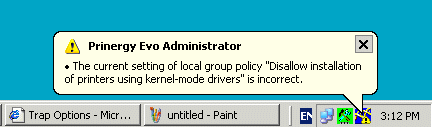
 

  1. To fix the problem, start the Prinergy Evo Administrator, click the Tools tab, and then click System Configurations.
  2. In the System Configurations dialog box, in the Policy area, click the problem setting listed.
    Prinergy Evo software provides more details about the problem and how to fix it.
  3. Click Fix All if you want Prinergy Evo software to fix the problem for you.
    Alternatively, you can fix the problem yourself by following the directions in the Suggested solution area of the dialog box.

Le logiciel Prinergy Evo détecte des configurations de serveurs spécifiques qui empêchent le programme de fonctionner comme prévu. Lorsque le logiciel Prinergy Evo détecte un problème sous Windows 2003 ou 2008, une alerte apparaît dans le coin droit du bureau du serveur. Voici un exemple de ce qui peut apparaître :

  1. Pour résoudre le problème, démarrez Prinergy Evo Administrator, cliquez sur l'onglet Outils, puis cliquez sur //Configurations du système.
  2. À partir de la boîte de dialogue //Configurations du système, dans la zone //Règle, cliquez sur le paramètre de problème répertorié. Le logiciel Prinergy Evo propose plus de détails et des solutions.
  3. Cliquez sur Corriger tout si vous souhaitez que le logiciel Prinergy Evo résolve le problème à votre place. Vous pouvez également le résoudre vous-même en suivant les instructions de la zone //Solution proposée de la boîte de dialogue.

印能捷演化版软件可检测妨碍软件按设计正常工作的特定服务器配置。印能捷演化版软件在 Windows 2003 或 2008 操作系统上检测到问题时,您会在服务器桌面的右下角看到一个警报。以下是一个您可能会看到的内容的示例:

  1. 要修复该问题,启动印能捷演化版管理器,单击工具选项卡,然后单击系统配置
  2. 在"系统配置"对话框的策略区域中,单击列出的问题设置。印能捷演化版软件提供了有关该问题及如何修复它的更多详细信息。
  3. 如果要印能捷演化版软件修复问题,请单击全部修复。或者,可按照对话框//建议的解决方法区域中的说明自行修复问题。

Die Prinergy Evo-Software erkennt bestimmte Serverkonfigurationen, die das Programm an einer ordnungsgemäßen Ausführung hindern könnten. Wenn die Prinergy Evo-Software Probleme mit dem Betriebssystem Windows Server 2003 oder 2008 erkennt, wird in der rechten unteren Ecke des Server-Desktops eine Warnung angezeigt. Hier sehen Sie ein entsprechendes Beispiel:

  1. Um das Problem zu beheben, starten Sie Prinergy Evo Administrator, klicken Sie auf die Registerkarte Tools und anschließend auf Systemkonfigurationen.
  2. Klicken Sie im Abschnitt Richtlinie des Dialogfelds „Systemkonfigurationen" auf das angeführte Problem. Daraufhin zeigt die Prinergy Evo-Software zusätzliche Einzelheiten zum Problem und zu dessen Lösung an.
  3. Klicken Sie auf Alles beheben, um das Problem von der Prinergy Evo-Software beheben zu lassen. Alternativ dazu können Sie das Problem selbst beheben, indem Sie die Anweisungen im Dialogfeldabschnitt Lösungsvorschlag befolgen.

L'applicazione rileva le configurazioni del server specifiche che impediscono il funzionamento corretto del programma. Quando viene rilevato un problema sul sistema operativo Windows 2003 o 2008, verrà visualizzato un avviso nella parte destra del desktop del server. Di seguito viene mostrato un esempio di quello che potrebbe essere visualizzato:

  1. Per risolvere il problema, avviare Prinergy Evo Administrator, fare clic sulla scheda Strumenti, quindi selezionare Configurazioni di sistema.
  2. Nella finestra di dialogo Configurazioni di sistema, nella sezione Criterio, fare clic sull'impostazione del problema elencata. L'applicazione Prinergy Evo fornisce maggiori dettagli sul problema e sulla sua risoluzione.
  3. Fare clic su Correggi tutto se si desidera che l'applicazione Prinergy Evo risolva il problema. In alternativa, è possibile risolvere il problema autonomamente attenendosi alle istruzioni contenute nella sezione relativa alla soluzione consigliata della finestra di dialogo.

Prinergy Evo detecta las configuraciones específicas de servidor que impiden que el programa funcione correctamente. Cuando Prinergy Evo detecta un problema en el sistema operativo Windows 2003 o 2008, se muestra una alerta en la esquina derecha del escritorio del servidor. A continuación figura un ejemplo de lo que se puede mostrar:

  1. Para solucionar el problema, inicie Prinergy Evo Administrator, haga clic en la ficha Herramientas y, a continuación, en Configuraciones del sistema.
  2. En el cuadro de diálogo Configuraciones del sistema, haga clic en uno de los problemas que se muestra en el área Política. Prinergy Evo proporciona más detalles acerca del problema y cómo solucionarlo.
  3. Haga clic en Arreglar todo si desea que Prinergy Evo arregle el problema automáticamente. También puede solucionar el problema usted mismo siguiendo las instrucciones del área Solución sugerida del cuadro de diálogo.