Page tree

Versions Compared

Key

  • This line was added.
  • This line was removed.
  • Formatting was changed.
Comment: Published by Scroll Versions from space PRINERGY and version 11.6
Sv translation
languageen

This section lists bugs and limitations that are known to exist in the software. If a future version of the software resolves a bug listed here, the bug is moved to the Fixed bugs section of the release notes accompanying that version of the software.

Limitations new to Prinergy 11.6:

NSHighResolutionCapable not supported in MacOS 26 Tahoe

  • We added this as a default setting in Prinergy 11.6, it Tahoe it will have no affect. On macOS 26 and higher, NSHighResolutionCapable is no longer effective for Java 8 applications. This is due to Java 8’s legacy, non-HiDPI rendering architecture. (PRINERGY-54566)

RBA Select Job Filter removed

  • This RBA filter was causing all Manual Trigger rules to freeze Workshop. The filter was added in 11.5 and not widely adopted, so this should not affect most customers. If you are using this filter, please remove it prior to updating to Prinergy 11.6 (PRINERGY-54532)no new limitations

Limitations relevant to Prinergy 11.6 and previous versions:

Preflight+ on PDF Output:

  • Loose page output status is incorrect if output with Preflight+ and the number of output subpages is more than one page. (PRINERGY-54356)
  • If you output a Multi-Page PDF file, you must select the first page to be able open the report.

Mac Workshop:

  • Mac Workshop: Processing info window stays on top of running applications if you launch Preps or Pandora interactively. (PRINERGY-54326)
    • We have a switch that can be applied to change this behaviour. The switch has a side affect, where that the processing window will fall behind the job manager window (when you click the job window)
      • Refer to Kodak Customer Portal KA28777 for the procedure to set the switch.

New Feature to Abort Output if imposition contains an unassigned page:

  • If the imposition contains more than 1 unassigned page, history only reports 1 of them.

PLUG-INS:

New Acrobat Mode is not supported with Plugins

Acrobat "Use Page Cache" could be helpful to be ON for Complex PDFs when using the Geometry Editor Plugin. Note, we force it off when using the Trapper Plugin.

Changing font size in Workshop Preferences does not apply to all menus:

  • In Prinergy 10 and previous the job finder list, job favourites and column data (filename, date refined etc) were changed. In Prinergy 11, we extended this to the dropdown and contextual menus, which can be controlled with the "Apply to All" checkbox in preferences.

Preps:

  • Preps Production reports cannot be created via RBA (PRINERGY-52932, PREPS-16717)
  • Most of the Preps Page and Page Bleed Marks issues have been addressed in Preps 9.5. Please see the Preps 9.5 Release Notes for more details

VPS+

  • VPS+ is only installed on macOS 10.15 and above Macintosh systems.  VPS Classic will continue to be installed on Windows clients and legacy Mac clients, until VPS+ has sufficient feature parity with VPS Classic.

Oracle Patcher:

  • To install the latest qualified Oracle patches, please contact your regional support office.

Azure File Storage:

  • Azure Storage "Add Azure" in Prinergy Administrator remains in development at this time and is not ready for release

Workshop options "VPS from KMS to Local" and "Lock File for Edit":

  • These options remain in development at this time and are not ready for release.
  • Note: They will become visible in Workshop if you create the KMSFileSync share as part of the W9.5.0.x Workshop patch procedures

Page Labels:

  • Page Labels column and variable marks do not populate correctly if you include Prefix when numbering pages (PRINERGY-53029)


Creating or Importing Preps Impositions with 500 or more Signatures is not supported (PREPS-16758)

  • Depending on the exact content the exact number could be different


Prinergy variable $[PageName] populates incorrectly if pages are n-up (PRINERGY-53644)

  • Workaround: Use Prinergy variable $[PageFileName] for n-up impositions


Some free "Internet fonts" can cause issues

  • Malformed Fonts that do not follow strict specifications (typically found for free on the Internet) may cause issues on refine and or output. Proof carefully if using these types of fonts.
    • Using a Preflight+ check such as "List Potential Font Problems" is sometimes a good way to mitigate this risk.


Dashboard has been removed  in Prinergy 9.0 and is no longer supported

  • With the end of support for Adobe Flash, Dashboard is no longer available in Prinergy. Dashboard functionality is migrating to the PRINERGY On Demand portal. See Kodak Customer Portal answer ID 75256 for more information.


PDF Editor Adobe Illustrator Plugin is no longer installed as of Prinergy 9.0

macOS

  • The shortcut WorkshopInstaller does not work properly. If you double-click it, Workshop will not be installed.

Workaround 

1. Connect to the WkspInstall share on the server.
2. Within the share, navigate to MacOSX>Disk1>InstData 
3. Double-click the WorkshopInstaller application to begin the installation.

(PRINERGY-49418)

Managed Services - Line Extension License entitlement

  • The current Managed Services entitlement under the Line Extension License feature may not be reflected in the number of JTPs you are licensed for on your Prinergy Primary. Version 9.0.0 is currently limited to a maximum of seven trapper JTPs and 15 Register JTPs. 

Send to Digital - No Target Device on macOS 10.15 and above

  • The action needs to use Digital Direct/Digital Submit component which is 32-bit and not compatible with 64-bit macOS 10.15 and above. The process stalls on Create Document while waiting for the 2nd “Digital Submit” window to pop up.  The option is available and working on Windows clients and please do not use the option on macOS 10.15 and above. [PRINERGY-51752]

Digital Job Ticket Editor

  • In Windows, when using Digital Job Ticket Editor from within Workshop to edit a job ticket, it is intended to behave as a modal window, that is, it should prevent interactions with other elements of the Workshop client user interface until you have completed your interaction with Digital Job Ticket Editor. The current behavior on Windows is non-modal and incorrectly allows other elements in the Workshop client to be edited while Digital Job Ticket Editor is open. Therefore, it is not recommended to do anything in Workshop until you have finished using Digital Job Ticket Editor (clicking Submit or Cancel ). [PRINERGY-40231]
  • When using Digital Job Ticket Editor from within Workshop (Send to Digital command) or when opening Device Track from the Workshops Tools menu, the Measurement Unit defined in Workshop's Preferences is used and the Weight Unit and Thickness Unit (Caliper) are taken from Setup's Preferences.
    When Device Track is opened on the web (not from within Workshop), all unit settings in Digital Job Ticket Editor are taken from Setup's Preferences. [PRINERGY-42049]

  • Settings available In RBA are not necessarily relevant to all digital devices. If you set a parameter which is not relevant for the selected device, this setting will be ignored when the rule is executed.
  • Digital Job Ticket Editor can only display substrates in the Substrate drop down list that have sizes assigned. If a user creates a substrate on the digital device that lacks a defined size, it will not be sent to Prinergy and will not appear in Prinergy's Job Ticket Editor. [PRINERGY-46624]
  • Digital Job Ticket Editor's Substrate drop down cannot display two substrates with the same name. If a user defines two substrates with the same name and size only one of them will be appear in Job Ticket Editor. [PRINERGY-46624]
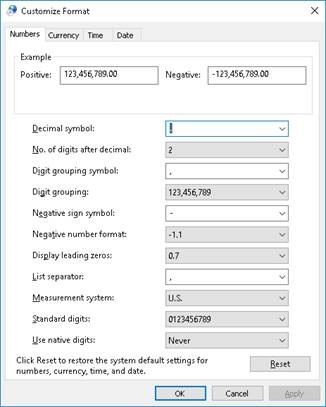
  • Commas are not supported as a decimal separator in the Job Ticket Editor. To change the number format, open the Region control panel and press the Additional Settings button. When the Customize Format window appears, select the Numbers tab and make sure that the Decimal symbol is set to a period (.).

Device Track

  • Resizing columns in Device Track may result in columns being pushed off screen. [PRINERGY-41180]
  • An issue with status reporting coming from Kodak Xpo can cause the In Process queues in Prinergy’s Device Track UI and Xpo to get out of sync and display output separation in the wrong order in Device Track. [PRINERGY-47843]

  • After successful completion of output to EFI or Canon digital front-ends, the completed output jobs are absent from all queues in Device Track. [PRINERGY-47923] [PRINERGY-43780]

  • In some older versions of EFI Fiery software, the number of inks reported was limited to five. This would cause jobs with more than five colors to incorrectly limit their color reporting back to Prinergy’s Device Track UI to five colors. [PRINERGY-46698]
  • When resubmitting a separation via Device Track, the separation receives a new Job ID from the device control software (Xpo or Print Console). This is due to the separation being treated as a new output instance rather than a remake of a previous output.

TIFF Direct CTP connectivity

  • When resubmitting a job to Print Console, two instances of the job will appear in the Print Console queue. The original job will include a note indicating it was removed by a Prinergy Workshop client, but still appears in the list. The second instance is the resubmitted job.[PRINERGY-46206]
  • When adding a new media configuration, such as a new plate size, to a CTP output device, there is a delay of about one minute between adding it to the device and the new media appearing in Prinergy Workflow's UI via the new TIFF Direct connectivity. [PRINERGY-46439]
  • When adding or removing punch settings on a CTP device, the status change is not communicated to Prinergy Workflow. If you add or remove a punch from a CTP device, you must disconnect the device from the Prinergy Administrator (UADM) and reconnect it to refresh the punch status. [PRINERGY-46404]
  • The Cut Media check box in the Device section of the final output process template is not supported by Xpo and Print Console and should not be selected.[PRINERGY-46874]
  • The Punch Setting list contains all available punch settings for the selected device. When you select a punch setting, make sure you select a punch that is compatible with the selected media.
  • VMR (Variable Mainscan Resolution) imaging is not supported with Xpo. [PRINERGY-47187]
  • VMR (Variable Mainscan Resolution) imaging is not supported with Print Console. [PRINERGY-47338]
  • When using a slugline mark with the updated sluglinemark positioning settings in the process template with direct (GDAPI) and TIFF Direct connectivity to CTP devices, the slugline mark may appear in the wrong location on the plate. [PRINERGY-46463] 

CTP connectivity

  • When using a slugline mark with the updated sluglinemark positioning settings in the process template with direct (GDAPI) and TIFF Direct connectivity to CTP devices, the slugline mark may appear in the wrong location on the plate. [PRINERGY-46463] 

  • When adding or removing punch settings on a CTP device, the status change is not communicated to Prinergy Workflow. If you add or remove a punch from a CTP device, you must restart the JTP and define a new process template. [PRINERGY-46404]

Setup

  • Due to limitations in third-party JDF implementation, some settings may not flow back to Prinergy Workflow’s Setup application when updated in the front end software. This can include: binding edge, maximum density, layout, and sheet size options. [PRINERGY-39050] [PRINERGY-39982] [PRINERGY-40039]  [PRINERGY-41632] [PRINERGY-41732] [PRINERGY-41745] [PRINERGY-41836] [PRINERGY-41906]

  • If you try to import substrates and/or reload device capabilities (in Setup > Equipment > Digital Device) from a connected press or DFE while this device is down, the substrates and/or device settings will no longer be visible in the Digital Job Ticket Editor when you submit a job. Once the device is up and running, you must re-import the substrates and/or reload the device capabilities so that they are visible again in the Digital Job Ticket Editor. [PRINERGY-45261] 
  • Setup is not localized with Chinese and Japanese on macOS Sierra (version 10.12) and macOS High Sierra (version 10.13) because of missing fonts. [PRINERGY-46365] 
    To solve this issue, install the missing fonts:
    1. MS Gothic.ttf -> for Japanese
    2. 华文黑体.ttf -> for Chinese

Job search

  • In Job Finder, in the job advanced search feature, the search fails if you use the is not operator with a numerical value. [PRINERGY-38941]
  • In Job Finder, in the job advanced search feature, if you select Any, the search results contain both jobs and pre-jobs that match the defined search criteria. [PRINERGY-39664]

Integration with ColorFlow

The following limitations have been identified for using the ColorFlow software with Prinergy:

  • Pages added to a ColorFlow-enabled job using Prinergy's Bypass Refine will have undefined Color Setup. This is expected behavior. Refining with ColorConvert enabled is recommended with ColorFlow integration.

  • If you attempt to output a file with a different snapshot number from the number you defined in the refine process template, an error message appears.

ColorConvert

The following ColorConvert problems have been identified:

  • Color matching certain files with transparent objects can result in significant changes in appearance. The problem is file specific and is dependent on the transparency blending modes applied, the object's color and the DeviceLink or ICC profile used to colorconvert the objects. The problem occurs because each graphic and image object used in the transparency group is color-converted separately. Blending of the objects in the destination color space changes the appearance.
    Recommendation: Flatten the PDF files. If your PDF files contain RGB data, it is highly recommended to Color-Convert this data prior to flattening. Please refer to Kodak Customer Portal Answer ID 72326 for best practices and setting up a 2-Step refine.
    Note: Contone proofing cannot be used to predict this issue when colormatching is performed on final output.

  • ColorMatch vector overprint handling of certain files with transparency groups that also use overprint management can generate unexpected results. The new objects generated by the ColorMatcher vector overprint handling process end up ruining the appearance. Contone proofing with raster overprint handling cannot be used to predict the problem with vector overprint handling used on final output. See the Prinergy help for detailed descriptions about the processing differences between raster and vector overprint handling.
    Recommendation: Flatten the PDF files. If your PDF files contain RGB data, it is highly recommended to Color-Convert this data prior to flattening. Refer to Answer ID 72326 for best practices and setting up a 2-Step refine.

  • RGB Transparency Blend Color Space is not supported. Blend spaces should only be defined as DeviceCMYK.
    Recommendation: Change the blend space in the input file or set up a Preflight+ profile to detect and/or fix the condition.

  • ColorConvert is automatically selected in Vector Output process templates after you upgrade to Prinergy 8.3. This is due to a migration script bug. If you have a Basic License which doesn’t enable ColorConvert, vector output will fail. If you are licensed for advanced Color Management, Color Conversion will be applied at output and may cause incorrect output. [PRINERGY-42167]
    Workaround: open any Vector Output process templates which should not have ColorConvert enabled and clear the ColorConvert checkbox.

Preflight+

  • When upgrading to Prinergy 11.0 from 7.5.x, 8.0.x, or 8.1.x Custom Checks and Fixups will not be migrated as their own entities. However, profiles referencing Custom Checks and Fixups will have been updated to incorporate the Custom Checks and Fixups; meaning, they will continue to work as they did prior to upgrading.

  • callas process plans and profiles that create layers or contain unlicensed DeviceLinks are not supported.

  • Kodak does not support or provide a license of callas pdfToolbox software. However, a copy of pdfToolbox (Preflight+ Profile Manager) is provided and licensed solely for the purpose of editing and creating preflight profiles that are to be used within Prinergy. Modification of the license as well as changing or upgrading the version of callas pdfToolbox that is provided with Prinergy is not recommended and not supported by Kodak. Kodak does not provide assistance or support for editing or creating new callas profiles. For information and support with the creation and editing of profiles, go to https://help.callassoftware.com/m/pdftoolbox/l/671652-profiles-checks-fixups-process-plans-and-libraries.
    Note: Kodak does support issues related to the integration of callas preflight within Prinergy Workshop.

  • Overview reports contain information from all pages in a multi-page PDF input file. When you open the report, it may contain information about pages you haven't selected.
  • Report Page links are supported only when you copy the full report.
  • callas fix-ups are "use at own risk". Exercise extra caution and check your proofs closely when applying fix-ups.

  • callas Profiles and Prinergy support different variations of the Chinese character set.

    • Simplified = ZH_CN (callas) = PRC
    • Simplified = ZH_Hans (Prinergy) = South East Asia and Singapore

  • callas template-based reports via PDFToolBox are not available in Preflight+ in Prinergy.
  • Because each PDF report contains a full copy of the original input PDF file, using Preflight+ may result in higher demands on storage space in your job home disks. 

  • To avoid Preflight+ becoming a bottleneck in the Refine process, it is advised to purchase the same amount of Preflight+ JTPs as Refine JTPs.
  • The use of variables that prompt users for input are not supported.
  • Customized checks and fixup names do not translate. Create them in the language you require.
  • Creation of New Libraries for organizing Checks and Fixups into categories is not supported
    Note: Profiles with Devicelink, Javascript and Variables are not supported.
  • The "Test" function seen when creating new profiles is not supported
  • Advanced Preflight is now in code freeze. There will be no further code changes, it is left in place as a convenience. Please consider migrating to the newer Preflight+ engine.

Adobe PDF Print Engine

  • The Adobe PDF Print Engine (APPE) RIP cannot process PDF files containing embedded PostScript objects, including pages that were processed with PostScript bypass or with the OPI bypass features of Prinergy.
  • The APPE RIP is the preferred RIP for Prinergy.
  • As of APPE 4.7 a maximum of 123 spots colors is supported (in addition to the four CMYK process colors, for a total of 127 colors).

Observe the following precautions:

  • Proofs and plates: In plating jobs with the APPE RIP, be careful with plates that were proofed with the previous APPE RIP. Because the RIPs are different, there is a slight chance of an interpretation difference between proof and plate. Ideally, jobs should be plated with the same version of Prinergy that was used to generate the proofs.
    Note: To avoid this situation you should coordinate hub and spoke configurations when upgrading Prinergy.

  • Reprints: For reprints of jobs that were printed previously using an older RIP, it is recommended that you rerun proofs using the new RIP to ensure there are no unforeseen differences between the original press run and the reprint.

PANTONE+ V3 libraries

  • In keeping with PANTONE best practice guidelines, all previous PANTONE libraries have been removed as factory libraries and will no longer appear in your process templates. Previous Prinergy PANTONE libraries are provided in archive format and can be imported as user libraries, if desired, for legacy reprint jobs. For more details, see About PANTONE libraries.

Maxtone CX, Maxtone FX, and Maxtone SX RIP

  • Kodak Maxtone CX, Maxtone FX, and Maxtone SX screens are available for APPE RIP only. They are not available for use with CPSI RIP.

System spot color library L*a*b* 2000

When system spot color library L*a*b* 2000 is added to a refine process template, it may not appear in the spot color libraries list but it will be available to be used by refine processes created from the refine process template. [PRINERGY-44022]

Refine to PDF/x-1a fails when Lab Spot Color Libraries are loaded and you are NOT converting Spots

  • As of Prinergy 8.0, all factory Spot Color libraries were replaced with Pantone V3 Lab libraries. If you refine a file that contains a Spot Color that is defined in the Lab library, the Spot Colors Alternate Color Space will change to Lab. Since Lab is not allowed in PDF/x-1a, the process will fail.
  • To resolve this, you can remove the PANTONE V3 library or load a CMYK library, such as a legacy user or ColorBridge library (Answer ID 73041). 
    Note: If your incoming PDF has Spots with LAB Alternate Color space, you will want to have a CMYK Pantone library loaded, otherwise refine will also fail.
  • When converting Spots to Process, its recommended to use the new PANTONE V3 Library. See the About Pantone Libraries section of the Workflow Help for more information. [PRINERGY-43630]

Selecting “Replace variable marks in PDF content files” causes incorrect overprints on some objects 

  • When using this setting you must follow the procedure outlined in Kodak Customer Portal Answer ID 69302. Failing to do so could result in serious Output problems.

Windows Server 2016 and 2019 operating systems

The following limitations have been identified when running Prinergy using the Windows Server 2016 and 2019 operating systems:

  • Not all legacy Kodak computer-to-plate (CTP) devices have controlled release software that is compatible with Windows Server 2016 and Windows Server 2019. Contact your Kodak representative to confirm if your CTP device has a compatible controlled release software available.

Limitations with SMB 2 and SMB 3 on Windows Servers in mixed environments

  • By default, Prinergy servers running Windows Server 2016 and Windows Server 2019 are shipped with SMB 2 and 3 enabled.
  • For best performance, all Prinergy servers and tertiary servers should be running the same operating system version. If any of the tertiary servers are not running at least Windows Server 2012 R2, SMB 2 and 3 need to be disabled so that SMB 1 is used. If this is not done, this can cause performance and file access/transfer issues. For assistance in disabling SMB 2 and 3, contact your local support representative.

Network File System connectivity

  • Prinergy does not support The Open Group UNIX NFS (Open Group UNIX Network File System). You can access UNIX servers using an SMB/CIFS protocol installed on the server (such as SAMBA).

NexPress Job Ticket Editor cannot be launched by Digital Submit on Windows 10

  • When running Digital Submit with NexPress on Windows 10, the Job Ticket Editor in Digital Submit fails to launch. [PRINERGY-41688]

Workarounds: To launch the NexPress Job Ticket Editor:

  • Run Digital Submit and NexPress Job Ticket Editor on a workstation with a different operating system
  • Manually launch the NexPress Job Ticket Editor outside Digital Submit.

HP Job Ticket Editor cannot be installed on Windows 8 and Windows 10

The HP Job Ticket Editor is software available from HP which is used in Prinergy Workflow when connecting to HP digital presses. The latest version of the software available from HP is not compatible with Windows 8 and Windows 10 operating systems. HP is aware of the issue and will address it in a future product update. [PRINERGY-41575]

HP

  • When using a Hewlett Packard SmartStream DFE connected to multiple presses, each press connected to the SmartStream DFE consumes a connection license from Prinergy Workflow. If you have more presses connected to the SmartStream DFE than you have licenses for connections in Prinergy Workflow, Prinergy will not be able to connect with all presses connected to the SmartStream DFE. [PRINERGY-44364]
  • If you try to import substrates and/or reload device capabilities (in Setup > Equipment > Digital Device) from a connected press or DFE while this device is down, the substrates and/or device settings will no longer be visible in the Digital Job Ticket Editor when you submit a job. Once the device is up and running, you must re-import the substrates and/or reload the device capabilities so that they are visible again in the Digital Job Ticket Editor. [PRINERGY-44749]
  • HP DFE with multiple connected presses does not recognize Prinergy server by its name. Make sure the Prinergy server name is correctly resolved on the DFE. For a DFE running on Windows, add the Prinergy host name and IP address in C:\Windows\System32\drivers\etc\host [PRINERGY-45428]

Ricoh 

  • Perfect bound jobs with covers sent to Ricoh digital front end with PDF RIP Enhanced by Kodak type S4 may result in output with incorrect orientation. [PRINERGY-42077] 

  • Due to limitations in JDF implementation for Ricoh digital front end with PDF RIP Enhanced by Kodak type S4, layout options are not currently supported. [PRINERGY-39050] 

  • When sending a surface to Ricoh, the binding edge defined in the job will rotate 90 degrees clockwise due to geometry translation, but the end result of the output at the printer will be correct. If you have questions, contact your Kodak representative for assistance. [PRINERGY-42029]

Konica Minolta

  • The status of coated or uncoated stock may not be imported or reflected correctly in Prinergy Setup for digital connections to Konica Minolta IC-602 or C1070 digital printer front end software. Job settings may need to be manually updated in the Konica Minolta software to complete output successfully. [PRINERGY-43211]

EFI

  • Due to a limitation in the bi-directional communication with EFI’s software, completed jobs are do not appear in Prinergy Workflow’s Device Track Completed queue and are not present in any queues upon completion. [PRINERGY-43780]
  • Due to an EFI issue with bi-directional connectivity, Prinergy Device Track displays incorrect number of inks. [PRINERGY-46698]
  • Due to a known EFI process with legacy JDF connectivity, jobs are not printed directly, but go to the On Hold queue first. [PRINERGY-46646]

Prinergy Workshop localized to Japanese

  • Submitting a file to Prinergy Workshop localized to Japanese via drag and drop to a process template may cause Workshop to quit unexpectedly. [PRINERGY-43660] 

Prinergy Signature Select Limitations

  • Prinergy Signature Selection works in Preps 5 mode. Therefore, there are several limitations related to working with Preps 6 or later.
Editing impositions
  • It is not possible to edit come-and-go, cut-and-stack, and multibinding style jobs with Signature Selection. If you try to edit an imposition that uses any of these styles, the Use Prinergy Signature Selection option will not be available in the Edit Imposition dialog box. Instead, you will be able to select Use External Imposition Application to start Preps.
  • If you create a come-and-go or cut-and-stack imposition using Signature Selection, and then edit the imposition using Preps 6 or later, a warning message appears, indicating that the job was produced in an earlier version of Preps. You can ignore this message.
Importing Impositions
  • Signature Selection does not support import of Preps 6 jobs with come-and-go or cut-and-stack binding styles. When creating a new imposition, if you select Use existing Preps job and select a Preps 6 job with a come-and-go or cut-and-stack binding style, an error message appears. You have the choice of selecting a different job file or using external imposition software to create the imposition.
Creating Impositions
  • When you create a new imposition, the come-and-go or cut-and-stack binding styles are available in Preps 5 mode only.
  • Preps 5 and 6 differ in the way that they display cut-and-stack and come-and-go jobs. In Preps 6, cut-and-stack jobs are shown as multiple webs, and come-and-go jobs are shown as multiple sections. In Prinergy Workshop, such jobs are displayed in the Preps 6 format, while in Signature Selection, they are displayed in the Preps 5 format. This is just a difference in display. The page assignment is correct and the imposition will print correctly.

Auto Select in Prinergy Signature Selection

  • The use of Auto Select in Prinergy Signature Selection may produce different results from the use of Auto Select in Preps. Check that Auto Select produces the expected results.

    If required, you can use Move Up or Move Down to adjust the signature order, or use Add or Delete to get the right signature.
    To prevent the problem, edit the PrepsPrinergy.cfg and the PrepsPrinergy.cfg.template files to include the line:
    AUTOSELECT_MINIMUM_PAGES:1.

Re-editing imposition of imported job may not work in certain cases

  • Re-editing a Preps imposition from Workshop may not work for certain imported jobs. If the imported job contains an imposition name that is greater than 25 characters and had an imposition that was previously edited and the older version was deleted. To prevent this issue when editing existing impositions always choose the import option to "Keep existing imposition". [PRINERGY-50121]

RBA

  • Rules Based Automation (RBA) may not start after upgrading to Prinergy Workflow 8.1.2 or later. To address this issue, if encountered, see Kodak Customer Portal answer 73601.

Creating Jobs Fails After Downgrading to Prinergy Workflow 8.1.2 from Prinergy Workflow 9.x

  • If a downgrade to Prinergy 8.1.2 is required after upgrading to 9.x, errors may be encountered with creating jobs in the downgraded 8.1.2 server.
    • If you encounter this problem, contact your Kodak service representative to address the issue with your Prinergy system. [PRINERGY-46987]

McAfee 10.5.3 / 10.6 on Windows 2016 with Windows Defender

  1. McAfee 10.5.3 / 10.6 cannot be installed and run on Windows 2016 if Windows Defender is installed. This is a limitation of the McAfee anti-virus software that requires Windows Defender to be uninstalled on systems you wish to install McAfee on. [PRINERGY-48947]

Adding an output device in Prinergy Administrator may not work

  • The first time you attempt to add an output device in Prinergy Administrator after restarting the server Prinergy is running on, Prinergy Administrator may crash. You will be able to add the device successfully after restarting the Prinergy Administrator interface.[PRINERGY-48874]

Acrobat 2017 and 2020 Support 

  • Acrobat 2017 and 2020 are one-time purchase release updates of Acrobat DC (similar to the original Acrobat 2015 release). The Prinergy Workshop installer does not detect the folder location for Acrobat 2017 or 2020. If you are using the version of Acrobat DC that is sold and labelled as Acrobat 2017 or 2020, you will need to manually install the Acrobat DC plugins in Acrobat 2017 or 2020.
  • See Kodak Customer Portal Answer ID 74309 for plugins and manual installation instructions.

Export Job

  • Exported jobs from Prinergy 9.x that contain Preflight+ XML reports cannot be imported into Prinergy 7.x.

Submitting Multiple Signatures

  • Submitting over 100 signatures (200 surfaces) * at one time can impact Prinergy performance. *Results may vary depending on the number of signatures and the complexity of the page content. (PRINERGY-52976)

Sv translation
languagezh

本节列出了软件中已知的错误和限制。如果软件的未来版本解决了此处列出的错误,则该错误将移至该版本软件随附的发行说明的“已修复错误”部分。

Prinergy 11.6 新增的限制:

NSHighResolutionCapable 在 MacOS 26 Tahoe 中不受支持

  • 我们在 Prinergy 11.6 中将此作为默认设置添加,但在 Tahoe 中不会产生任何影响。在 macOS 26 及更高版本中,NSHighResolutionCapable 对 Java 8 应用程序不再有效。这是由于 Java 8 的旧式非 HiDPI 渲染架构所致。(PRINERGY-54566)

已移除 RBA Select Job Filter

  •  此 RBA 过滤器会导致所有 Manual Trigger 规则使 Workshop 冻结。该过滤器在 11.5 中添加,但未被广泛采用,因此这对大多数客户不会产生影响。如果您正在使用此过滤器,请在更新到 Prinergy 11.6 之前将其移除。(PRINERGY-54532)

    没有新的限制

Prinergy 11.6 及更早版本的相关限制:

PDF 输出的预检+:

  • 如果使用 Preflight+ 进行输出,且输出子页数超过一页,则散页输出状态不正确。(PRINERGY-54356)
  • 如果输出多页 PDF 文件,必须选择第一页才能打开报告。

Mac 工作坊:

  • Mac Workshop:如果您以交互方式启动 Preps 或 Pandora,处理信息窗口会始终显示在正在运行的应用程序之上。(PRINERGY-54326)
    • 我们有一个开关可以用来改变这种行为。这个开关会产生一个副作用,那就是处理窗口会移动到作业管理器窗口的后面(当你点击作业窗口时)。
      • 有关设置开关的步骤,请参阅柯达客户门户网站KA28777 。

新增功能:如果拼版中包含未分配的页面,则中止输出:

  • 如果拼版中包含超过 1 个未分配的页面,历史记录只会报告其中的 1 个。

PLUG-INS:

  • 新版 Acrobat 模式不支持插件
  • 使用几何编辑器插件时,开启 Acrobat 的“使用页面缓存”功能可能有助于处理复杂的 PDF 文件。请注意,使用 Trapper 插件时,我们会强制关闭此功能。

在“工作坊首选项”中更改字体大小并不适用于所有菜单:

  • 在 Prinergy 10 及更早版本中,职位搜索列表、职位收藏夹和列数据(文件名、筛选日期等)均已更改。在 Prinergy 11 中,我们将此更改扩展到了下拉菜单和上下文菜单,您可以通过首选项中的“全部应用”复选框进行控制。

准备工作:

  • 无法通过 RBA 创建 Preps 生产报告(PRINERGY-52932,PREPS-16717)
  • Preps 9.5 版本已解决大部分排版页和页面出血线问题。更多详情请参阅 Preps 9.5 版本说明。

VPS+

  • VPS+仅安装在 macOS 10.15 及更高版本的 Macintosh 系统上。VPS  Classic将继续安装在 Windows 客户端和旧版 Mac 客户端上,直到 VPS+ 的功能与 VPS Classic 完全一致为止。

Oracle Patcher:

  • 要安装最新的合格Oracle补丁,请联系您所在地区的Oracle支持办事处。

Azure 文件存储:

  • Prinergy 管理器中的“添加 Azure”Azure 存储功能目前仍在开发中,尚未准备好发布。

工作坊选项“从 KMS 到本地的 VPS”和“锁定文件进行编辑”:

  • 这些功能目前仍在开发中,尚未准备好发布。
  • 注意:如果您在 W9.5.0.x Workshop 补丁程序过程中创建了 KMSFileSync 共享,它们将在 Workshop 中可见。

页面标签:

  • 如果在页码编号时包含前缀,则“页面标签”列和变量标记无法正确填充(PRINERGY-53029)


创建或导入包含 500 个或更多签名的 Preps 拼版不支持(PREPS-16758)

  • 根据具体内容的不同,确切数字可能会有所不同。


如果页面是多页并排显示,Prinergy 变量 $[PageName] 的填充不正确(PRINERGY-53644)

  • 解决方法:使用 Prinergy 变量 $[PageFileName] 进行 n 合 1 的页面布局。


某些免费的“网络字体”可能会导致问题。

  • 不符合严格规范的错误字体(通常可从互联网上免费获取)可能会导致优化或输出问题。如果使用此类字体,请务必仔细校对。
    • 使用“列出潜在字体问题”之类的预检+检查功能有时是降低这种风险的好方法。


Prinergy 9.0 中已移除仪表盘功能,且不再提供支持。

  • 由于 Adob​​e Flash 停止支持,Prinergy 中不再提供 Dashboard 功能。Dashboard 功能正在迁移到 PRINERGY On Demand 门户。更多信息,请参阅柯达客户门户网站解答 ID 75256。


从 Prinergy 9.0 版本开始,PDF 编辑器 Adob​​e Illustrator 插件不再安装。

macOS

  • 快捷方式 WorkshopInstaller 无法正常工作。如果双击它,Workshop 将无法安装。

解决方法 

1. 连接到 WkspInstall 服务器上的共享文件夹。2
. 在共享文件夹中,导航至 MacOSX>Disk1>InstData 
3. 双击 WorkshopInstaller 应用程序开始安装。

(PRINERGY-49418)

托管服务 -线路扩展许可授权

  • 您当前在线路扩展许可功能下获得的托管服务权益可能与您在 Prinergy 主设备上获准使用的 JTP 数量不符。9.0.0 版本目前最多支持 7 个捕获 JTP 和 15 个注册 JTP。 

发送至数字设备 - macOS 10.15 及更高版本无目标设备

  • 此操作需要使用 32 位 Digital Direct/Digital Submit 组件,该组件与 64 位 macOS 10.15 及更高版本不兼容。在“创建文档”步骤中,等待第二个“Digital Submit”窗口弹出时,流程会卡住。此选项在 Windows 客户端上可用且运行正常,请勿在 macOS 10.15 及更高版本上使用此选项。[PRINERGY-51752]

数字求职票务编辑器

  • 在 Windows 系统中,当从 Workshop 内部使用“数字工单编辑器”编辑工单时,其预期行为应为模态窗口,即在您完成与“数字工单编辑器”的交互之前,应阻止您与 Workshop 客户端用户界面的其他元素进行交互。然而,当前 Windows 系统的行为并非模态,而是错误地允许在“数字工单编辑器”打开时编辑 Workshop 客户端中的其他元素。因此,建议您在完成“数字工单编辑器”的使用(单击 “提交”  “取消” )之前,不要在 Workshop 中进行任何操作。[PRINERGY-40231]
  • 在 Workshop 中使用“数字作业单编辑器”(通过“发送至数字” 命令)或从 Workshop 的 “工具” 菜单打开“设备跟踪”时,  将使用 Workshop 首选项中定义的 测量单位,而重量单位 和 厚度单位(卡尺) 则取自“设置”首选项。
    当在网页上打开“设备跟踪”(而非在 Workshop 中打开)时,数字作业单编辑器中的所有单位设置均取自“设置”首选项。[PRINERGY-42049]

  • RBA 中的设置并非一定适用于所有数字设备。如果您设置的参数与所选设备无关,则在执行规则时,该设置将被忽略。
  • 数字作业单编辑器只能在“基材”下拉列表中显示已分配尺寸的基材。如果用户在数字设备上创建的基材未定义尺寸,则该基材将不会发送到 Prinergy,也不会显示在 Prinergy 的作业单编辑器中。[PRINERGY-46624]
  • 数字作业单编辑器的“基材”下拉菜单无法显示两个名称相同的基材。如果用户定义了两个名称和尺寸相同的基材,则作业单编辑器中只会显示其中一个。[PRINERGY-46624]
  • 作业单编辑器不支持使用逗号作为小数分隔符。要更改数字格式,请打开“区域”控制面板,然后单击“其他设置”按钮。在“自定义格式”窗口中,选择“数字”选项卡,并确保“小数点”符号设置为句点 (.)。

设备跟踪

  • 调整设备轨道中的列宽可能会导致列移出屏幕。[PRINERGY-41180]
  • Kodak Xpo 的状态报告存在问题,可能导致Prinergy 设备跟踪用户界面和 Xpo 中的“正在处理”队列不同步,并在设备跟踪中以错误顺序显示输出分离。[PRINERGY-47843]

  • 成功完成向 EFI 或佳能数字前端的输出后,已完成的输出作业不会出现在设备跟踪的所有队列中。[PRINERGY-47923] [PRINERGY-43780]

  • 在某些旧版本的 EFI Fiery 软件中,报告的墨水数量限制为五种。这会导致包含五种以上颜色的作业错误地将其颜色报告限制为五种颜色,并返回给 Prinergy 的设备跟踪用户界面。[PRINERGY-46698]
  • 通过设备跟踪重新提交分色作业时,设备控制软件(Xpo 或打印控制台)会为该分色作业分配一个新的作业 ID。这是因为系统会将该分色作业视为一个新的输出实例,而不是对先前输出的重新制作。

TIFF 直接 CTP 连接

  • 当重新向打印控制台提交作业时,打印控制台队列中会出现该作业的两个实例。原始作业会包含一条注释,表明它已被 Prinergy Workshop 客户端删除,但仍显示在列表中。第二个实例是重新提交的作业。[PRINERGY-46206]
  • 当向 CTP 输出设备添加新的介质配置(例如新的印版尺寸)时,从将其添加到设备到新介质通过新的 TIFF Direct 连接出现在 Prinergy Workflow 的用户界面中,大约会有一分钟的延迟。[PRINERGY-46439]
  • 在 CTP 设备上添加或删除打卡设置时,状态更改不会通知 Prinergy Workflow。如果您在 CTP 设备上添加或删除打卡,则必须断开设备与 Prinergy Administrator (UADM) 的连接,然后再重新连接以刷新打卡状态。[PRINERGY-46404]
  • Xpo 和 Print Console 不支持最终输出流程模板“设备”部分中的“切割介质”复选框,因此不应选中。[PRINERGY-46874]
  • 打孔设置列表包含所选设备的所有可用打孔设置。选择打孔设置时,请确保选择与所选介质兼容的打孔设置。
  • Xpo不支持VMR(可变主扫描分辨率)成像。[PRINERGY-47187]
  • Print Console 不支持 VMR(可变主扫描分辨率)成像。[PRINERGY-47338]
  • 当使用工艺模板中更新的线标记定位设置,并通过直接 (GDAPI) 和 TIFF Direct 连接到 CTP 设备时,线标记可能会出现在印版上的错误位置。[PRINERGY-46463] 

CTP 连接

  • 当使用工艺模板中更新的线标记定位设置,并通过直接 (GDAPI) 和 TIFF Direct 连接到 CTP 设备时,线标记可能会出现在印版上的错误位置。[PRINERGY-46463] 

  • 在 CTP 设备上添加或删除冲孔设置时,状态更改不会通知 Prinergy Workflow。如果从 CTP 设备添加或删除冲孔,则必须重新启动 JTP 并定义新的工艺模板。[PRINERGY-46404]

设置

  • 由于第三方 JDF 实现方面的限制,某些设置可能无法在前端软件更新后同步到 Prinergy Workflow 的设置应用程序中。这些设置包括:装订边、最大密度、布局和纸张尺寸选项。[PRINERGY-39050] [PRINERGY-39982] [PRINERGY-40039] [PRINERGY-41632] [PRINERGY-41732] [PRINERGY-41745] [PRINERGY-41836] [PRINERGY-41906]

  • 如果设备处于停机状态,您尝试从连接的印刷机或数字印刷设备 (DFE) 导入基材和/或重新加载设备功能(在“设置”>  “设备”  >  “数字设备”中),则提交作业时,这些基材和/或设备设置将不再显示在数字作业单编辑器中。设备恢复运行后,您必须重新导入基材和/或重新加载设备功能,才能使其再次显示在数字作业单编辑器中。[PRINERGY-45261] 
  • 由于缺少字体,macOS Sierra(版本 10.12)和 macOS High Sierra(版本 10.13)上的安装程序未本地化为中文和日文。[PRINERGY-46365] 
    要解决此问题,请安装缺失的字体:
    1. MS Gothic.ttf -> 适用于日语
    2. 华文黑体.ttf -> 中文

求职

  • 在求职应用的高级搜索功能中,如果使用“非 ”运算符并传入数值,则搜索会失败 。[PRINERGY-38941]
  • 在求职工具的高级搜索功能中,如果您选择 “任意”,搜索结果将包含符合您设定的搜索条件的职位和预选职位。[PRINERGY-39664]

与 ColorFlow 集成

使用 ColorFlow 软件与 Prinergy 结合使用时,已发现以下局限性:

  • 使用 Prinergy 的 Bypass Refine 功能添加到启用 ColorFlow 的作业中的页面,其颜色设置将未定义。这是预期行为。建议在使用 ColorFlow 集成时启用 ColorConvert 功能进行优化。

  • 如果您尝试输出的快照编号与您在精炼过程模板中定义的编号不同的文件,则会显示错误消息。

颜色转换

已发现以下 ColorConvert 问题:

  • 对某些包含透明对象的文件进行颜色匹配可能会导致外观发生显著变化。此问题与文件类型有关,取决于应用的透明度混合模式、对象的颜色以及用于颜色转换对象的 DeviceLink 或 ICC 配置文件。出现此问题的原因是,透明度组中使用的每个图形和图像对象都是单独进行颜色转换的。目标颜色空间中对象的混合会改变外观。
    建议: 拼合 PDF 文件。如果您的 PDF 文件包含 RGB 数据,强烈建议在拼合之前对这些数据进行颜色转换。 有关最佳实践和设置两步优化,请参阅柯达客户门户网站的解答 ID 72326。
    注意: 在最终输出上执行颜色匹配时,无法使用连续色调打样来预测此问题。

  • ColorMatch矢量叠印处​​理某些包含透明度组且同时使用叠印管理的文件时,可能会产生意想不到的结果。ColorMatcher矢量叠印处​​理过程生成的新对象最终会破坏图像外观。使用栅格叠印处理的连续色调校样无法预测最终输出中使用的矢量叠印处​​理所导致的问题。有关栅格叠印和矢量叠印处​​理之间处理差异的详细说明,请参阅Prinergy帮助。
    建议: 拼合PDF文件。如果您的PDF文件包含RGB数据,强烈建议在拼合之前对这些数据进行颜色转换。 有关最佳实践和设置两步精修,请参阅答案ID 72326。

  • 不支持 RGB 透明度混合色彩空间。混合空间只能定义为 DeviceCMYK。
    建议: 更改输入文件中的混合空间,或设置 Preflight+ 配置文件来检测和/或修复此问题。

  • 升级到 Prinergy 8.3 后,矢量输出流程模板中的“颜色转换”功能会自动启用。这是由于迁移脚本存在错误导致的。如果您使用的是未启用“颜色转换”功能的基础许可证,则矢量输出将失败。如果您拥有高级颜色管理许可证,则会在输出时应用颜色转换,这可能会导致输出错误。[PRINERGY-42167]
    解决方法: 打开任何不应启用“颜色转换”功能的矢量输出流程模板,并取消选中 “颜色转换” 复选框。

飞行前+

  • 从 Prinergy 7.5.x、8.0.x 或 8.1.x 升级到 11.0 时,自定义检查和修复功能不会作为独立实体迁移。但是,引用自定义检查和修复功能的配置文件将会更新,以包含这些自定义检查和修复功能;这意味着它们将继续像升级前一样正常工作。

  • callas 进程计划和配置文件创建图层或包含未经许可的设备链接不受支持。

  • 柯达公司不提供 callas pdfToolbox 软件的支持或许可。但是,我们提供 pdfToolbox(预检+配置文件管理器)的副本,并授权其仅用于编辑和创建要在 Prinergy 中使用的预检配置文件。不建议修改许可,也不建议更改或升级 Prinergy 随附的 callas pdfToolbox 版本,柯达公司对此不提供支持。柯达公司不提供编辑或创建新 callas 配置文件的帮助或支持。有关创建和编辑配置文件的信息和支持,请访问 https://help.callassoftware.com/m/pdftoolbox/l/671652-profiles-checks-fixups-process-plans-and-libraries
    注意: 柯达公司支持与在 Prinergy Workshop 中集成 callas 预检相关的问题。

  • 概览报告包含多页 PDF 输入文件中所有页面的信息。打开报告时,其中可能包含您未选择的页面信息。
  • 仅当您复制完整报告时才支持报告页面链接。
  • 马蹄莲补色剂“使用风险自负”。补色时务必格外小心,并仔细检查样片。

  • callas Profiles 和 Prinergy 支持不同版本的中文字符集。

    • 简化版 = ZH_CN(马蹄莲)= PRC
    • 简化版 = ZH_Hans (Prinergy) = 东南亚和新加坡

  • Prinergy 的 Preflight+ 中不提供通过 PDFToolBox 生成的 callas 模板报告。
  • 由于每个 PDF 报告都包含原始输入 PDF 文件的完整副本,因此使用 Preflight+ 可能会导致作业主磁盘上的存储空间需求增加。 

  • 为避免 Preflight+ 成为 Refine 流程的瓶颈,建议购买与 Refine JTP 数量相同的 Preflight+ JTP。
  • 不支持使用提示用户输入的变量。
  • 自定义检查项和修正项名称无法翻译。请使用您需要的语言创建它们。
  • 不支持创建新库来将检查和修复程序组织成类别。
    注意:不支持包含 Devicelink、Javascript 和变量的配置文件。
  • 创建新配置文件时看到的“测试”功能不受支持。
  • 高级预检功能现已停止代码更新。不会再进行任何代码更改,保留该功能仅为方便用户使用。请考虑迁移到更新的 Preflight+ 引擎。

Adobe PDF 打印引擎

  • Adobe PDF 打印引擎 (APPE) RIP 无法处理包含嵌入式 PostScript 对象的 PDF 文件,包括使用 PostScript 旁路或 Prinergy 的 OPI 旁路功能处理的页面。
  • APPE RIP 是 Prinergy 的首选 RIP。
  • 从 APPE 4.7 开始,最多支持 123 种专色(加上四种 CMYK 四色印刷,总共支持 127 种颜色)。

请注意以下事项:

  • 打样和印版:在使用 APPE RIP 进行印版作业时,请谨慎处理使用先前 APPE RIP 版本打样的印版。由于 RIP 版本不同,打样和印版之间可能存在细微的差异。理想情况下,印版作业应使用与生成打样相同的 Prinergy 版本。
    注意: 为避免这种情况,升级 Prinergy 时应协调中心和辐射状配置。

  • 重印:对于之前使用较旧的 RIP 印刷的作业的重印,建议您使用新的 RIP 重新运行校样,以确保原始印刷和重印之间没有意外的差异。

PANTONE+ V3 色库

  • 为遵循 PANTONE 最佳实践指南,所有之前的 PANTONE 色卡均已从工厂色卡中移除,并且不会再出现在您的工艺模板中。之前的 Prinergy PANTONE 色卡以存档格式提供,如有需要,可将其作为用户色卡导入,用于旧版重印作业。更多详情,请参阅“ 关于 PANTONE 色卡”

Maxtone CX、Maxtone FX 和 Maxtone SX RIP

  • 柯达 Maxtone CX、Maxtone FX 和 Maxtone SX 网屏仅适用于 APPE RIP,不适用于 CPSI RIP。

系统专色库 L*a*b* 2000

当系统专色库 L*a*b* 2000 添加到精细化工艺模板时,它可能不会出现在专色库列表中,但使用该精细化工艺模板创建的精细化工艺仍可使用该库。[PRINERGY-44022]

当加载了 Lab 专色库且未转换专色时,“优化为 PDF/x-1a”操作会失败。

  • 从 Prinergy 8.0 版本开始,所有工厂专色库均已替换为 Pantone V3 Lab 库。如果您要处理的文件中包含 Lab 库中定义的专色,则专色备选色彩空间将更改为 Lab。由于 PDF/x-1a 不允许使用 Lab,因此处理过程将失败。
  • 要解决此问题,您可以移除 PANTONE V3 色库或加载 CMYK 色库,例如旧版用户色库或 ColorBridge 色库(答案 ID 73041)。 
    注意:如果您的 PDF 文件包含使用 LAB 替代颜色空间的专色,则必须加载 CMYK Pantone 色库,否则优化操作也会失败。
  • 将专色转换为四色时,建议使用新的 PANTONE V3 色卡。有关更多信息,请参阅工作流程帮助中的“关于 Pantone 色卡”部分。[PRINERGY-43630]

选择“替换 PDF 内容文件中的变量标记”会导致某些对象上出现错误的叠印。 

  • 使用此设置时,必须按照柯达客户门户网站解答 ID 69302 中概述的步骤进行操作。否则可能会导致严重的输出问题。

Windows Server 2016 和 2019 操作系统

使用 Windows Server 2016 和 2019 操作系统运行 Prinergy 时,已发现以下限制:

  • 并非所有旧款柯达计算机直接制版 (CTP) 设备都配备与 Windows Server 2016 和 Windows Server 2019 兼容的受控释放软件。请联系您的柯达代表,确认您的 CTP 设备是否有兼容的受控释放软件可用。

在混合环境下,Windows 服务器上 SMB 2 和 SMB 3 的局限性

  • 默认情况下,运行 Windows Server 2016 和 Windows Server 2019 的 Prinergy 服务器出厂时已启用 SMB 2 和 3。
  • 为获得最佳性能,所有 Prinergy 服务器和辅助服务器应运行相同的操作系统版本。如果任何辅助服务器未运行 Windows Server 2012 R2 或更高版本,则需要禁用 SMB 2 和 3,以便使用 SMB 1。否则,可能会导致性能和文件访问/传输问题。如需有关禁用 SMB 2 和 3 的帮助,请联系您当地的支持代表。

网络文件系统连接

  • Prinergy 不支持 The Open Group UNIX NFS(Open Group UNIX 网络文件系统)。您可以使用服务器上安装的 SMB/CIFS 协议(例如 SAMBA)访问 UNIX 服务器。

在 Windows 10 系统上,无法通过 Digital Submit 启动 NexPress Job Ticket Editor。

  • 在 Windows 10 系统上使用 NexPress 运行 Digital Submit 时,Digital Submit 中的作业单编辑器无法启动。[PRINERGY-41688]

解决方法: 要启动 NexPress 工单编辑器:

  • 在具有不同操作系统的工作站上运行 Digital Submit 和 NexPress Job Ticket Editor
  • 在 Digital Submit 之外手动启动 NexPress Job Ticket Editor。

HP Job Ticket Editor 无法安装在 Windows 8 和 Windows 10 上。

HP Job Ticket Editor 是惠普公司提供的一款软件,用于在 Prinergy Workflow 中连接惠普数码印刷机。惠普提供的最新版本软件与 Windows 8 和 Windows 10 操作系统不兼容。惠普公司已知悉此问题,并将在未来的产品更新中予以解决。[PRINERGY-41575]

惠普

  • 当使用连接多台印刷机的惠普 SmartStream DFE 时,每台连接到 SmartStream DFE 的印刷机都会占用 Prinergy Workflow 的一个连接许可证。如果连接到 SmartStream DFE 的印刷机数量超过 Prinergy Workflow 中的连接许可证数量,则 Prinergy 将无法连接到所有连接到 SmartStream DFE 的印刷机。[PRINERGY-44364]
  • 如果设备处于停机状态,您尝试从连接的印刷机或数字印刷设备 (DFE) 导入基材和/或重新加载设备功能(在“设置”>  “设备”  >  “数字设备”中),则提交作业时,这些基材和/或设备设置将不再显示在数字作业单编辑器中。设备恢复运行后,您必须重新导入基材和/或重新加载设备功能,才能使其再次显示在数字作业单编辑器中。[PRINERGY-44749]
  • 连接多台印刷机的 HP DFE 无法通过名称识别 Prinergy 服务器。请确保 DFE 上已正确解析 Prinergy 服务器名称。对于运行在 Windows 系统上的 DFE,请在C:\Windows\System32\drivers\etc\host [PRINERGY-45428]中添加 Prinergy 主机名和 IP 地址。

理光 

  • 使用柯达S4型PDF RIP增强技术将带封面的完美装订作业发送到理光数码前端,可能会导致输出方向错误。[PRINERGY-42077] 

  • 由于理光数字前端采用柯达S4型PDF RIP增强技术时JDF实现存在限制,目前不支持布局选项。[PRINERGY-39050] 

  • 将打印件送至理光时,由于几何平移,作业中定义的装订边会顺时针旋转 90 度,但打印机的最终输出结果是正确的。如有疑问,请联系您的柯达代表寻求帮助。[PRINERGY-42029]

柯尼卡美能达

  • 对于与柯尼卡美能达 IC-602 或 C1070 数码打印机前端软件的数字连接,Prinergy Setup 可能无法正确导入或反映涂布纸或非涂布纸的状态。可能需要在柯尼卡美能达软件中手动更新作业设置才能成功完成输出。[PRINERGY-43211]

电子燃油喷射

  • 由于与 EFI 软件的双向通信存在限制,已完成的作业不会出现在 Prinergy Workflow 的“设备跟踪 已完成” 队列中,也不会在完成后出现在任何队列中。[PRINERGY-43780]
  • 由于双向连接的 EFI 问题,Prinergy 设备跟踪显示的墨水数量不正确。[PRINERGY-46698]
  • 由于已知的 EFI 进程与旧版 JDF 连接存在兼容性问题,作业不会直接打印,而是先进入“暂缓打印”队列。[PRINERGY-46646]

Prinergy Workshop 已本地化为日语

  • 通过拖放方式将本地化为日语的文件提交到 Prinergy Workshop 的流程模板中,可能会导致 Workshop 意外退出。[PRINERGY-43660] 

Prinergy Signature Select 限制

  • Prinergy签名选择功能在Preps 5模式下运行。因此,在使用Preps 6或更高版本时存在一些限制。
编辑附加条款
  • 使用签名选择功能无法编辑“即插即用”、“裁切堆叠”和“多重装订”样式的作业。如果您尝试编辑使用这些样式的拼版,则 “编辑拼版”对话框中将不会显示“使用 Prinergy 签名选择” 选项。取而代之的是,您可以选择 “使用外部拼版应用程序” 来启动准备工作。
  • 如果您使用签名选择功能创建了快进快出或剪切堆叠式拼版,然后使用 Preps 6 或更高版本编辑该拼版,则会显示一条警告消息,指出该作业是在早期版本的 Preps 中创建的。您可以忽略此消息。
进口关税
  • Signature Selection 不支持导入使用“即装即用”或“裁切堆叠”装订方式的 Preps 6 作业。创建新拼版时,如果您选择“ 使用现有 Preps 作业” 并选择了使用“即装即用”或“裁切堆叠”装订方式的 Preps 6 作业,则会显示错误消息。您可以选择其他作业文件或使用外部拼版软件创建拼版。
强加于人
  • 创建新拼版时,仅在 Preps 5 模式下提供即插即用或裁切堆叠装订样式。
  • Preps 5 和 Preps 6 的区别在于它们显示裁切堆叠作业和即印即走作业的方式。在 Preps 6 中,裁切堆叠作业显示为多个卷筒纸,而即印即走作业显示为多个部分。在 Prinergy Workshop 中,此类作业以 Preps 6 格式显示,而在 Signature Selection 中,则以 Preps 5 格式显示。这只是显示方式上的差异。页面分配正确,拼版打印也正确无误。

Prinergy签名选择中的自动选择

  • 在 Prinergy 签名选择中使用自动选择功能可能与在 Preps 中使用自动选择功能产生不同的结果。请检查自动选择功能是否产生预期结果。

    如有需要,您可以使用 “上移” 或 “下移” 来调整签名顺序,或使用 “添加” 或 “删除” 来获取正确的签名。
    为避免此问题,请编辑 文件PrepsPrinergy.cfg 并 PrepsPrinergy.cfg.template 添加以下行:
    AUTOSELECT_MINIMUM_PAGES:1

在某些情况下,重新编辑导入作业的强制执行可能行不通。

  • 从 Workshop 重新编辑 Preps 拼版可能对某些导入的作业无效。如果导入的作业包含超过 25 个字符的拼版名称,并且之前已编辑过拼版但旧版本已被删除,则可能会出现此问题。为避免此问题,在编辑现有拼版时,请始终选择“保留现有拼版”导入选项。[PRINERGY-50121]

澳大利亚储备银行

  • 升级到 Prinergy Workflow 8.1.2 或更高版本后,基于规则的自动化 (RBA) 可能无法启动。如果遇到此问题,请参阅柯达客户门户网站的解答73601以解决此问题。

从 Prinergy Workflow 9.x 降级到 Prinergy Workflow 8.1.2 后,创建作业失败。

  • 如果在升级到 9.x 后需要降级到 Prinergy 8.1.2,则在降级的 8.1.2 服务器上创建作业时可能会遇到错误。
    • 如果您遇到此问题,请联系您的柯达服务代表,以解决您的 Prinergy 系统的问题。[PRINERGY-46987]

在 Windows 2016 上使用 McAfee 10.5.3 / 10.6 和 Windows Defender

  1. 如果系统上安装了 Windows Defender,则无法在 Windows 2016 上安装和运行 McAfee 10.5.3 / 10.6。这是 McAfee 防病毒软件的限制,要求在要安装 McAfee 的系统上卸载 Windows Defender。[PRINERGY-48947]

在 Prinergy Administrator 中添加输出设备可能无法正常工作。

  • 在重启运行 Prinergy 的服务器后,首次尝试在 Prinergy Administrator 中添加输出设备时,Prinergy Administrator 可能会崩溃。重启 Prinergy Administrator 界面后,即可成功添加设备。[PRINERGY-48874]

支持 Acrobat 2017 和 2020 

  • Acrobat 2017 和 2020 是 Acrobat DC 的一次性购买更新版本(类似于最初的 Acrobat 2015 版本)。Prinergy Workshop 安装程序无法检测到 Acrobat 2017 或 2020 的安装文件夹位置。如果您使用的是标有 Acrobat 2017 或 2020 的 Acrobat DC 版本,则需要手动在 Acrobat 2017 或 2020 中安装 Acrobat DC 插件。
  • 有关插件和手动安装说明,请参阅柯达客户门户网站答案 ID 74309。

出口作业

  • 从 Prinergy 9.x 导出的包含 Preflight+ XML 报告的作业无法导入到 Prinergy 7.x 中

提交多个签名

  • 一次性提交超过 100 个签名(200 个页面)*可能会影响 Prinergy 的性能。*结果可能因签名数量和页面内容的复杂程度而异。(PRINERGY-52976)


Sv translation
languagefr

Cette section répertorie les bogues et limitations connus du logiciel. Si une version ultérieure corrige un bogue listé ici, celui-ci sera déplacé dans la section « Bugs corrigés » des notes de version.

Nouvelles limitations de Prinergy 11.6 :

  • aucune nouvelle limitation

NSHighResolutionCapable n’est pas pris en charge dans MacOS 26 Tahoe

  • Nous avons ajouté ce paramètre par défaut dans Prinergy 11.6, mais dans Tahoe il n’aura aucun effet. Sur macOS 26 et versions ultérieures, NSHighResolutionCapable n’est plus efficace pour les applications Java 8, en raison de l’architecture de rendu héritée et non‑HiDPI de Java 8. (PRINERGY‑54566)

Filtre RBA Select Job supprimé

  • Ce filtre RBA provoquait le blocage de toutes les règles Manual Trigger dans Workshop. Le filtre a été ajouté en 11.5 mais n’a pas été largement adopté, donc cela ne devrait pas affecter la majorité des clients. Si vous utilisez ce filtre, veuillez le retirer avant de mettre à jour vers Prinergy 11.6. (PRINERGY‑54532)

Limitations relatives à Prinergy 11.6 et aux versions précédentes :

Contrôle en amont+ sur la sortie PDF :

  • L'état de sortie des pages non liées est incorrect si la sortie est effectuée avec Preflight+ et que le nombre de sous-pages de sortie est supérieur à une page. (PRINERGY-54356)
  • Si vous générez un fichier PDF multipage, vous devez sélectionner la première page pour pouvoir ouvrir le rapport.

Atelier Mac :

  • Mac Workshop : La fenêtre d’informations de traitement reste au premier plan des applications en cours d’exécution si vous lancez Preps ou Pandora de manière interactive. (PRINERGY-54326)
    • Il existe une option permettant de modifier ce comportement. Cette option a un effet secondaire : la fenêtre de traitement se superpose à la fenêtre du gestionnaire de tâches (lorsque vous cliquez sur la fenêtre de la tâche).
      • Consultez le portail client Kodak KA28777 pour connaître la procédure de réglage du commutateur.

Nouvelle fonctionnalité permettant d'interrompre la sortie si l'imposition contient une page non attribuée :

  • Si l'imposition contient plus d'une page non attribuée, l'historique n'en signale qu'une seule.

PLUG-INS:

  • Le nouveau mode Acrobat n'est pas compatible avec les plugins.
  • L'option « Utiliser le cache de page » d'Acrobat peut s'avérer utile pour les PDF complexes lors de l'utilisation du plugin Geometry Editor. Notez que nous la désactivons avec le plugin Trapper.

La modification de la taille de la police dans les préférences de l'atelier ne s'applique pas à tous les menus :

  • Dans Prinergy 10 et les versions antérieures, la liste de recherche d'emploi, les offres favorites et les données des colonnes (nom du fichier, date de traitement, etc.) ont été modifiées. Dans Prinergy 11, ces modifications ont été étendues aux menus déroulants et contextuels, qui peuvent être contrôlés à l'aide de la case à cocher « Appliquer à tous » dans les préférences.

Préparatifs :

  • Les rapports de production Preps ne peuvent pas être créés via RBA (PRINERGY-52932, PREPS-16717)
  • La plupart des problèmes liés à la page de préparation et aux marques de fond perdu ont été résolus dans Preps 9.5. Veuillez consulter les notes de version de Preps 9.5 pour plus de détails.

VPS+

  • VPS+ est installé uniquement sur les systèmes Macintosh fonctionnant sous macOS 10.15 et versions ultérieures.  VPS Classic continuera d'être installé sur les clients Windows et les anciens clients Mac, jusqu'à ce que VPS+ offre des fonctionnalités équivalentes à celles de VPS Classic.

Correctif Oracle :

  • Pour installer les derniers correctifs Oracle qualifiés, veuillez contacter votre bureau d'assistance régional.

Stockage de fichiers Azure :

  • L'ajout d'Azure Storage dans Prinergy Administrator est encore en développement et n'est pas encore disponible.

Options de l'atelier « VPS de KMS vers local » et « Verrouiller le fichier pour modification » :

  • Ces options sont encore en développement pour le moment et ne sont pas prêtes à être commercialisées.
  • Remarque : Ces éléments deviendront visibles dans Workshop si vous créez le partage KMSFileSync dans le cadre des procédures de correctif Workshop pour Windows 9.5.0.x.

Étiquettes de page :

  • Les colonnes « Étiquettes de page » et les marques variables ne s’affichent pas correctement si vous incluez un préfixe lors de la numérotation des pages (PRINERGY-53029).


La création ou l'importation de documents Preps comportant 500 signatures ou plus n'est pas prise en charge (PREPS-16758).

  • En fonction du contenu exact, le nombre exact pourrait être différent.


La variable Prinergy $[PageName] est renseignée incorrectement si les pages sont n-up (PRINERGY-53644)

  • Solution de contournement : utiliser la variable Prinergy $[PageFileName] pour les impositions n-up


Certaines polices Internet gratuites peuvent causer des problèmes

  • Les polices mal formées qui ne respectent pas des spécifications strictes (généralement disponibles gratuitement sur Internet) peuvent entraîner des problèmes d'amélioration et/ou d'impression. Soyez particulièrement vigilant lors de l'utilisation de ce type de polices.
    • L'utilisation d'une vérification Preflight+ telle que « Lister les problèmes potentiels de police » est parfois un bon moyen d'atténuer ce risque.


Le tableau de bord a été supprimé dans Prinergy 9.0 et n'est plus pris en charge.

  • Suite à l'arrêt de la prise en charge d'Adobe Flash, le tableau de bord n'est plus disponible dans Prinergy. Ses fonctionnalités sont désormais intégrées au portail PRINERGY On Demand. Pour plus d'informations, consultez la réponse n° 75256 du portail client Kodak.


Le plugin PDF Editor pour Adobe Illustrator n'est plus installé depuis Prinergy 9.0.

macOS

  • Le raccourci  WorkshopInstaller  ne fonctionne pas correctement. Si vous double-cliquez dessus, Workshop ne sera pas installé.

solution de contournement 

1. Connectez-vous au  WkspInstall partage sur le serveur.
2. Dans le partage, accédez à  MacOSX>Disk1>InstData 
3. Double-cliquez sur l'  application WorkshopInstaller  pour lancer l'installation.

(PRINERGY-49418)

Services gérés - Droit de licence d'extension de ligne

  • Le nombre de JTP (Job Trade Packages) autorisés sur votre système Prinergy principal peut ne pas correspondre à votre droit actuel aux services gérés au titre de la licence d'extension de ligne. La version 9.0.0 est actuellement limitée à un maximum de sept JTP de type trapper et quinze JTP de type registre. 

Envoyer vers un appareil numérique - Aucun périphérique cible sous macOS 10.15 et versions ultérieures

  • Cette action nécessite l'utilisation du composant Digital Direct/Digital Submit, qui est en 32 bits et n'est pas compatible avec macOS 10.15 et versions ultérieures (64 bits). Le processus se bloque lors de la création du document, en attendant l'affichage de la deuxième fenêtre « Digital Submit ». Cette option est disponible et fonctionnelle sur les clients Windows ; veuillez ne pas l'utiliser sur macOS 10.15 et versions ultérieures. [PRINERGY-51752]

Éditeur de tickets d'emploi numériques

  • Sous Windows, lorsque vous utilisez l'Éditeur de bons de travail numériques depuis Workshop pour modifier un bon de travail, celui-ci est censé se comporter comme une fenêtre modale. Autrement dit, il devrait empêcher toute interaction avec les autres éléments de l'interface utilisateur du client Workshop tant que vous n'avez pas terminé votre modification. Actuellement, sous Windows, le comportement est différent : il est impossible d'effectuer d'autres actions dans le client Workshop pendant que l'Éditeur de bons de travail numériques est ouvert. Par conséquent, il est déconseillé d'effectuer toute autre action dans Workshop tant que vous n'avez pas terminé d'utiliser l'Éditeur de bons de travail numériques (en cliquant sur  « Soumettre »  ou  « Annuler  »). [PRINERGY-40231]
  • Lors de l'utilisation de l'Éditeur de bons de travail numériques depuis Workshop ( commande Envoyer au numérique  ) ou lors de l'ouverture de Device Track depuis le   menu  Outils de Workshop, l' unité de mesure  définie dans les Préférences de Workshop est utilisée, tandis que l'  unité de poids  et  l'unité d'épaisseur (pied à coulisse)  sont issues des Préférences de Configuration.
    Lorsque Device Track est ouvert sur le Web (et non depuis Workshop), tous les paramètres d'unité de l'Éditeur de bons de travail numériques sont issus des Préférences de Configuration. [PRINERGY-42049]

  • Les paramètres disponibles dans RBA ne sont pas nécessairement pertinents pour tous les appareils numériques. Si vous définissez un paramètre non pertinent pour l'appareil sélectionné, ce paramètre sera ignoré lors de l'exécution de la règle.
  • L'éditeur de bons de travail numériques ne peut afficher dans la liste déroulante « Substrat » que les supports dont les dimensions sont définies. Si un utilisateur crée un support sur l'appareil numérique sans dimension définie, celui-ci ne sera pas envoyé à Prinergy et n'apparaîtra pas dans l'éditeur de bons de travail de Prinergy. [PRINERGY-46624]
  • Dans l'éditeur de tickets de travail numériques, la liste déroulante « Substrat » ne peut pas afficher deux substrats portant le même nom. Si un utilisateur définit deux substrats de même nom et de même taille, un seul apparaîtra dans l'éditeur de tickets de travail. [PRINERGY-46624]
  • L'éditeur de tickets d'intervention ne prend pas en charge la virgule comme séparateur décimal. Pour modifier le format des nombres, ouvrez le panneau de configuration Région et cliquez sur le bouton Paramètres supplémentaires. Dans la fenêtre Personnaliser le format, sélectionnez l'onglet Nombres et assurez-vous que le symbole décimal est un point (.).

Suivi de l'appareil

  • Le redimensionnement des colonnes dans Device Track peut entraîner leur déplacement hors de l'écran. [PRINERGY-41180]
  • Un problème de transmission des informations d'état depuis Kodak Xpo peut entraîner une désynchronisation des files d' attente « En cours de traitement » dans l'interface utilisateur Device Track de Prinergy et dans Xpo, et un affichage incorrect de la séparation des impressions dans Device Track. [PRINERGY-47843]

  • Une fois l'impression terminée sur les écrans EFI ou Canon, les tâches d'impression terminées disparaissent de toutes les files d'attente dans Device Track. [PRINERGY-47923] [PRINERGY-43780]

  • Dans certaines versions antérieures du logiciel EFI Fiery, le nombre d'encres signalées était limité à cinq. De ce fait, les travaux d'impression comportant plus de cinq couleurs limitaient incorrectement le nombre de couleurs renvoyées à l'interface utilisateur Device Track de Prinergy à cinq couleurs. [PRINERGY-46698]
  • Lors de la soumission d'une séparation via le suivi des périphériques, celle-ci reçoit un nouvel identifiant de tâche du logiciel de contrôle du périphérique (Xpo ou Print Console). Cela s'explique par le fait qu'elle est traitée comme une nouvelle instance de sortie et non comme une réédition d'une sortie précédente.

Connectivité CTP directe TIFF

  • Lors de la nouvelle soumission d'une tâche à la console d'impression, deux instances de cette tâche apparaissent dans la file d'attente. La tâche d'origine comporte une note indiquant qu'elle a été supprimée par un client de Prinergy Workshop, mais qu'elle figure toujours dans la liste. La seconde instance correspond à la tâche soumise à nouveau. [PRINERGY-46206]
  • Lors de l'ajout d'une nouvelle configuration de support, comme un nouveau format de plaque, à un périphérique de sortie CTP, un délai d'environ une minute s'écoule entre l'ajout de cette configuration et son affichage dans l'interface utilisateur de Prinergy Workflow via la nouvelle connectivité TIFF Direct. [PRINERGY-46439]
  • Lors de l'ajout ou de la suppression de paramètres de perforation sur un périphérique CTP, la modification d'état n'est pas communiquée à Prinergy Workflow. Si vous ajoutez ou supprimez une perforation d'un périphérique CTP, vous devez déconnecter ce dernier de Prinergy Administrator (UADM) puis le reconnecter pour actualiser l'état de la perforation. [PRINERGY-46404]
  • La case à cocher « Couper le support » dans la section « Périphérique » du modèle de processus de sortie final n’est pas prise en charge par Xpo et Print Console et ne doit pas être sélectionnée.[PRINERGY-46874]
  • La liste des paramètres de perforation contient tous les paramètres disponibles pour le périphérique sélectionné. Lorsque vous sélectionnez un paramètre de perforation, assurez-vous qu'il est compatible avec le support sélectionné.
  • L'imagerie VMR (Variable Mainscan Resolution) n'est pas prise en charge par Xpo. [PRINERGY-47187]
  • L'imagerie VMR (résolution de balayage principal variable) n'est pas prise en charge par la console d'impression. [PRINERGY-47338]
  • Lors de l'utilisation d'un repère de ligne de repère avec les paramètres de positionnement mis à jour dans le modèle de processus avec connectivité directe (GDAPI) et TIFF Direct aux périphériques CTP, le repère de ligne de repère peut apparaître au mauvais endroit sur la plaque. [PRINERGY-46463] 

connectivité CTP

  • Lors de l'utilisation d'un repère de ligne de repère avec les paramètres de positionnement mis à jour dans le modèle de processus avec connectivité directe (GDAPI) et TIFF Direct aux périphériques CTP, le repère de ligne de repère peut apparaître au mauvais endroit sur la plaque. [PRINERGY-46463] 

  • Lors de l'ajout ou de la suppression de paramètres de perforation sur un périphérique CTP, la modification d'état n'est pas communiquée à Prinergy Workflow. Si vous ajoutez ou supprimez une perforation d'un périphérique CTP, vous devez redémarrer le JTP et définir un nouveau modèle de processus. [PRINERGY-46404]

Installation

  • En raison des limitations de l'implémentation JDF tierce, certains paramètres peuvent ne pas être répercutés dans l'application Configuration de Prinergy Workflow lors de leur mise à jour dans le logiciel frontal. Cela peut concerner : le bord de reliure, la densité maximale, la mise en page et les options de format de feuille. [PRINERGY-39050] [PRINERGY-39982] [PRINERGY-40039] [PRINERGY-41632] [PRINERGY-41732] [PRINERGY-41745] [PRINERGY-41836] [PRINERGY-41906]

  • Si vous tentez d'importer des supports et/ou de recharger les capacités de l'appareil (dans Configuration >  Équipement  >  Appareil numérique ) à partir d'une presse ou d'un DFE connecté alors que cet appareil est hors service, les supports et/ou les paramètres de l'appareil ne seront plus visibles dans l'éditeur de bons de travail numériques lors de la soumission d'une tâche. Une fois l'appareil en marche, vous devrez réimporter les supports et/ou recharger les capacités de l'appareil pour qu'ils soient à nouveau visibles dans l'éditeur de bons de travail numériques. [PRINERGY-45261] 
  • L'installation n'est pas localisée en chinois et en japonais sur macOS Sierra (version 10.12) et macOS High Sierra (version 10.13) en raison de polices manquantes. [PRINERGY-46365] 
    Pour résoudre ce problème, installez les polices manquantes :
    1. MS Gothic.ttf -> pour le japonais
    2. 华文黑体.ttf -> pour le chinois

Recherche d'emploi

  • Dans l'outil de recherche d'emploi, la recherche avancée échoue si vous utilisez l'  opérateur « n'est pas »  avec une valeur numérique. [PRINERGY-38941]
  • Dans l'outil de recherche d'emploi, dans la fonction de recherche avancée, si vous sélectionnez  « Tous » , les résultats de recherche incluent à la fois les offres d'emploi et les pré-offres correspondant aux critères de recherche définis. [PRINERGY-39664]

Intégration avec ColorFlow

Les limitations suivantes ont été identifiées lors de l'utilisation du logiciel ColorFlow avec Prinergy :

  • Les pages ajoutées à un projet ColorFlow via la fonction « Bypass Refine » de Prinergy auront une configuration de couleurs indéfinie. Ce comportement est normal. Il est recommandé d'utiliser ColorConvert avec l'intégration ColorFlow.

  • Si vous tentez de générer un fichier avec un numéro d'instantané différent de celui que vous avez défini dans le modèle de processus d'affinage, un message d'erreur s'affiche.

Conversion de couleurs

Les problèmes suivants liés à ColorConvert ont été identifiés :

  • L'harmonisation des couleurs de certains fichiers contenant des objets transparents peut entraîner des modifications importantes de leur apparence. Ce problème est spécifique à chaque fichier et dépend des modes de fusion de la transparence appliqués, de la couleur de l'objet et du profil DeviceLink ou ICC utilisé pour la conversion des couleurs. Il survient car chaque objet graphique et image utilisé dans le groupe de transparence est converti séparément. La fusion des objets dans l'espace colorimétrique de destination modifie leur apparence.
    Recommandation :  aplatissez les fichiers PDF. Si vos fichiers PDF contiennent des données RVB, il est fortement recommandé de convertir ces données avant l'aplatissement. Veuillez  consulter la réponse n° 72326 du portail client Kodak pour connaître les bonnes pratiques et configurer un processus d'affinage en deux étapes.
    Remarque :  l'épreuvage en tons directs ne permet pas de prédire ce problème lors de l'harmonisation des couleurs sur le rendu final.

  • La gestion de la surimpression vectorielle ColorMatch pour certains fichiers comportant des groupes de transparence utilisant également la gestion de la surimpression peut générer des résultats inattendus. Les nouveaux objets créés par le processus de surimpression vectorielle ColorMatch finissent par altérer l'apparence. L'épreuvage en tons directs avec gestion de la surimpression raster ne permet pas de prédire le problème lié à la gestion de la surimpression vectorielle utilisée sur le rendu final. Consultez l'aide de Prinergy pour obtenir des descriptions détaillées des différences de traitement entre la gestion de la surimpression raster et vectorielle.
    Recommandation :  aplatissez les fichiers PDF. Si vos fichiers PDF contiennent des données RVB, il est fortement recommandé de convertir ces données en couleurs avant l'aplatissement.  Reportez-vous à la réponse n° 72326 pour connaître les bonnes pratiques et configurer un affinement en deux étapes.

  • L’espace colorimétrique de fusion de transparence RVB n’est pas pris en charge. Les espaces de fusion doivent être définis uniquement comme DeviceCMYK.
    Recommandation :  modifiez l’espace de fusion dans le fichier d’entrée ou configurez un profil Preflight+ pour détecter et/ou corriger ce problème.

  • Après la mise à niveau vers Prinergy 8.3, ColorConvert est automatiquement sélectionné dans les modèles de processus de sortie vectorielle. Ceci est dû à un bogue du script de migration. Si vous possédez une licence de base ne permettant pas l'activation de ColorConvert, la sortie vectorielle échouera. Si vous disposez d'une licence pour la gestion avancée des couleurs, la conversion des couleurs sera appliquée à la sortie et peut entraîner des résultats incorrects. [PRINERGY-42167]
    Solution :  ouvrez les modèles de processus de sortie vectorielle pour lesquels ColorConvert ne devrait pas être activé et décochez la  case correspondante  .

Avant le vol+

  • Lors de la mise à niveau vers Prinergy 11.0 depuis les versions 7.5.x, 8.0.x ou 8.1.x, les contrôles et corrections personnalisés ne seront pas migrés en tant qu'entités distinctes. Toutefois, les profils faisant référence à ces contrôles et corrections personnalisés seront mis à jour afin de les intégrer ; ils continueront donc de fonctionner comme avant la mise à niveau.

  • Les plans et profils de processus Callas qui créent des couches ou contiennent des DeviceLinks sans licence ne sont pas pris en charge.

  • Kodak ne fournit ni assistance ni licence pour le logiciel callas pdfToolbox. Cependant, une copie de pdfToolbox (Preflight+ Profile Manager) est fournie sous licence uniquement pour la création et la modification de profils de contrôle en amont destinés à être utilisés dans Prinergy. La modification de la licence, ainsi que le changement ou la mise à niveau de la version de callas pdfToolbox fournie avec Prinergy, sont déconseillés et non pris en charge par Kodak. Kodak n'offre aucune assistance pour la création ou la modification de profils callas. Pour obtenir des informations et de l'aide concernant la création et la modification de profils, veuillez consulter la page :  https://help.callassoftware.com/m/pdftoolbox/l/671652-profiles-checks-fixups-process-plans-and-libraries .
    Remarque :  Kodak prend en charge les problèmes liés à l'intégration du contrôle en amont callas dans Prinergy Workshop.

  • Les rapports de synthèse contiennent des informations provenant de toutes les pages d'un fichier PDF multipage. À l'ouverture du rapport, des informations relatives à des pages non sélectionnées peuvent s'y trouver.
  • Les liens vers la page du rapport ne sont pris en charge que lorsque vous copiez le rapport complet.
  • Les produits de correction pour callas sont à utiliser à vos risques et périls. Faites preuve d'une extrême prudence et vérifiez attentivement vos épreuves lors de leur application.

  • Les profils Callas et Prinergy prennent en charge différentes variantes du jeu de caractères chinois.

    • Simplifié = ZH_CN (callas) = ​​PRC
    • Simplifié = ZH_Hans (Prinergy) = Asie du Sud-Est et Singapour

  • Les rapports basés sur des modèles Callas via PDFToolBox ne sont pas disponibles dans Preflight+ dans Prinergy.
  • Étant donné que chaque rapport PDF contient une copie complète du fichier PDF d'entrée original, l'utilisation de Preflight+ peut entraîner une demande accrue d'espace de stockage sur vos disques de travail. 

  • Pour éviter que Preflight+ ne devienne un goulot d'étranglement dans le processus de raffinement, il est conseillé d'acheter la même quantité de JTP Preflight+ que de JTP de raffinement.
  • L'utilisation de variables invitant les utilisateurs à saisir des données n'est pas prise en charge.
  • Les noms personnalisés des contrôles et des corrections ne sont pas traduits. Créez-les dans la langue souhaitée.
  • La création de nouvelles bibliothèques pour organiser les vérifications et les corrections en catégories n'est pas prise en charge.
    Remarque : les profils avec Devicelink, Javascript et variables ne sont pas pris en charge.
  • La fonction « Test » affichée lors de la création de nouveaux profils n'est pas prise en charge.
  • Le module de contrôle en amont avancé est désormais gelé. Aucune modification ne sera apportée au code ; il est maintenu en place par simple commodité. Nous vous recommandons de migrer vers le nouveau moteur Preflight+.

Moteur d'impression Adobe PDF

  • Le moteur d'impression Adobe PDF (APPE) RIP ne peut pas traiter les fichiers PDF contenant des objets PostScript intégrés, y compris les pages qui ont été traitées avec le contournement PostScript ou avec les fonctions de contournement OPI de Prinergy.
  • Le système RIP APPE est le système RIP privilégié pour Prinergy.
  • À partir d'APPE 4.7, un maximum de 123 couleurs d'accompagnement est pris en charge (en plus des quatre couleurs quadri CMJN, pour un total de 127 couleurs).

Respectez les précautions suivantes :

  • Épreuves et plaques : Lors des opérations de métallisation avec le RIP APPE, soyez vigilant avec les plaques dont l’épreuve a été réalisée avec une version précédente du RIP APPE. Les deux RIP étant différents, il existe un léger risque de divergence d’interprétation entre l’épreuve et la plaque. Idéalement, les opérations de métallisation devraient être réalisées avec la même version de Prinergy que celle utilisée pour générer les épreuves.
    Remarque :  Pour éviter ce problème, il est recommandé de coordonner les configurations hub and spoke lors de la mise à niveau de Prinergy.

  • Réimpressions : Pour les réimpressions de travaux imprimés précédemment avec une ancienne version du RIP, il est recommandé de relancer les épreuves avec la nouvelle version du RIP afin de s’assurer qu’il n’y a pas de différences imprévues entre le tirage original et la réimpression.

Bibliothèques PANTONE+ V3

  • Conformément aux recommandations de PANTONE, toutes les anciennes bibliothèques PANTONE ont été supprimées des bibliothèques d'usine et n'apparaîtront plus dans vos modèles de processus. Les anciennes bibliothèques PANTONE de Prinergy sont disponibles au format archive et peuvent être importées comme bibliothèques utilisateur, si nécessaire, pour les travaux de réimpression existants. Pour plus d'informations, consultez la section  À propos des bibliothèques PANTONE .

Maxtone CX, Maxtone FX et Maxtone SX RIP

  • Les écrans Kodak Maxtone CX, Maxtone FX et Maxtone SX sont compatibles uniquement avec APPE RIP. Ils ne sont pas compatibles avec CPSI RIP.

Bibliothèque de couleurs d'accompagnement système L*a*b* 2000

Lorsque la bibliothèque de couleurs d'accompagnement système L*a*b* 2000 est ajoutée à un modèle de processus d'affinage, elle peut ne pas apparaître dans la liste des bibliothèques de couleurs d'accompagnement, mais elle sera disponible pour les processus d'affinage créés à partir de ce modèle. [PRINERGY-44022]

L'option « Améliorer au format PDF/x-1a » échoue lorsque les bibliothèques de couleurs d'accompagnement de laboratoire sont chargées et que vous ne convertissez PAS les couleurs d'accompagnement.

  • À partir de Prinergy 8.0, toutes les bibliothèques de couleurs d'accompagnement d'usine ont été remplacées par les bibliothèques Pantone V3 Lab. Si vous modifiez un fichier contenant une couleur d'accompagnement définie dans la bibliothèque Lab, l'espace colorimétrique alternatif de cette couleur sera modifié et passera à Lab. Comme le format Lab n'est pas autorisé dans le format PDF/x-1a, le processus échouera.
  • Pour résoudre ce problème, vous pouvez supprimer la bibliothèque PANTONE V3 ou charger une bibliothèque CMJN, comme une bibliothèque utilisateur existante ou une bibliothèque ColorBridge (Réponse n° 73041). 
    Remarque : Si votre PDF contient des tons directs en espace colorimétrique alternatif LAB, vous devrez charger une bibliothèque Pantone CMJN ; sinon, l’affinage échouera également.
  • Lors de la conversion des teintes Spot en teintes Process, il est recommandé d'utiliser la nouvelle bibliothèque PANTONE V3. Consultez la section « À propos des bibliothèques Pantone » de l'aide relative au flux de travail pour plus d'informations. [PRINERGY-43630]

La sélection de l'option « Remplacer les marques variables dans les fichiers de contenu PDF » entraîne des surimpressions incorrectes sur certains objets. 

  • Lorsque vous utilisez ce paramètre, vous devez suivre la procédure décrite dans la réponse n° 69302 du portail client Kodak. Le non-respect de cette procédure pourrait entraîner de graves problèmes d'impression.

Systèmes d'exploitation Windows Server 2016 et 2019

Les limitations suivantes ont été identifiées lors de l'exécution de Prinergy sous les systèmes d'exploitation Windows Server 2016 et 2019 :

  • Tous les anciens systèmes CTP (Computer-to-Plate) de Kodak ne disposent pas d'un logiciel de libération contrôlée compatible avec Windows Server 2016 et Windows Server 2019. Veuillez contacter votre représentant Kodak pour vérifier si votre système CTP dispose d'un logiciel de libération contrôlée compatible.

Limitations des protocoles SMB 2 et SMB 3 sur les serveurs Windows dans des environnements mixtes

  • Par défaut, les serveurs Prinergy exécutant Windows Server 2016 et Windows Server 2019 sont livrés avec SMB 2 et 3 activés.
  • Pour des performances optimales, tous les serveurs Prinergy et les serveurs tertiaires doivent exécuter la même version du système d'exploitation. Si l'un des serveurs tertiaires n'exécute pas au moins Windows Server 2012 R2, les protocoles SMB 2 et 3 doivent être désactivés au profit du protocole SMB 1. À défaut, des problèmes de performances et d'accès/transfert de fichiers peuvent survenir. Pour obtenir de l'aide concernant la désactivation des protocoles SMB 2 et 3, veuillez contacter votre représentant du support technique local.

connectivité au système de fichiers réseau

  • Prinergy ne prend pas en charge le système de fichiers réseau Open Group UNIX (NFS). Vous pouvez accéder aux serveurs UNIX à l'aide d'un protocole SMB/CIFS installé sur le serveur (tel que SAMBA).

NexPress Job Ticket Editor ne peut pas être lancé par Digital Submit sous Windows 10

  • Lors de l'exécution de Digital Submit avec NexPress sous Windows 10, l'éditeur de tickets de travail de Digital Submit ne se lance pas. [PRINERGY-41688]

Solutions de contournement :  Pour lancer l’éditeur de tickets d’intervention NexPress :

  • Exécutez Digital Submit et NexPress Job Ticket Editor sur un poste de travail doté d'un système d'exploitation différent.
  • Lancez manuellement l'éditeur de tickets de travail NexPress en dehors de la soumission numérique.

HP Job Ticket Editor ne peut pas être installé sur Windows 8 et Windows 10.

L'éditeur de tickets de travail HP est un logiciel fourni par HP et utilisé dans Prinergy Workflow lors de la connexion aux presses numériques HP. La dernière version de ce logiciel n'est pas compatible avec Windows 8 et Windows 10. HP est au courant de ce problème et le corrigera dans une prochaine mise à jour. [PRINERGY-41575]

HP

  • Lorsqu'un module Hewlett Packard SmartStream DFE est connecté à plusieurs presses, chaque presse connectée consomme une licence de connexion Prinergy Workflow. Si le nombre de presses connectées au module SmartStream DFE dépasse le nombre de licences de connexion disponibles dans Prinergy Workflow, Prinergy ne pourra pas se connecter à toutes les presses. [PRINERGY-44364]
  • Si vous tentez d'importer des supports et/ou de recharger les capacités de l'appareil (dans Configuration >  Équipement  >  Appareil numérique ) à partir d'une presse ou d'un DFE connecté alors que cet appareil est hors service, les supports et/ou les paramètres de l'appareil ne seront plus visibles dans l'éditeur de bons de travail numériques lors de la soumission d'une tâche. Une fois l'appareil en marche, vous devrez réimporter les supports et/ou recharger les capacités de l'appareil pour qu'ils soient à nouveau visibles dans l'éditeur de bons de travail numériques. [PRINERGY-44749]
  • L'imprimante HP DFE avec plusieurs presses connectées ne reconnaît pas le serveur Prinergy par son nom. Assurez-vous que le nom du serveur Prinergy est correctement résolu sur l'imprimante DFE. Pour une imprimante DFE fonctionnant sous Windows, ajoutez le nom d'hôte et l'adresse IP de Prinergy dans C:\Windows\System32\drivers\etc\host [PRINERGY-45428].

Ricoh 

  • Les travaux de reliure dos carré collé avec couverture envoyés au terminal numérique Ricoh avec PDF RIP Enhanced by Kodak type S4 peuvent entraîner une orientation incorrecte à l'impression. [PRINERGY-42077] 

  • En raison des limitations de l'implémentation JDF pour le terminal numérique Ricoh avec PDF RIP Enhanced by Kodak type S4, les options de mise en page ne sont actuellement pas prises en charge. [PRINERGY-39050] 

  • Lors de l'envoi d'une surface à Ricoh, le bord de reliure défini dans la tâche subira une rotation de 90 degrés dans le sens horaire en raison de la translation géométrique, mais le résultat final à l'impression sera correct. Pour toute question, veuillez contacter votre représentant Kodak. [PRINERGY-42029]

Konica Minolta

  • Il est possible que l'état du support (couché ou non) ne soit pas importé ou affiché correctement dans Prinergy Setup pour les connexions numériques aux logiciels frontaux des imprimantes numériques Konica Minolta IC-602 ou C1070. Il peut être nécessaire de mettre à jour manuellement les paramètres de travail dans le logiciel Konica Minolta pour que l'impression se déroule correctement. [PRINERGY-43211]

EFI

  • En raison d'une limitation de la communication bidirectionnelle avec le logiciel EFI, les tâches terminées n'apparaissent pas dans la file d'attente « Tâches  terminées » de Prinergy Workflow  et sont absentes de toutes les autres files d'attente une fois terminées. [PRINERGY-43780]
  • En raison d'un problème EFI lié à la connectivité bidirectionnelle, Prinergy Device Track affiche un nombre d'encres incorrect. [PRINERGY-46698]
  • En raison d'un problème connu de processus EFI avec une connectivité JDF héritée, les travaux ne sont pas imprimés directement, mais sont d'abord placés dans la file d' attente . [PRINERGY-46646]

Atelier Prinergy localisé en japonais

  • L’envoi d’un fichier localisé en japonais à Prinergy Workshop par glisser-déposer dans un modèle de processus peut entraîner la fermeture inattendue de Workshop. [PRINERGY-43660] 

Limitations de Prinergy Signature Select

  • Prinergy Signature Selection fonctionne en mode Preps 5. Par conséquent, son utilisation avec Preps 6 ou une version ultérieure présente plusieurs limitations.
impositions de modification
  • Il est impossible de modifier les travaux de style « come-and-go », « cut-and-stack » et « multireliure » ​​avec la sélection de signature. Si vous tentez de modifier une imposition utilisant l’un de ces styles, l’  option « Utiliser la sélection de signature Prinergy »  ne sera pas disponible dans la boîte de dialogue « Modifier l’imposition ». Vous pourrez alors sélectionner  « Utiliser une application d’imposition externe »  pour démarrer la préparation.
  • Si vous créez une imposition de type « come-and-go » ou « cut-and-stack » à l’aide de la sélection de signature, puis que vous la modifiez avec Preps 6 ou une version ultérieure, un message d’avertissement s’affiche, indiquant que la tâche a été produite avec une version antérieure de Preps. Vous pouvez ignorer ce message.
Importation des taxes
  • Signature Selection ne prend pas en charge l'importation des travaux Preps 6 avec reliure à ouverture facile ou à découper et empiler. Lors de la création d'une nouvelle imposition, si vous sélectionnez «  Utiliser un travail Preps existant »  et choisissez un travail Preps 6 avec une reliure à ouverture facile ou à découper et empiler, un message d'erreur s'affiche. Vous pouvez alors sélectionner un autre fichier de travail ou utiliser un logiciel d'imposition externe.
Créer des impositions
  • Lorsque vous créez une nouvelle imposition, les styles de reliure « aller-retour » ou « couper et empiler » ne sont disponibles qu'en mode Preps 5.
  • Les versions 5 et 6 diffèrent dans l'affichage des travaux de découpe et d'empilage, ainsi que des travaux d'impression à accès intermittent. Dans la version 6, les travaux de découpe et d'empilage sont affichés sous forme de plusieurs bandes, et les travaux d'impression à accès intermittent sous forme de plusieurs sections. Dans Prinergy Workshop, ces travaux sont affichés au format de la version 6, tandis que dans Signature Selection, ils sont affichés au format de la version 5. Il s'agit uniquement d'une différence d'affichage. L'affectation des pages est correcte et l'imposition s'imprimera correctement.

Sélection automatique dans Prinergy Signature Selection

  • L'utilisation de la sélection automatique dans Prinergy Signature Selection peut donner des résultats différents de son utilisation dans Preps. Vérifiez que la sélection automatique produit les résultats attendus.

    Si nécessaire, vous pouvez utiliser  Déplacer vers le haut  ou  Déplacer vers le bas  pour ajuster l'ordre des signatures, ou utiliser  Ajouter  ou  Supprimer  pour obtenir la signature souhaitée.
    Pour éviter ce problème, modifiez les  PrepsPrinergy.cfg fichiers  PrepsPrinergy.cfg.template pour y inclure la ligne :
    AUTOSELECT_MINIMUM_PAGES:1.

La réimposition d'un emploi importé peut ne pas fonctionner dans certains cas.

  • La modification d'une imposition Preps depuis Workshop peut ne pas fonctionner pour certains travaux importés. Ce problème survient notamment si le nom de l'imposition comporte plus de 25 caractères et si une imposition précédente a été modifiée puis supprimée. Pour éviter ce problème lors de la modification d'impositions existantes, choisissez toujours l'option d'importation « Conserver l'imposition existante ». [PRINERGY-50121]

RBA

  • L'automatisation basée sur des règles (RBA) peut ne pas démarrer après la mise à niveau vers Prinergy Workflow 8.1.2 ou une version ultérieure. Pour résoudre ce problème, le cas échéant, consultez la réponse 73601 du portail client Kodak .

La création de tâches échoue après la rétrogradation de Prinergy Workflow 9.x vers Prinergy Workflow 8.1.2.

  • Si une rétrogradation vers Prinergy 8.1.2 est nécessaire après la mise à niveau vers la version 9.x, des erreurs peuvent survenir lors de la création de tâches sur le serveur rétrogradé 8.1.2.
    • Si vous rencontrez ce problème, contactez votre représentant du service après-vente Kodak pour résoudre le problème avec votre système Prinergy. [PRINERGY-46987]

McAfee 10.5.3 / 10.6 sur Windows 2016 avec Windows Defender

  1. McAfee 10.5.3 / 10.6 ne peut pas être installé ni exécuté sur Windows 2016 si Windows Defender est installé. Cette limitation du logiciel antivirus McAfee exige la désinstallation de Windows Defender sur les systèmes où vous souhaitez installer McAfee. [PRINERGY-48947]

L'ajout d'un périphérique de sortie dans Prinergy Administrator peut ne pas fonctionner.

  • Lors de votre première tentative d'ajout d'un périphérique de sortie dans Prinergy Administrator après le redémarrage du serveur sur lequel Prinergy est exécuté, Prinergy Administrator peut se bloquer. Vous pourrez ajouter le périphérique correctement après avoir redémarré l'interface de Prinergy Administrator. [PRINERGY-48874]

Assistance pour Acrobat 2017 et 2020 

  • Acrobat 2017 et 2020 sont des mises à jour d'Acrobat DC disponibles en achat unique (comme la version originale d'Acrobat 2015). Le programme d'installation de Prinergy Workshop ne détecte pas l'emplacement du dossier d'installation d'Acrobat 2017 ou 2020. Si vous utilisez la version d'Acrobat DC vendue sous le nom d'Acrobat 2017 ou 2020, vous devrez installer manuellement les modules complémentaires d'Acrobat DC dans Acrobat 2017 ou 2020.
  • Consultez la réponse n° 74309 du portail client Kodak pour obtenir des instructions sur les plugins et l'installation manuelle.

Emploi à l'exportation

  • Les tâches exportées de Prinergy 9.x contenant des rapports XML Preflight+ ne peuvent pas être importées dans Prinergy 7.x.

Soumission de plusieurs signatures

  • L’envoi simultané de plus de 100 signatures (200 surfaces) peut impacter les performances de Prinergy. *Les résultats peuvent varier en fonction du nombre de signatures et de la complexité du contenu de la page. (PRINERGY-52976)
Sv translation
languagede

Dieser Abschnitt listet bekannte Fehler und Einschränkungen der Software auf. Wird ein hier aufgeführter Fehler in einer zukünftigen Version der Software behoben, wird er in den Abschnitt „Behobene Fehler“ der zugehörigen Versionshinweise verschoben.

Neue Einschränkungen in Prinergy 11.6:

NSHighResolutionCapable wird in MacOS 26 Tahoe nicht unterstützt

  •  Wir haben dies in Prinergy 11.6 als Standardeinstellung hinzugefügt, aber in Tahoe hat es keine Wirkung. Unter macOS 26 und höher ist NSHighResolutionCapable für Java‑8‑Anwendungen nicht mehr wirksam, aufgrund der veralteten, nicht‑HiDPI‑Rendering‑Architektur von Java 8. (PRINERGY‑54566)

RBA Select Job Filter entfernt

  • Dieser RBA‑Filter führte dazu, dass alle Manual‑Trigger‑Regeln Workshop einfrieren. Der Filter wurde in 11.5 hinzugefügt, aber nicht weit verbreitet genutzt, daher sollte dies die meisten Kunden nicht betreffen. Wenn Sie diesen Filter verwenden, entfernen Sie ihn bitte vor dem Update auf Prinergy 11.6. (PRINERGY‑54532)

    keine neuen Einschränkungen

Einschränkungen im Zusammenhang mit Prinergy 11.6 und früheren Versionen:

Preflight+ auf PDF-Ausgabe:

  • Der Ausgabestatus für lose Seiten ist fehlerhaft, wenn die Ausgabe mit Preflight+ erfolgt und die Anzahl der Ausgabeunterseiten mehr als eine Seite beträgt. (PRINERGY-54356)
  • Wenn Sie eine mehrseitige PDF-Datei ausgeben, müssen Sie die erste Seite auswählen, um den Bericht öffnen zu können.

Mac-Workshop:

  • Mac Workshop: Das Informationsfenster zur Verarbeitung bleibt beim interaktiven Starten von Preps oder Pandora über den laufenden Anwendungen sichtbar. (PRINERGY-54326)
    • Wir haben einen Schalter, mit dem dieses Verhalten geändert werden kann. Dieser Schalter hat einen Nebeneffekt: Das Verarbeitungsfenster wird hinter das Jobmanager-Fenster zurückversetzt (wenn Sie auf das Jobfenster klicken).
      • Die Vorgehensweise zum Einstellen des Schalters finden Sie im Kodak-Kundenportal KA28777 .

Neue Funktion zum Abbrechen der Ausgabe, wenn die Seitenzählung eine nicht zugewiesene Seite enthält:

  • Enthält der Ausschießvorgang mehr als eine nicht zugewiesene Seite, wird im Verlauf nur eine davon angezeigt.

PLUG-INS:

  • Der neue Acrobat-Modus wird von Plugins nicht unterstützt.
  • Die Option „Seitencache verwenden“ in Acrobat kann bei komplexen PDFs in Verbindung mit dem Geometrie-Editor-Plugin hilfreich sein. Beachten Sie, dass wir diese Option bei Verwendung des Trapper-Plugins deaktivieren.

Die Änderung der Schriftgröße in den Workshop-Einstellungen gilt nicht für alle Menüs:

  • In Prinergy 10 und früheren Versionen wurden die Jobsuche-Liste, die Jobfavoriten und die Spaltendaten (Dateiname, Datum der letzten Aktualisierung usw.) geändert. In Prinergy 11 haben wir dies auf die Dropdown- und Kontextmenüs ausgeweitet, die über die Option „Auf alle anwenden“ in den Einstellungen gesteuert werden können.

Vorbereitungen:

  • Preps-Produktionsberichte können nicht über RBA erstellt werden (PRINERGY-52932, PREPS-16717)
  • Die meisten Probleme mit der Seitenvorbereitung und den Anschnittmarken wurden in Preps 9.5 behoben. Weitere Informationen finden Sie in den Versionshinweisen zu Preps 9.5.

VPS+

  • VPS+ wird nur auf macOS 10.15 und höher installiert.  VPS Classic wird weiterhin auf Windows-Clients und älteren Mac-Clients installiert, bis VPS+ den gleichen Funktionsumfang wie VPS Classic bietet.

Oracle Patcher:

  • Um die neuesten qualifizierten Oracle-Patches zu installieren, wenden Sie sich bitte an Ihr regionales Supportbüro.

Azure-Dateispeicher:

  • Die Funktion „Azure hinzufügen“ für Azure Storage im Prinergy Administrator befindet sich derzeit noch in der Entwicklung und ist noch nicht zur Veröffentlichung bereit.

Workshop-Optionen „VPS von KMS zu lokal“ und „Datei zum Bearbeiten sperren“:

  • Diese Optionen befinden sich derzeit noch in der Entwicklung und sind noch nicht zur Veröffentlichung bereit.
  • Hinweis: Sie werden in Workshop sichtbar, wenn Sie die KMSFileSync-Freigabe im Rahmen der Patch-Prozeduren für W9.5.0.x Workshop erstellen.

Seitenbeschriftungen:

  • Die Spalten für Seitenbeschriftungen und die variablen Markierungen werden nicht korrekt ausgefüllt, wenn beim Nummerieren der Seiten ein Präfix angegeben wird (PRINERGY-53029)


Das Erstellen oder Importieren von Preps-Ausschussdrucken mit 500 oder mehr Unterschriften wird nicht unterstützt (PREPS-16758).

  • Je nach genauem Inhalt kann die genaue Zahl unterschiedlich sein.


Die Prinergy-Variable $[PageName] wird bei n-up-Seiten falsch befüllt (PRINERGY-53644).

  • Workaround: Verwenden Sie die Prinergy-Variable $[PageFileName] für n-up-Ausschießungen.


Manche kostenlose „Internet-Schriftarten“ können Probleme verursachen.

  • Fehlerhafte Schriftarten, die nicht den strengen Spezifikationen entsprechen (und typischerweise kostenlos im Internet zu finden sind), können Probleme beim Verfeinern oder Ausgeben verursachen. Prüfen Sie daher sorgfältig, wenn Sie solche Schriftarten verwenden.
    • Die Verwendung einer Preflight+-Prüfung wie z. B. „Potenzielle Schriftartprobleme auflisten“ ist manchmal eine gute Möglichkeit, dieses Risiko zu mindern.


Das Dashboard wurde in Prinergy 9.0 entfernt und wird nicht mehr unterstützt.

  • Da der Support für Adobe Flash eingestellt wurde, ist das Dashboard in Prinergy nicht mehr verfügbar. Die Dashboard-Funktionalität wird in das PRINERGY On Demand-Portal migriert. Weitere Informationen finden Sie im Kodak-Kundenportal unter der Antwort-ID 75256.


Das PDF-Editor-Plugin für Adobe Illustrator ist ab Prinergy 9.0 nicht mehr vorinstalliert.

macOS

  • Die Verknüpfung  „WorkshopInstaller“  funktioniert nicht richtig. Wenn Sie darauf doppelklicken, wird Workshop nicht installiert.

Workaround 

1. Stellen Sie eine Verbindung zur  WkspInstall Freigabe auf dem Server her.
2. Navigieren Sie innerhalb der Freigabe zu  MacOSX>Disk1>InstData 
folgendem Pfad: 3. Doppelklicken Sie auf die  Anwendung WorkshopInstaller  , um die Installation zu starten.

(PRINERGY-49418)

Managed Services – Lizenzberechtigung für Leitungserweiterungen

  • Die aktuelle Berechtigung für Managed Services im Rahmen der Leitungserweiterungslizenz spiegelt sich möglicherweise nicht in der Anzahl der JTPs wider, die Sie auf Ihrem Prinergy-Primärsystem lizenziert haben. Version 9.0.0 ist derzeit auf maximal sieben Trapper-JTPs und 15 Register-JTPs beschränkt. 

An Digital senden – Kein Zielgerät unter macOS 10.15 und höher

  • Für diese Aktion ist die Verwendung der Komponente „Digital Direct/Digital Submit“ erforderlich, die 32-Bit-basiert und nicht mit macOS 10.15 (64-Bit) und höher kompatibel ist. Der Prozess bleibt beim Erstellen des Dokuments hängen, da auf das Erscheinen des zweiten Fensters „Digital Submit“ gewartet wird. Die Option ist unter Windows verfügbar und funktioniert dort. Bitte verwenden Sie diese Option nicht unter macOS 10.15 und höher. [PRINERGY-51752]

Digitaler Job-Ticket-Editor

  • Unter Windows sollte der digitale Auftragsbearbeitungs-Editor in Workshop wie ein modales Fenster funktionieren. Das heißt, er sollte die Interaktion mit anderen Elementen der Workshop-Benutzeroberfläche verhindern, bis die Bearbeitung des Auftragsbearbeitungs-Editors abgeschlossen ist. Aktuell verhält er sich unter Windows jedoch nicht modal und ermöglicht fälschlicherweise die Bearbeitung anderer Elemente im Workshop-Client, während der digitale Auftragsbearbeitungs-Editor geöffnet ist. Daher wird empfohlen, in Workshop keine Aktionen auszuführen, bis die Bearbeitung des digitalen Auftragsbearbeitungs-Editors abgeschlossen ist (durch Klicken auf  „Senden“  oder  „Abbrechen“  ). [PRINERGY-40231]
  • Bei Verwendung des Digitalen Auftragsbeleg-Editors innerhalb von Workshop ( Befehl „ An Digital senden  “) oder beim Öffnen von Device Track über das   Menü  „Workshop -Werkzeuge“  wird die in den Workshop-Einstellungen definierte  Maßeinheit verwendet. Die Gewichtseinheit  und  die Dickeneinheit (Messschieber)  werden aus den Setup-Einstellungen übernommen.
    Wird Device Track im Web geöffnet (nicht innerhalb von Workshop), werden alle Einheiteneinstellungen im Digitalen Auftragsbeleg-Editor aus den Setup-Einstellungen übernommen. [PRINERGY-42049]

  • Die in RBA verfügbaren Einstellungen sind nicht unbedingt für alle digitalen Geräte relevant. Wenn Sie einen Parameter festlegen, der für das ausgewählte Gerät nicht relevant ist, wird diese Einstellung bei der Ausführung der Regel ignoriert.
  • Der digitale Auftragseditor kann in der Dropdown-Liste „Substrat“ nur Substrate mit zugewiesenen Größen anzeigen. Wenn ein Benutzer auf dem digitalen Gerät ein Substrat ohne definierte Größe erstellt, wird dieses nicht an Prinergy gesendet und erscheint nicht im Auftragseditor von Prinergy. [PRINERGY-46624]
  • Im Dropdown -Menü „Substrat“ des digitalen Auftragsbearbeitungsprogramms können nicht zwei Substrate mit demselben Namen angezeigt werden. Wenn ein Benutzer zwei Substrate mit demselben Namen und derselben Größe definiert, wird nur eines davon im Auftragsbearbeitungsprogramm angezeigt. [PRINERGY-46624]
  • Im Job-Ticket-Editor werden Kommas als Dezimaltrennzeichen nicht unterstützt. Um das Zahlenformat zu ändern, öffnen Sie die Regions-Systemsteuerung und klicken Sie auf die Schaltfläche „Zusätzliche Einstellungen“. Wählen Sie im Fenster „Format anpassen“ die Registerkarte „Zahlen“ aus und stellen Sie sicher, dass als Dezimaltrennzeichen ein Punkt (.) ausgewählt ist.

Geräteverfolgung

  • Durch das Ändern der Spaltengröße in Device Track kann es vorkommen, dass Spalten außerhalb des Bildschirms verschoben werden. [PRINERGY-41180]
  • Ein Problem mit der Statusmeldung von Kodak Xpo kann dazu führen, dass die Warteschlangen „In Bearbeitung“ in der Benutzeroberfläche von Prinergy Device Track und in Xpo nicht mehr synchron sind und die Ausgabetrennung in Device Track in der falschen Reihenfolge angezeigt wird. [PRINERGY-47843]

  • Nach erfolgreicher Ausgabe an EFI- oder Canon-Digital-Frontends sind die abgeschlossenen Ausgabeaufträge in keiner Warteschlange in Device Track mehr vorhanden. [PRINERGY-47923] [PRINERGY-43780]

  • In einigen älteren Versionen der EFI Fiery-Software war die Anzahl der gemeldeten Tinten auf fünf beschränkt. Dies führte dazu, dass Aufträge mit mehr als fünf Farben die Farbmeldung an die Device Track-Benutzeroberfläche von Prinergy fälschlicherweise auf fünf Farben beschränkten. [PRINERGY-46698]
  • Beim erneuten Einreichen einer Separation über Device Track erhält diese eine neue Job-ID von der Gerätesteuerungssoftware (Xpo oder Print Console). Dies liegt daran, dass die Separation als neue Ausgabeinstanz und nicht als Neuauflage einer vorherigen Ausgabe behandelt wird.

TIFF Direct CTP-Konnektivität

  • Beim erneuten Absenden eines Druckauftrags an die Druckkonsole werden zwei Instanzen dieses Auftrags in der Warteschlange angezeigt. Die ursprüngliche Instanz enthält einen Hinweis darauf, dass sie von einem Prinergy Workshop-Client entfernt wurde, wird aber weiterhin in der Liste angezeigt. Die zweite Instanz ist der erneut gesendete Auftrag. [PRINERGY-46206]
  • Beim Hinzufügen einer neuen Medienkonfiguration, z. B. eines neuen Plattenformats, zu einem CTP-Ausgabegerät tritt eine Verzögerung von etwa einer Minute zwischen dem Hinzufügen zum Gerät und dem Erscheinen der neuen Medien in der Benutzeroberfläche von Prinergy Workflow über die neue TIFF Direct-Konnektivität auf. [PRINERGY-46439]
  • Beim Hinzufügen oder Entfernen von Stempeleinstellungen an einem CTP-Gerät wird die Statusänderung nicht an Prinergy Workflow übermittelt. Wenn Sie einen Stempel an einem CTP-Gerät hinzufügen oder entfernen, müssen Sie das Gerät vom Prinergy Administrator (UADM) trennen und erneut verbinden, um den Stempelstatus zu aktualisieren. [PRINERGY-46404]
  • Das Kontrollkästchen „Medien schneiden “ im Abschnitt „Gerät“ der Vorlage für den endgültigen Ausgabeprozess wird von Xpo und der Druckkonsole nicht unterstützt und sollte nicht ausgewählt werden. [PRINERGY-46874]
  • Die Liste der Stanzeinstellungen enthält alle verfügbaren Stanzeinstellungen für das ausgewählte Gerät. Achten Sie bei der Auswahl einer Stanzeinstellung darauf, dass diese mit dem ausgewählten Medium kompatibel ist.
  • Die VMR-Bildgebung (Variable Mainscan Resolution) wird von Xpo nicht unterstützt. [PRINERGY-47187]
  • Die VMR-Bildgebung (Variable Mainscan Resolution) wird von der Druckkonsole nicht unterstützt. [PRINERGY-47338]
  • Bei Verwendung einer Slugline-Markierung mit den aktualisierten Positionierungseinstellungen in der Prozessvorlage bei direkter (GDAPI) und TIFF-Direktverbindung zu CTP-Geräten kann die Slugline-Markierung an der falschen Stelle auf der Platte erscheinen. [PRINERGY-46463] 

CTP-Konnektivität

  • Bei Verwendung einer Slugline-Markierung mit den aktualisierten Positionierungseinstellungen in der Prozessvorlage bei direkter (GDAPI) und TIFF-Direktverbindung zu CTP-Geräten kann die Slugline-Markierung an der falschen Stelle auf der Platte erscheinen. [PRINERGY-46463] 

  • Beim Hinzufügen oder Entfernen von Stempeleinstellungen an einem CTP-Gerät wird die Statusänderung nicht an Prinergy Workflow übermittelt. Wenn Sie einen Stempel an einem CTP-Gerät hinzufügen oder entfernen, müssen Sie den JTP neu starten und eine neue Prozessvorlage definieren. [PRINERGY-46404]

Aufstellen

  • Aufgrund von Einschränkungen bei der JDF-Implementierung von Drittanbietern werden einige Einstellungen nach einer Aktualisierung in der Frontend-Software möglicherweise nicht an die Setup-Anwendung von Prinergy Workflow zurückgespielt. Dies betrifft unter anderem Optionen für Bindungskante, maximale Dichte, Layout und Blattgröße. [PRINERGY-39050] [PRINERGY-39982] [PRINERGY-40039] [PRINERGY-41632] [PRINERGY-41732] [PRINERGY-41745] [PRINERGY-41836] [PRINERGY-41906]

  • Wenn Sie versuchen, Substrate zu importieren und/oder Gerätefunktionen neu zu laden (unter Setup >  Equipment  >  Digital Device ), während das Gerät ausgeschaltet ist, sind die Substrate und/oder Geräteeinstellungen im Digital Job Ticket Editor nach dem Absenden eines Auftrags nicht mehr sichtbar. Sobald das Gerät wieder betriebsbereit ist, müssen Sie die Substrate erneut importieren und/oder die Gerätefunktionen neu laden, damit sie wieder im Digital Job Ticket Editor angezeigt werden. [PRINERGY-45261] 
  • Die Installation ist unter macOS Sierra (Version 10.12) und macOS High Sierra (Version 10.13) aufgrund fehlender Schriftarten nicht in Chinesisch und Japanisch lokalisiert. [PRINERGY-46365] 
    Um dieses Problem zu beheben, installieren Sie die fehlenden Schriftarten.
    1. MS Gothic.ttf -> für Japanisch
    2. 华文黑体.ttf -> für Chinesisch

Jobsuche

  • Im Job Finder schlägt die Suche in der erweiterten Jobsuche fehl, wenn der  Operator „ ist nicht“  mit einem numerischen Wert verwendet wird. [PRINERGY-38941]
  • Im Job Finder werden bei Auswahl von „Beliebig“ in der erweiterten Jobsuche  sowohl offene Stellen als auch Vorstellen angezeigt, die den definierten Suchkriterien entsprechen. [PRINERGY-39664]

Integration mit ColorFlow

Für die Verwendung der ColorFlow-Software mit Prinergy wurden folgende Einschränkungen festgestellt:

  • Seiten, die einem ColorFlow-fähigen Auftrag mithilfe der Bypass-Verfeinerung von Prinergy hinzugefügt werden, weisen eine undefinierte Farbkonfiguration auf. Dies ist das erwartete Verhalten. Die Verfeinerung mit aktiviertem ColorConvert wird bei der ColorFlow-Integration empfohlen.

  • Wenn Sie versuchen, eine Datei mit einer anderen Snapshot-Nummer als der in der Verfeinerungsprozessvorlage definierten Nummer auszugeben, wird eine Fehlermeldung angezeigt.

Farbkonvertierung

Folgende Probleme mit ColorConvert wurden identifiziert:

  • Die Farbanpassung bestimmter Dateien mit transparenten Objekten kann zu erheblichen Darstellungsänderungen führen. Das Problem ist dateispezifisch und hängt von den angewendeten Transparenzmodi, der Objektfarbe und dem zur Farbkonvertierung verwendeten DeviceLink- oder ICC-Profil ab. Es tritt auf, weil jedes Grafik- und Bildobjekt in der Transparenzgruppe separat farbkonvertiert wird. Die Überblendung der Objekte im Zielfarbraum verändert die Darstellung.
    Empfehlung:  Reduzieren Sie die Ebenen der PDF-Dateien. Falls Ihre PDF-Dateien RGB-Daten enthalten, wird dringend empfohlen, diese Daten vor der Reduzierung zu konvertieren. Weitere Informationen  zu Best Practices und zur Einrichtung einer zweistufigen Verfeinerung finden Sie im Kodak Customer Portal unter der Antwort-ID 72326.
    Hinweis:  Die Tonwertkorrektur kann dieses Problem bei der Farbanpassung der endgültigen Ausgabe nicht vorhersagen.

  • Die Vektorüberdruckverarbeitung von ColorMatch in bestimmten Dateien mit Transparenzgruppen, die ebenfalls die Überdruckverwaltung nutzen, kann zu unerwarteten Ergebnissen führen. Die durch die Vektorüberdruckverarbeitung von ColorMatcher erzeugten neuen Objekte beeinträchtigen das Erscheinungsbild. Die Farbtonprüfung mit Rasterüberdruckverarbeitung kann das Problem der Vektorüberdruckverarbeitung im Endergebnis nicht vorhersagen. Ausführliche Beschreibungen der Verarbeitungsunterschiede zwischen Raster- und Vektorüberdruckverarbeitung finden Sie in der Prinergy-Hilfe.
    Empfehlung:  Reduzieren Sie die Ebenen in den PDF-Dateien. Wenn Ihre PDF-Dateien RGB-Daten enthalten, wird dringend empfohlen, diese vor dem Reduzieren farbkonvertieren zu lassen. Informationen  zu Best Practices und zur Einrichtung einer zweistufigen Verfeinerung finden Sie in der Antwort-ID 72326.

  • RGB-Transparenzmischungsfarbraum wird nicht unterstützt. Mischräume sollten ausschließlich als DeviceCMYK definiert werden.
    Empfehlung:  Ändern Sie den Mischraum in der Eingabedatei oder richten Sie ein Preflight+-Profil ein, um den Fehler zu erkennen und/oder zu beheben.

  • Nach dem Upgrade auf Prinergy 8.3 ist ColorConvert in den Prozessvorlagen für die Vektorausgabe automatisch ausgewählt. Dies ist auf einen Fehler im Migrationsskript zurückzuführen. Wenn Sie eine Basislizenz besitzen, die ColorConvert nicht aktiviert, schlägt die Vektorausgabe fehl. Bei Lizenzen für erweitertes Farbmanagement wird die Farbkonvertierung bei der Ausgabe angewendet und kann zu fehlerhaften Ergebnissen führen. [PRINERGY-42167]
    Problemumgehung:  Öffnen Sie alle Prozessvorlagen für die Vektorausgabe, in denen ColorConvert nicht aktiviert sein soll, und deaktivieren Sie das  Kontrollkästchen für ColorConvert  .

Vorflugkontrolle+

  • Beim Upgrade von Prinergy 7.5.x, 8.0.x oder 8.1.x auf 11.0 werden benutzerdefinierte Prüfungen und Korrekturen nicht als separate Entitäten migriert. Profile, die auf benutzerdefinierte Prüfungen und Korrekturen verweisen, werden jedoch aktualisiert, um diese zu integrieren. Das bedeutet, dass sie weiterhin wie vor dem Upgrade funktionieren.

  • Callas-Prozesspläne und -Profile, die Ebenen erstellen oder nicht lizenzierte DeviceLinks enthalten, werden nicht unterstützt.

  • Kodak bietet weder Support noch eine Lizenz für die callas pdfToolbox-Software an. Eine Kopie der pdfToolbox (Preflight+ Profile Manager) wird jedoch ausschließlich zum Bearbeiten und Erstellen von Preflight-Profilen für Prinergy bereitgestellt und lizenziert. Änderungen an der Lizenz sowie das Ändern oder Aktualisieren der mit Prinergy bereitgestellten Version der callas pdfToolbox werden von Kodak nicht empfohlen und nicht unterstützt. Kodak bietet keine Unterstützung beim Bearbeiten oder Erstellen neuer callas-Profile. Informationen und Unterstützung zum Erstellen und Bearbeiten von Profilen finden Sie unter  https://help.callassoftware.com/m/pdftoolbox/l/671652-profiles-checks-fixups-process-plans-and-libraries .
    Hinweis:  Kodak bietet Unterstützung bei Problemen im Zusammenhang mit der Integration von callas preflight in Prinergy Workshop.

  • Übersichtsberichte enthalten Informationen von allen Seiten einer mehrseitigen PDF-Eingabedatei. Beim Öffnen des Berichts können auch Informationen über Seiten enthalten sein, die Sie nicht ausgewählt haben.
  • Links zu Berichtsseiten werden nur unterstützt, wenn Sie den vollständigen Bericht kopieren.
  • Die Anwendung von Callas-Reparaturen erfolgt auf eigene Gefahr. Seien Sie besonders vorsichtig und prüfen Sie Ihre Abzüge sorgfältig, bevor Sie Reparaturen durchführen.

  • callas Profiles und Prinergy unterstützen verschiedene Varianten des chinesischen Zeichensatzes.

    • Vereinfacht = ZH_CN (Callas) = ​​VR China
    • Vereinfacht = ZH_Hans (Prinergy) = Südostasien und Singapur

  • Callas-Vorlagenberichte über PDFToolBox sind in Preflight+ in Prinergy nicht verfügbar.
  • Da jeder PDF-Bericht eine vollständige Kopie der ursprünglichen PDF-Eingabedatei enthält, kann die Verwendung von Preflight+ zu einem höheren Speicherbedarf auf Ihren Job-Home-Festplatten führen. 

  • Um zu vermeiden, dass Preflight+ zu einem Engpass im Raffinierungsprozess wird, empfiehlt es sich, die gleiche Menge an Preflight+ JTPs wie an Raffinierungs-JTPs zu kaufen.
  • Die Verwendung von Variablen, die Benutzer zur Eingabe auffordern, wird nicht unterstützt.
  • Benutzerdefinierte Prüf- und Korrekturnamen werden nicht übersetzt. Erstellen Sie sie in der gewünschten Sprache.
  • Die Erstellung neuer Bibliotheken zur Kategorisierung von Prüfungen und Korrekturen wird nicht unterstützt.
    Hinweis: Profile mit Devicelink, Javascript und Variablen werden nicht unterstützt.
  • Die beim Erstellen neuer Profile angezeigte "Test"-Funktion wird nicht unterstützt.
  • Die Entwicklung von Advanced Preflight ist nun eingefroren. Es werden keine weiteren Codeänderungen mehr vorgenommen; die Funktion bleibt aus Gründen der Benutzerfreundlichkeit erhalten. Wir empfehlen Ihnen, auf die neuere Preflight+-Engine umzusteigen.

Adobe PDF-Druckmodul

  • Der Adobe PDF Print Engine (APPE) RIP kann keine PDF-Dateien verarbeiten, die eingebettete PostScript-Objekte enthalten, einschließlich Seiten, die mit PostScript-Bypass oder mit den OPI-Bypass-Funktionen von Prinergy verarbeitet wurden.
  • Der APPE RIP ist der bevorzugte RIP für Prinergy.
  • Ab APPE 4.7 werden maximal 123 Sonderfarben unterstützt (zusätzlich zu den vier CMYK-Prozessfarben, insgesamt also 127 Farben).

Beachten Sie folgende Vorsichtsmaßnahmen:

  • Proofs und Platten: Bei Galvanisierungsaufträgen mit dem APPE RIP ist Vorsicht geboten bei Platten, die mit dem vorherigen APPE RIP geprüft wurden. Da die RIPs unterschiedlich sind, besteht ein geringes Risiko von Interpretationsunterschieden zwischen Proof und Platte. Idealerweise sollten Aufträge mit derselben Prinergy-Version galvanisiert werden, die auch zur Erstellung der Proofs verwendet wurde.
    Hinweis:  Um dies zu vermeiden, sollten Sie Hub-and-Spoke-Konfigurationen beim Upgrade von Prinergy abstimmen.

  • Nachdrucke: Für Nachdrucke von Aufträgen, die zuvor mit einem älteren RIP gedruckt wurden, wird empfohlen, Probedrucke mit dem neuen RIP erneut durchzuführen, um sicherzustellen, dass es keine unvorhergesehenen Unterschiede zwischen dem ursprünglichen Druckvorgang und dem Nachdruck gibt.

PANTONE+ V3 Bibliotheken

  • Gemäß den PANTONE-Richtlinien wurden alle bisherigen PANTONE-Bibliotheken als Werksbibliotheken entfernt und werden nicht mehr in Ihren Prozessvorlagen angezeigt. Frühere Prinergy PANTONE-Bibliotheken stehen im Archivformat zur Verfügung und können bei Bedarf für ältere Nachdruckaufträge als Benutzerbibliotheken importiert werden. Weitere Informationen finden Sie  unter „Über PANTONE-Bibliotheken“ .

Maxtone CX, Maxtone FX und Maxtone SX RIP

  • Die Kodak Maxtone CX-, Maxtone FX- und Maxtone SX-Siebdruckrahmen sind ausschließlich für APPE RIP verfügbar. Sie sind nicht mit CPSI RIP kompatibel.

System-Sonderfarbbibliothek L*a*b* 2000

Wird die System-Sonderfarbbibliothek L*a*b* 2000 zu einer Verfeinerungsprozessvorlage hinzugefügt, erscheint sie möglicherweise nicht in der Liste der Sonderfarbbibliotheken, steht aber für Verfeinerungsprozesse zur Verfügung, die aus dieser Vorlage erstellt wurden. [PRINERGY-44022]

Die Option „In PDF/x-1a verfeinern“ schlägt fehl, wenn Laborfarbbibliotheken geladen sind und Sie keine Spots konvertieren.

  • Ab Prinergy 8.0 wurden alle werkseitigen Sonderfarbenbibliotheken durch Pantone V3 Lab-Bibliotheken ersetzt. Wenn Sie eine Datei bearbeiten, die eine in der Lab-Bibliothek definierte Sonderfarbe enthält, ändert sich der alternative Farbraum der Sonderfarben in Lab. Da Lab in PDF/x-1a nicht zulässig ist, schlägt der Vorgang fehl.
  • Um dieses Problem zu beheben, können Sie die PANTONE V3-Bibliothek entfernen oder eine CMYK-Bibliothek laden, z. B. eine ältere Benutzerbibliothek oder eine ColorBridge-Bibliothek (Antwort-ID 73041). 
    Hinweis : Wenn Ihre eingehende PDF-Datei Sonderfarben im LAB-Farbraum (alternativ) enthält, müssen Sie eine CMYK-Pantone-Bibliothek laden, da die Optimierung sonst ebenfalls fehlschlägt.
  • Bei der Umwandlung von Spotfarben in Prozessfarben wird die Verwendung der neuen PANTONE V3-Bibliothek empfohlen. Weitere Informationen finden Sie im Abschnitt „Über Pantone-Bibliotheken“ der Workflow-Hilfe. [PRINERGY-43630]

Die Auswahl von „Variablenmarken in PDF-Inhaltsdateien ersetzen“ führt zu fehlerhaften Überdrucken bei einigen Objekten. 

  • Bei Verwendung dieser Einstellung müssen Sie die im Kodak-Kundenportal unter der Antwort-ID 69302 beschriebene Vorgehensweise befolgen. Andernfalls kann es zu schwerwiegenden Ausgabeproblemen kommen.

Windows Server 2016- und 2019-Betriebssysteme

Folgende Einschränkungen wurden bei der Ausführung von Prinergy unter den Betriebssystemen Windows Server 2016 und 2019 festgestellt:

  • Nicht alle älteren Kodak Computer-to-Plate (CTP)-Geräte verfügen über eine kontrollierte Freigabesoftware, die mit Windows Server 2016 und Windows Server 2019 kompatibel ist. Wenden Sie sich an Ihren Kodak-Ansprechpartner, um zu bestätigen, ob für Ihr CTP-Gerät eine kompatible kontrollierte Freigabesoftware verfügbar ist.

Einschränkungen von SMB 2 und SMB 3 auf Windows-Servern in gemischten Umgebungen

  • Prinergy-Server, auf denen Windows Server 2016 und Windows Server 2019 laufen, werden standardmäßig mit aktiviertem SMB 2 und 3 ausgeliefert.
  • Für optimale Leistung sollten alle Prinergy-Server und Tertiärserver dieselbe Betriebssystemversion verwenden. Falls auf einem der Tertiärserver nicht mindestens Windows Server 2012 R2 installiert ist, müssen SMB 2 und 3 deaktiviert und SMB 1 verwendet werden. Andernfalls kann es zu Leistungseinbußen sowie Problemen beim Dateizugriff und -transfer kommen. Unterstützung bei der Deaktivierung von SMB 2 und 3 erhalten Sie von Ihrem lokalen Supportmitarbeiter.

Netzwerkdateisystem-Konnektivität

  • Prinergy unterstützt das Open Group UNIX NFS (Open Group UNIX Network File System) nicht. Sie können auf UNIX-Server über ein auf dem Server installiertes SMB/CIFS-Protokoll (z. B. SAMBA) zugreifen.

Der NexPress Job Ticket Editor kann unter Windows 10 nicht von Digital Submit gestartet werden.

  • Beim Ausführen von Digital Submit mit NexPress unter Windows 10 kann der Job-Ticket-Editor in Digital Submit nicht gestartet werden. [PRINERGY-41688]

Umgehungslösungen:  So starten Sie den NexPress Job Ticket Editor:

  • Führen Sie Digital Submit und NexPress Job Ticket Editor auf einer Workstation mit einem anderen Betriebssystem aus.
  • Starten Sie den NexPress Job Ticket Editor manuell außerhalb von Digital Submit.

HP Job Ticket Editor kann nicht unter Windows 8 und Windows 10 installiert werden.

Der HP Job Ticket Editor ist eine von HP bereitgestellte Software, die im Prinergy Workflow für die Anbindung an HP Digitaldruckmaschinen verwendet wird. Die neueste Version der Software ist nicht mit den Betriebssystemen Windows 8 und Windows 10 kompatibel. HP ist sich des Problems bewusst und wird es in einem zukünftigen Produktupdate beheben. [PRINERGY-41575]

HP

  • Bei Verwendung eines Hewlett Packard SmartStream DFE, der mit mehreren Druckmaschinen verbunden ist, verbraucht jede an den SmartStream DFE angeschlossene Druckmaschine eine Verbindungslizenz von Prinergy Workflow. Sind mehr Druckmaschinen an den SmartStream DFE angeschlossen, als in Prinergy Workflow Verbindungslizenzen verfügbar sind, kann Prinergy nicht alle an den SmartStream DFE angeschlossenen Druckmaschinen erreichen. [PRINERGY-44364]
  • Wenn Sie versuchen, Substrate zu importieren und/oder Gerätefunktionen neu zu laden (unter „Einrichtung >  Geräte  >  Digitales Gerät “), während das Gerät ausgeschaltet ist, sind die Substrate und/oder Geräteeinstellungen im Digitalen Auftragsbeleg-Editor nach dem Absenden eines Auftrags nicht mehr sichtbar. Sobald das Gerät wieder betriebsbereit ist, müssen Sie die Substrate erneut importieren und/oder die Gerätefunktionen neu laden, damit sie wieder im Digitalen Auftragsbeleg-Editor angezeigt werden. [PRINERGY-44749]
  • HP DFE mit mehreren angeschlossenen Druckmaschinen erkennt den Prinergy-Server nicht anhand seines Namens. Stellen Sie sicher, dass der Name des Prinergy-Servers auf dem DFE korrekt aufgelöst wird. Fügen Sie bei einem unter Windows laufenden DFE den Prinergy-Hostnamen und die IP-Adresse in C:\Windows\System32\drivers\etc\host [PRINERGY-45428] hinzu.

Ricoh 

  • Bei Klebebindungen mit Umschlag, die an das Ricoh Digital Front-End mit PDF RIP Enhanced by Kodak Typ S4 gesendet werden, kann es zu Ausgaben mit falscher Ausrichtung kommen. [PRINERGY-42077] 

  • Aufgrund von Einschränkungen bei der JDF-Implementierung für das Ricoh Digital Front End mit PDF RIP Enhanced by Kodak Typ S4 werden Layoutoptionen derzeit nicht unterstützt. [PRINERGY-39050] 

  • Beim Senden einer Oberfläche an Ricoh dreht sich die im Auftrag definierte Bindungskante aufgrund der Geometrieverschiebung um 90 Grad im Uhrzeigersinn. Das Druckergebnis ist jedoch korrekt. Bei Fragen wenden Sie sich bitte an Ihren Kodak-Ansprechpartner. [PRINERGY-42029]

Konica Minolta

  • Der Status von gestrichenem oder ungestrichenem Papier wird in Prinergy Setup für digitale Verbindungen zur Frontend-Software der Digitaldrucker Konica Minolta IC-602 oder C1070 möglicherweise nicht korrekt importiert oder angezeigt. Die Auftragseinstellungen müssen gegebenenfalls in der Konica Minolta-Software manuell aktualisiert werden, um den Druckvorgang erfolgreich abzuschließen. [PRINERGY-43211]

EFI

  • Aufgrund einer Einschränkung in der bidirektionalen Kommunikation mit der EFI-Software werden abgeschlossene Aufträge nicht in der Warteschlange „Geräteverfolgung  abgeschlossen “ von Prinergy Workflow angezeigt  und sind nach Abschluss in keiner Warteschlange vorhanden. [PRINERGY-43780]
  • Aufgrund eines EFI-Problems mit bidirektionaler Konnektivität zeigt Prinergy Device Track eine falsche Anzahl von Tinten an. [PRINERGY-46698]
  • Aufgrund eines bekannten EFI-Prozesses mit veralteter JDF-Anbindung werden Druckaufträge nicht direkt gedruckt, sondern zunächst in die Warteliste eingereiht . [PRINERGY-46646]

Prinergy Workshop lokalisiert auf Japanisch

  • Das Hochladen einer ins Japanische lokalisierten Datei in Prinergy Workshop per Drag & Drop in eine Prozessvorlage kann zu einem unerwarteten Abbruch von Workshop führen. [PRINERGY-43660] 

Prinergy Signature Select Einschränkungen

  • Prinergy Signature Selection funktioniert im Preps 5-Modus. Daher gibt es einige Einschränkungen bei der Verwendung mit Preps 6 oder höher.
Bearbeitungsauflagen
  • Aufträge mit den Stilen „Kommen und Gehen“, „Ausschneiden und Stapeln“ sowie „Mehrfachbindung“ können nicht mit der Signaturauswahl bearbeitet werden. Wenn Sie versuchen, einen Ausschießvorgang zu bearbeiten, der einen dieser Stile verwendet, ist die  Option „Prinergy-Signaturauswahl verwenden“  im Dialogfeld „Ausschießvorgang bearbeiten“ nicht verfügbar. Stattdessen können Sie „  Externe Ausschießanwendung verwenden“ auswählen  , um die Vorbereitungen zu starten.
  • Wenn Sie mit der Signaturauswahl eine Komm-und-Gehen- oder Schnitt-und-Stapel-Ausschießung erstellen und diese anschließend mit Preps 6 oder einer neueren Version bearbeiten, erscheint eine Warnmeldung, die darauf hinweist, dass der Auftrag mit einer älteren Version von Preps erstellt wurde. Sie können diese Meldung ignorieren.
Import von Zöllen
  • Die Signaturauswahl unterstützt den Import von Preps 6-Aufträgen mit den Bindungsarten „Come-and-Go“ oder „Cut-and-Stack“ nicht. Wenn Sie beim Erstellen eines neuen Ausschießens  „Vorhandenen Preps-Auftrag verwenden“ auswählen  und einen Preps 6-Auftrag mit einer solchen Bindungsart auswählen, erscheint eine Fehlermeldung. Sie können entweder eine andere Auftragsdatei auswählen oder eine externe Ausschießsoftware verwenden.
Erstellung von Impositionen
  • Beim Erstellen eines neuen Ausschießens sind die Bindungsarten Come-and-Go oder Cut-and-Stack nur im Preps 5-Modus verfügbar.
  • Die Programme Preps 5 und 6 unterscheiden sich in der Darstellung von Stapel- und Ein-/Ausdrucksaufträgen. In Preps 6 werden Stapel- und Ausdrucksaufträge als mehrere Bahnen, Ein-/Ausdrucksaufträge hingegen als mehrere Abschnitte angezeigt. In Prinergy Workshop werden solche Aufträge im Format von Preps 6, in Signature Selection hingegen im Format von Preps 5 dargestellt. Dies ist lediglich ein Unterschied in der Darstellung. Die Seitenzuordnung ist korrekt, und der Ausschießvorgang wird korrekt ausgeführt.

Automatische Auswahl in der Prinergy-Signaturauswahl

  • Die Verwendung der automatischen Auswahl in Prinergy Signature Selection kann zu anderen Ergebnissen führen als die automatische Auswahl in Preps. Prüfen Sie, ob die automatische Auswahl die erwarteten Ergebnisse liefert.

    Bei Bedarf können Sie  die Reihenfolge der Signaturen mit „Nach oben“  oder  „Nach unten“  anpassen oder   die richtige Signatur mit „Hinzufügen “  oder  „Löschen“
    einfügen. Um das Problem zu vermeiden, bearbeiten Sie die  Dateien PrepsPrinergy.cfg und  PrepsPrinergy.cfg.template fügen Sie die folgende Zeile hinzu:
    AUTOSELECT_MINIMUM_PAGES:1.

Das erneute Bearbeiten der importierten Auftragseinträge funktioniert in bestimmten Fällen möglicherweise nicht.

  • Das erneute Bearbeiten einer Preps-Ausschießposition aus dem Workshop funktioniert möglicherweise nicht für bestimmte importierte Aufträge. Dies ist der Fall, wenn der importierte Auftrag einen Ausschießpositionsnamen mit mehr als 25 Zeichen enthält und bereits eine Ausschießposition bearbeitet und die ältere Version gelöscht wurde. Um dieses Problem beim Bearbeiten vorhandener Ausschießpositionen zu vermeiden, wählen Sie beim Importieren immer die Option „Vorhandene Ausschießposition beibehalten“. [PRINERGY-50121]

RBA

  • Die regelbasierte Automatisierung (RBA) startet möglicherweise nach dem Upgrade auf Prinergy Workflow 8.1.2 oder höher nicht. Sollten Sie auf dieses Problem stoßen, lesen Sie die Antwort 73601 im Kodak-Kundenportal, um es zu beheben .

Das Erstellen von Aufträgen schlägt nach dem Downgrade von Prinergy Workflow 9.x auf Prinergy Workflow 8.1.2 fehl.

  • Wenn nach einem Upgrade auf Version 9.x ein Downgrade auf Prinergy 8.1.2 erforderlich ist, können beim Erstellen von Jobs auf dem herabgestuften Server 8.1.2 Fehler auftreten.
    • Sollten Sie auf dieses Problem stoßen, wenden Sie sich bitte an Ihren Kodak-Servicepartner, um das Problem mit Ihrem Prinergy-System zu beheben. [PRINERGY-46987]

McAfee 10.5.3 / 10.6 unter Windows 2016 mit Windows Defender

  1. McAfee 10.5.3 / 10.6 kann unter Windows Server 2016 nicht installiert und ausgeführt werden, wenn Windows Defender installiert ist. Dies ist eine Einschränkung der McAfee-Antivirensoftware, die die Deinstallation von Windows Defender auf Systemen erfordert, auf denen McAfee installiert werden soll. [PRINERGY-48947]

Das Hinzufügen eines Ausgabegeräts im Prinergy Administrator funktioniert möglicherweise nicht.

  • Beim ersten Versuch, nach einem Neustart des Servers, auf dem Prinergy ausgeführt wird, ein Ausgabegerät in Prinergy Administrator hinzuzufügen, kann Prinergy Administrator abstürzen. Nach einem Neustart der Benutzeroberfläche von Prinergy Administrator können Sie das Gerät erfolgreich hinzufügen. [PRINERGY-48874]

Unterstützung für Acrobat 2017 und 2020 

  • Acrobat 2017 und 2020 sind einmalig zu erwerbende Aktualisierungen von Acrobat DC (ähnlich der ursprünglichen Version Acrobat 2015). Das Installationsprogramm von Prinergy Workshop erkennt den Speicherort von Acrobat 2017 oder 2020 nicht. Wenn Sie eine als Acrobat 2017 oder 2020 verkaufte und gekennzeichnete Version von Acrobat DC verwenden, müssen Sie die Acrobat DC-Plugins manuell in Acrobat 2017 oder 2020 installieren.
  • Siehe Kodak Customer Portal Answer ID 74309 für Plugins und Anweisungen zur manuellen Installation.

Exportauftrag

  • Aus Prinergy 9.x exportierte Aufträge, die Preflight+ XML-Berichte enthalten, können nicht in Prinergy 7.x importiert werden .

Einreichen mehrerer Unterschriften

  • Das gleichzeitige Einreichen von mehr als 100 Signaturen (200 Oberflächen)* kann die Leistung von Prinergy beeinträchtigen. *Die Ergebnisse können je nach Anzahl der Signaturen und Komplexität des Seiteninhalts variieren. (PRINERGY-52976)
Sv translation
languageit

Questa sezione elenca bug e limitazioni noti del software. Se una versione futura del software risolve un bug qui elencato, il bug verrà spostato nella sezione "Bug risolti" delle note di rilascio che accompagnano quella versione del software.

Nuove limitazioni di Prinergy 11.6:limitazioni di Prinergy 11.6:

NSHighResolutionCapable non è supportato in MacOS 26 Tahoe 

  • Abbiamo aggiunto questa impostazione predefinita in Prinergy 11.6, ma in Tahoe non avrà alcun effetto. Su macOS 26 e versioni successive, NSHighResolutionCapable non è più efficace per le applicazioni Java 8, a causa dell’architettura di rendering legacy non‑HiDPI di Java 8. (PRINERGY‑54566)

RBA Select Job Filter rimosso

  • Questo filtro RBA causava il blocco di tutte le regole Manual Trigger in Workshop. Il filtro è stato aggiunto nella versione 11.5 ma non è stato ampiamente adottato, quindi non dovrebbe influire sulla maggior parte dei clienti. Se stai utilizzando questo filtro, rimuovilo prima di aggiornare a Prinergy 11.6. (PRINERGY‑54532)

    nessuna nuova limitazione

Limitazioni relative a Prinergy 11.6 e versioni precedenti:

Preflight+ su output PDF:

  • Lo stato di output della pagina allentata è errato se l'output avviene con Preflight+ e il numero di sottopagine di output è superiore a una pagina. (PRINERGY-54356)
  • Se si genera un file PDF multipagina, è necessario selezionare la prima pagina per poter aprire il report.

Officina Mac:

  • Mac Workshop: la finestra delle informazioni di elaborazione rimane in primo piano rispetto alle applicazioni in esecuzione se si avvia Preps o Pandora in modo interattivo. (PRINERGY-54326)
    • Disponiamo di un'opzione che può essere applicata per modificare questo comportamento. L'opzione ha un effetto collaterale: la finestra di elaborazione si troverà dietro la finestra del gestore dei lavori (quando si clicca sulla finestra dei lavori).
      • Per la procedura di impostazione dell'interruttore, fare riferimento al portale clienti Kodak KA28777 .

Nuova funzionalità per interrompere l'output se l'imposizione contiene una pagina non assegnata:

  • Se l'imposizione contiene più di 1 pagina non assegnata, la cronologia ne segnala solo 1.

PLUG-INS:

  • La nuova modalità Acrobat non è supportata con i plugin
  • Potrebbe essere utile attivare l'opzione "Usa cache di pagina" di Acrobat per i PDF complessi quando si utilizza il plugin Geometry Editor. Nota: la disattiviamo forzatamente quando si utilizza il plugin Trapper.

La modifica della dimensione del carattere nelle Preferenze del Workshop non si applica a tutti i menu:

  • In Prinergy 10 e nelle versioni precedenti, l'elenco di ricerca lavori, i preferiti e i dati delle colonne (nome file, data di aggiornamento, ecc.) erano stati modificati. In Prinergy 11, abbiamo esteso questa funzionalità ai menu a discesa e contestuali, che possono essere controllati tramite la casella di controllo "Applica a tutti" nelle preferenze.

Preparativi:

  • I report di produzione Preps non possono essere creati tramite RBA (PRINERGY-52932, PREPS-16717)
  • La maggior parte dei problemi relativi alla pagina Preps e ai segni di smarginatura sono stati risolti in Preps 9.5. Per maggiori dettagli, consultare le note di rilascio di Preps 9.5.

VPS+

  • VPS+ è installato solo sui sistemi Macintosh con macOS 10.15 e versioni successive.  VPS Classic continuerà a essere installato sui client Windows e sui client Mac legacy, finché VPS+ non avrà raggiunto una sufficiente parità di funzionalità con VPS Classic.

Patcher Oracle:

  • Per installare le patch Oracle qualificate più recenti, contattare l'ufficio di supporto regionale.

Archiviazione file di Azure:

  • Al momento, "Aggiungi Azure" all'archiviazione di Azure in Prinergy Administrator è ancora in fase di sviluppo e non è pronto per il rilascio.

Opzioni del workshop "VPS da KMS a locale" e "Blocca file per modifica":

  • Al momento queste opzioni sono ancora in fase di sviluppo e non sono pronte per il rilascio.
  • Nota: diventeranno visibili in Workshop se si crea la condivisione KMSFileSync come parte delle procedure di patch W9.5.0.x Workshop

Etichette di pagina:

  • La colonna Etichette di pagina e i segni delle variabili non vengono popolati correttamente se si include il prefisso durante la numerazione delle pagine (PRINERGY-53029)


La creazione o l'importazione di imposizioni Preps con 500 o più firme non è supportata (PREPS-16758)

  • A seconda del contenuto esatto, il numero esatto potrebbe essere diverso


La variabile Prinergy $[PageName] viene popolata in modo errato se le pagine sono n-up (PRINERGY-53644)

  • Soluzione alternativa: utilizzare la variabile Prinergy $[PageFileName] per le imposizioni n-up


Alcuni "font Internet" gratuiti possono causare problemi

  • Font malformati che non rispettano specifiche rigorose (solitamente reperibili gratuitamente su Internet) possono causare problemi di rifinitura e/o di output. Si consiglia di controllare attentamente se si utilizzano questi tipi di font.
    • Talvolta, utilizzare un controllo Preflight+ come "Elenca potenziali problemi con i font" è un buon modo per mitigare questo rischio.


La dashboard è stata rimossa in Prinergy 9.0 e non è più supportata

  • Con la fine del supporto per Adobe Flash, Dashboard non è più disponibile in Prinergy. La funzionalità Dashboard verrà trasferita al portale PRINERGY On Demand. Per ulteriori informazioni, consultare l'ID risposta 75256 del Portale Clienti Kodak.


Il plug-in PDF Editor Adobe Illustrator non è più installato a partire da Prinergy 9.0

macOS

  • Il collegamento  WorkshopInstaller  non funziona correttamente. Facendo doppio clic su di esso, Workshop non verrà installato.

Soluzione alternativa 

1. Connettersi alla  WkspInstall condivisione sul server.
2. All'interno della condivisione, accedere a  MacOSX>Disk1>InstData 
3. Fare doppio clic sull'applicazione  WorkshopInstaller  per avviare l'installazione.

(PRINERGY-49418)

Servizi gestiti - Diritto alla licenza di estensione della linea

  • L'attuale diritto ai Servizi Gestiti previsto dalla funzionalità di Licenza di Estensione di Linea potrebbe non essere incluso nel numero di JTP per cui si è in possesso della licenza sul proprio Prinergy Primary. La versione 9.0.0 è attualmente limitata a un massimo di sette JTP Trapper e 15 JTP Register. 

Invia a digitale - Nessun dispositivo di destinazione su macOS 10.15 e versioni successive

  • L'azione richiede l'utilizzo del componente Digital Direct/Digital Submit, che è a 32 bit e non è compatibile con macOS 10.15 e versioni successive a 64 bit. Il processo si blocca durante la creazione del documento, in attesa della visualizzazione della seconda finestra "Digital Submit". L'opzione è disponibile e funzionante sui client Windows, pertanto si prega di non utilizzarla su macOS 10.15 e versioni successive. [PRINERGY-51752]

Editor di biglietti di lavoro digitali

  • In Windows, quando si utilizza Digital Job Ticket Editor da Workshop per modificare un job ticket, questo dovrebbe comportarsi come una finestra modale, ovvero dovrebbe impedire interazioni con altri elementi dell'interfaccia utente del client Workshop fino al completamento dell'interazione con Digital Job Ticket Editor. Il comportamento attuale su Windows è non modale e consente erroneamente la modifica di altri elementi del client Workshop mentre Digital Job Ticket Editor è aperto. Pertanto, si sconsiglia di eseguire alcuna operazione in Workshop prima di aver completato l'utilizzo di Digital Job Ticket Editor (cliccando su  Invia  o  Annulla  ). [PRINERGY-40231]
  • Quando si utilizza Digital Job Ticket Editor da Workshop ( comando Invia a Digitale  ) o quando si apre Device Track dal   menu  Strumenti di Workshop, viene utilizzata l' Unità di Misura  definita nelle Preferenze di Workshop e l'  Unità di Peso  e  l'Unità di Spessore (Calibro)  vengono prese dalle Preferenze di Setup.
    Quando Device Track viene aperto sul Web (non da Workshop), tutte le impostazioni delle unità in Digital Job Ticket Editor vengono prese dalle Preferenze di Setup. [PRINERGY-42049]

  • Le impostazioni disponibili in RBA non sono necessariamente rilevanti per tutti i dispositivi digitali. Se si imposta un parametro non rilevante per il dispositivo selezionato, questa impostazione verrà ignorata quando la regola viene eseguita.
  • Digital Job Ticket Editor può visualizzare solo i substrati nell'elenco a discesa Substrato a cui sono state assegnate le dimensioni. Se un utente crea un substrato sul dispositivo digitale senza una dimensione definita, questo non verrà inviato a Prinergy e non apparirà nel Job Ticket Editor di Prinergy. [PRINERGY-46624]
  • Il menu a discesa "Substrato " del Digital Job Ticket Editor non può visualizzare due substrati con lo stesso nome. Se un utente definisce due substrati con lo stesso nome e le stesse dimensioni, solo uno di essi verrà visualizzato nel Job Ticket Editor. [PRINERGY-46624]
  • Le virgole non sono supportate come separatori decimali nell'Editor dei Job Ticket. Per modificare il formato dei numeri, aprire il pannello di controllo Regione e premere il pulsante Impostazioni aggiuntive. Quando viene visualizzata la finestra Personalizza formato, selezionare la scheda Numeri e assicurarsi che il simbolo decimale sia impostato su un punto (.).

Traccia del dispositivo

  • Il ridimensionamento delle colonne in Device Track potrebbe causare la fuoriuscita delle colonne dallo schermo. [PRINERGY-41180]
  • Un problema con la segnalazione dello stato proveniente da Kodak Xpo può causare la desincronizzazione delle code In elaborazione nell'interfaccia utente Device Track di Prinergy e Xpo e la visualizzazione della separazione dell'output nell'ordine errato in Device Track. [PRINERGY-47843]

  • Dopo il completamento con successo dell'output sui front-end digitali EFI o Canon, i lavori di output completati risultano assenti da tutte le code in Device Track. [PRINERGY-47923] [PRINERGY-43780]

  • In alcune versioni precedenti del software EFI Fiery, il numero di inchiostri segnalati era limitato a cinque. Questo faceva sì che i lavori con più di cinque colori limitassero erroneamente la segnalazione dei colori all'interfaccia utente Device Track di Prinergy a cinque colori. [PRINERGY-46698]
  • Quando si invia nuovamente una separazione tramite Device Track, la separazione riceve un nuovo ID processo dal software di controllo del dispositivo (Xpo o Print Console). Ciò è dovuto al fatto che la separazione viene trattata come una nuova istanza di output anziché come una rielaborazione di un output precedente.

Connettività TIFF Direct CTP

  • Quando si invia nuovamente un lavoro a Print Console, nella coda di Print Console appariranno due istanze del lavoro. Il lavoro originale includerà una nota che indica che è stato rimosso da un client di Prinergy Workshop, ma è ancora presente nell'elenco. La seconda istanza è il lavoro inviato nuovamente.[PRINERGY-46206]
  • Quando si aggiunge una nuova configurazione di supporto, ad esempio un nuovo formato di lastra, a un dispositivo di output CTP, si verifica un ritardo di circa un minuto tra l'aggiunta al dispositivo e la visualizzazione del nuovo supporto nell'interfaccia utente di Prinergy Workflow tramite la nuova connettività TIFF Direct. [PRINERGY-46439]
  • Quando si aggiungono o rimuovono le impostazioni di perforazione su un dispositivo CTP, la modifica dello stato non viene comunicata a Prinergy Workflow. Se si aggiunge o si rimuove una perforazione da un dispositivo CTP, è necessario scollegare il dispositivo da Prinergy Administrator (UADM) e ricollegarlo per aggiornare lo stato della perforazione. [PRINERGY-46404]
  • La casella di controllo Taglia supporto nella sezione Dispositivo del modello di processo di output finale non è supportata da Xpo e Print Console e non deve essere selezionata.[PRINERGY-46874]
  • L' elenco Impostazioni di perforazione contiene tutte le impostazioni di perforazione disponibili per il dispositivo selezionato. Quando si seleziona un'impostazione di perforazione, assicurarsi di selezionare una perforazione compatibile con il supporto selezionato.
  • L'imaging VMR (Variable Mainscan Resolution) non è supportato con Xpo. [PRINERGY-47187]
  • L'imaging VMR (Variable Mainscan Resolution) non è supportato da Print Console. [PRINERGY-47338]
  • Quando si utilizza un segno di slugline con le impostazioni di posizionamento aggiornate nel modello di processo con connettività diretta (GDAPI) e TIFF Direct ai dispositivi CTP, il segno di slugline potrebbe apparire nella posizione errata sulla lastra. [PRINERGY-46463] 

Connettività CTP

  • Quando si utilizza un segno di slugline con le impostazioni di posizionamento aggiornate nel modello di processo con connettività diretta (GDAPI) e TIFF Direct ai dispositivi CTP, il segno di slugline potrebbe apparire nella posizione errata sulla lastra. [PRINERGY-46463] 

  • Quando si aggiungono o rimuovono le impostazioni di punzonatura su un dispositivo CTP, la modifica dello stato non viene comunicata a Prinergy Workflow. Se si aggiunge o si rimuove una punzonatura da un dispositivo CTP, è necessario riavviare il JTP e definire un nuovo modello di processo. [PRINERGY-46404]

Impostare

  • A causa di limitazioni nell'implementazione JDF di terze parti, alcune impostazioni potrebbero non essere reintrodotte nell'applicazione di configurazione di Prinergy Workflow quando aggiornate nel software front-end. Tra queste, le opzioni relative al margine di rilegatura, alla densità massima, al layout e alle dimensioni del foglio. [PRINERGY-39050] [PRINERGY-39982] [PRINERGY-40039] [PRINERGY-41632] [PRINERGY-41732] [PRINERGY-41745] [PRINERGY-41836] [PRINERGY-41906]

  • Se si tenta di importare substrati e/o ricaricare le funzionalità del dispositivo (in Impostazioni >  Apparecchiature  >  Dispositivo digitale ) da una stampante o un DFE collegato mentre il dispositivo è inattivo, i substrati e/o le impostazioni del dispositivo non saranno più visibili nel Digital Job Ticket Editor quando si invia un lavoro. Una volta che il dispositivo è attivo e funzionante, è necessario reimportare i substrati e/o ricaricare le funzionalità del dispositivo in modo che siano nuovamente visibili nel Digital Job Ticket Editor. [PRINERGY-45261] 
  • L'installazione non è localizzata in cinese e giapponese su macOS Sierra (versione 10.12) e macOS High Sierra (versione 10.13) a causa di font mancanti. [PRINERGY-46365] 
    Per risolvere questo problema, installa i font mancanti:
    1. MS Gothic.ttf -> per il giapponese
    2. 华文黑体.ttf -> per il cinese

Ricerca di lavoro

  • In Job Finder, nella funzione di ricerca avanzata del lavoro, la ricerca fallisce se si utilizza l'  operatore is not  con un valore numerico. [PRINERGY-38941]
  • In Job Finder, nella funzione di ricerca avanzata dei lavori, se selezioni  Qualsiasi , i risultati della ricerca contengono sia lavori che pre-lavori che corrispondono ai criteri di ricerca definiti. [PRINERGY-39664]

Integrazione con ColorFlow

Sono state identificate le seguenti limitazioni per l'utilizzo del software ColorFlow con Prinergy:

  • Le pagine aggiunte a un processo abilitato per ColorFlow utilizzando la funzione Bypass Refine di Prinergy avranno un'impostazione colore non definita. Questo è un comportamento previsto. Si consiglia di eseguire la raffinazione con ColorConvert abilitato con l'integrazione ColorFlow.

  • Se si tenta di generare un file con un numero di snapshot diverso da quello definito nel modello di processo di perfezionamento, viene visualizzato un messaggio di errore.

Converti colore

Sono stati identificati i seguenti problemi di ColorConvert:

  • La corrispondenza dei colori di determinati file con oggetti trasparenti può comportare modifiche significative nell'aspetto. Il problema è specifico del file e dipende dalle modalità di fusione della trasparenza applicate, dal colore dell'oggetto e dal profilo DeviceLink o ICC utilizzato per la conversione dei colori degli oggetti. Il problema si verifica perché ogni oggetto grafico e immagine utilizzato nel gruppo di trasparenza viene convertito separatamente. La fusione degli oggetti nello spazio colore di destinazione ne modifica l'aspetto.
    Consiglio:  unire i file PDF. Se i file PDF contengono dati RGB, si consiglia vivamente di convertire i dati prima dell'unificazione. Fare  riferimento alla risposta ID 72326 del Portale Clienti Kodak per le best practice e l'impostazione di una rifinitura in due fasi.
    Nota:  la prova di colore a toni continui non può essere utilizzata per prevedere questo problema quando la corrispondenza dei colori viene eseguita sull'output finale.

  • La gestione della sovrastampa vettoriale ColorMatch di alcuni file con gruppi di trasparenza che utilizzano anche la gestione della sovrastampa può generare risultati inaspettati. I nuovi oggetti generati dal processo di gestione della sovrastampa vettoriale ColorMatcher finiscono per rovinare l'aspetto. La correzione di bozze a toni continui con la gestione della sovrastampa raster non può essere utilizzata per prevedere il problema con la gestione della sovrastampa vettoriale utilizzata nell'output finale. Consultare la guida di Prinergy per descrizioni dettagliate sulle differenze di elaborazione tra la gestione della sovrastampa raster e quella vettoriale.
    Consiglio:  unire i file PDF. Se i file PDF contengono dati RGB, si consiglia vivamente di convertire questi dati prima dell'unificazione.  Fare riferimento all'ID risposta 72326 per le best practice e l'impostazione di un affinamento in due fasi.

  • Lo spazio colore di fusione della trasparenza RGB non è supportato. Gli spazi di fusione devono essere definiti solo come DeviceCMYK.
    Consiglio:  modificare lo spazio di fusione nel file di input o impostare un profilo Preflight+ per rilevare e/o correggere la condizione.

  • ColorConvert viene selezionato automaticamente nei modelli di processo di output vettoriale dopo l'aggiornamento a Prinergy 8.3. Ciò è dovuto a un bug nello script di migrazione. Se si dispone di una licenza base che non abilita ColorConvert, l'output vettoriale non riuscirà. Se si dispone di una licenza per la gestione avanzata del colore, la conversione del colore verrà applicata in fase di output e potrebbe causare un output errato. [PRINERGY-42167]
    Soluzione alternativa:  aprire tutti i modelli di processo di output vettoriale che non dovrebbero avere ColorConvert abilitato e deselezionare la  casella di controllo ColorConvert  .

Preflight+

  • Durante l'aggiornamento a Prinergy 11.0 dalle versioni 7.5.x, 8.0.x o 8.1.x, i controlli e le correzioni personalizzati non verranno migrati come entità a sé stanti. Tuttavia, i profili che fanno riferimento ai controlli e alle correzioni personalizzati saranno stati aggiornati per incorporarli; ciò significa che continueranno a funzionare come prima dell'aggiornamento.

  • I piani e i profili di processo Callas che creano livelli o contengono DeviceLink senza licenza non sono supportati.

  • Kodak non supporta né fornisce una licenza per il software Callas PDFToolbox. Tuttavia, una copia di pdfToolbox (Preflight+ Profile Manager) viene fornita e concessa in licenza esclusivamente allo scopo di modificare e creare profili di preflight da utilizzare in Prinergy. La modifica della licenza, così come la modifica o l'aggiornamento della versione di Callas PDFToolbox fornita con Prinergy, non è consigliata e non è supportata da Kodak. Kodak non fornisce assistenza o supporto per la modifica o la creazione di nuovi profili Callas. Per informazioni e supporto sulla creazione e la modifica dei profili, visitare il sito  https://help.callassoftware.com/m/pdftoolbox/l/671652-profiles-checks-fixups-process-plans-and-libraries .
    Nota:  Kodak supporta i problemi relativi all'integrazione del preflight Callas in Prinergy Workshop.

  • I report di panoramica contengono informazioni da tutte le pagine di un file di input PDF multipagina. Quando apri il report, potrebbe contenere informazioni su pagine non selezionate.
  • I collegamenti alla pagina del report sono supportati solo quando si copia il report completo.
  • Le correzioni Callas sono "da usare a proprio rischio e pericolo". Prestare la massima attenzione e controllare attentamente le bozze quando si applicano le correzioni.

  • callas Profiles e Prinergy supportano diverse varianti del set di caratteri cinesi.

    • Semplificato = ZH_CN (callas) = ​​PRC
    • Semplificato = ZH_Hans (Prinergy) = Asia sud-orientale e Singapore

  • i report basati su template Callas tramite PDFToolBox non sono disponibili in Preflight+ in Prinergy.
  • Poiché ogni report PDF contiene una copia completa del file PDF di input originale, l'utilizzo di Preflight+ potrebbe comportare una maggiore richiesta di spazio di archiviazione nei dischi home dei processi. 

  • Per evitare che Preflight+ diventi un collo di bottiglia nel processo Refine, si consiglia di acquistare la stessa quantità di JTP Preflight+ e JTP Refine.
  • L'uso di variabili che richiedono input agli utenti non è supportato.
  • I controlli personalizzati e i nomi delle correzioni non vengono tradotti. Creali nella lingua desiderata.
  • La creazione di nuove librerie per organizzare controlli e correzioni in categorie non è supportata.
    Nota: i profili con Devicelink, Javascript e variabili non sono supportati.
  • La funzione "Test" visualizzata durante la creazione di nuovi profili non è supportata
  • Il codice di Advanced Preflight è ora in fase di congelamento. Non verranno apportate ulteriori modifiche al codice, che verrà mantenuto per comodità. Si consiglia di valutare la migrazione al nuovo motore Preflight+.

Motore di stampa Adobe PDF

  • Il RIP Adobe PDF Print Engine (APPE) non è in grado di elaborare file PDF contenenti oggetti PostScript incorporati, comprese le pagine elaborate con bypass PostScript o con le funzionalità di bypass OPI di Prinergy.
  • L'APPE RIP è il RIP preferito per Prinergy.
  • A partire dalla versione APPE 4.7 sono supportati al massimo 123 colori spot (oltre ai quattro colori di processo CMYK, per un totale di 127 colori).

Osservare le seguenti precauzioni:

  • Prove e lastre: nei lavori di placcatura con il RIP APPE, prestare attenzione alle lastre che sono state provate con il precedente RIP APPE. Poiché i RIP sono diversi, esiste una leggera possibilità di una differenza di interpretazione tra la prova e la lastra. Idealmente, i lavori dovrebbero essere placcati con la stessa versione di Prinergy utilizzata per generare le prove.
    Nota:  per evitare questa situazione, è necessario coordinare le configurazioni hub e spoke durante l'aggiornamento di Prinergy.

  • Ristampe: per le ristampe di lavori precedentemente stampati utilizzando un RIP precedente, si consiglia di rieseguire le bozze utilizzando il nuovo RIP per garantire che non vi siano differenze impreviste tra la tiratura originale e la ristampa.

Librerie PANTONE+ V3

  • In conformità con le linee guida PANTONE, tutte le precedenti librerie PANTONE sono state rimosse come librerie di fabbrica e non saranno più presenti nei modelli di processo. Le precedenti librerie PANTONE Prinergy sono fornite in formato archivio e possono essere importate come librerie utente, se lo si desidera, per i lavori di ristampa legacy. Per maggiori dettagli, consultare la sezione Informazioni  sulle librerie PANTONE .

Maxtone CX, Maxtone FX e Maxtone SX RIP

  • Gli schermi Kodak Maxtone CX, Maxtone FX e Maxtone SX sono disponibili solo per APPE RIP. Non sono compatibili con CPSI RIP.

Libreria di colori spot di sistema L*a*b* 2000

Quando la libreria di colori spot di sistema L*a*b* 2000 viene aggiunta a un modello di processo di perfezionamento, potrebbe non apparire nell'elenco delle librerie di colori spot, ma sarà disponibile per l'uso nei processi di perfezionamento creati dal modello di processo di perfezionamento. [PRINERGY-44022]

La conversione in PDF/x-1a non riesce quando vengono caricate le librerie di colori spot Lab e NON si stanno convertendo i colori spot

  • A partire da Prinergy 8.0, tutte le librerie di colori spot di fabbrica sono state sostituite con le librerie Pantone V3 Lab. Se si perfeziona un file contenente un colore spot definito nella libreria Lab, lo spazio colore alternativo dei colori spot verrà modificato in Lab. Poiché Lab non è consentito in PDF/x-1a, il processo non andrà a buon fine.
  • Per risolvere il problema, puoi rimuovere la libreria PANTONE V3 o caricare una libreria CMYK, come una libreria utente legacy o una libreria ColorBridge (ID risposta 73041). 
    Nota : se il PDF in arrivo contiene colori spot con spazio colore alternativo LAB, dovrai caricare una libreria Pantone CMYK, altrimenti anche la rifinitura non riuscirà.
  • Per convertire i colori Pantone in colori di processo, si consiglia di utilizzare la nuova libreria PANTONE V3. Per ulteriori informazioni, consultare la sezione "Informazioni sulle librerie Pantone" della Guida al flusso di lavoro. [PRINERGY-43630]

La selezione di "Sostituisci segni variabili nei file di contenuto PDF" provoca sovrastampe errate su alcuni oggetti 

  • Quando si utilizza questa impostazione, è necessario seguire la procedura descritta nella risposta ID 69302 del portale clienti Kodak. In caso contrario, potrebbero verificarsi gravi problemi di output.

Sistemi operativi Windows Server 2016 e 2019

Sono state identificate le seguenti limitazioni durante l'esecuzione di Prinergy con i sistemi operativi Windows Server 2016 e 2019:

  • Non tutti i dispositivi CTP (Computer-to-Plate) Kodak legacy dispongono di un software di rilascio controllato compatibile con Windows Server 2016 e Windows Server 2019. Contatta il tuo rappresentante Kodak per verificare se il tuo dispositivo CTP dispone di un software di rilascio controllato compatibile.

Limitazioni con SMB 2 e SMB 3 su server Windows in ambienti misti

  • Per impostazione predefinita, i server Prinergy che eseguono Windows Server 2016 e Windows Server 2019 vengono forniti con SMB 2 e 3 abilitati.
  • Per prestazioni ottimali, tutti i server Prinergy e i server terziari devono eseguire la stessa versione del sistema operativo. Se uno qualsiasi dei server terziari non esegue almeno Windows Server 2012 R2, è necessario disabilitare SMB 2 e 3 in modo da utilizzare SMB 1. In caso contrario, potrebbero verificarsi problemi di prestazioni e di accesso/trasferimento dei file. Per assistenza nella disabilitazione di SMB 2 e 3, contattare il rappresentante dell'assistenza locale.

Connettività del file system di rete

  • Prinergy non supporta il protocollo NFS (Open Group UNIX Network File System) di Open Group UNIX. È possibile accedere ai server UNIX utilizzando un protocollo SMB/CIFS installato sul server (ad esempio SAMBA).

NexPress Job Ticket Editor non può essere avviato da Digital Submit su Windows 10

  • Quando si esegue Digital Submit con NexPress su Windows 10, l'editor dei ticket di lavoro in Digital Submit non si avvia. [PRINERGY-41688]

Soluzioni alternative:  per avviare NexPress Job Ticket Editor:

  • Eseguire Digital Submit e NexPress Job Ticket Editor su una workstation con un sistema operativo diverso
  • Avviare manualmente NexPress Job Ticket Editor al di fuori di Digital Submit.

HP Job Ticket Editor non può essere installato su Windows 8 e Windows 10

HP Job Ticket Editor è un software fornito da HP e utilizzato in Prinergy Workflow per la connessione alle macchine da stampa digitali HP. L'ultima versione del software disponibile da HP non è compatibile con i sistemi operativi Windows 8 e Windows 10. HP è a conoscenza del problema e lo risolverà in un futuro aggiornamento del prodotto. [PRINERGY-41575]

HP

  • Quando si utilizza un Hewlett Packard SmartStream DFE connesso a più stampanti, ogni stampante connessa allo SmartStream DFE consuma una licenza di connessione da Prinergy Workflow. Se si hanno più stampanti connesse allo SmartStream DFE di quante licenze di connessione si abbiano in Prinergy Workflow, Prinergy non sarà in grado di connettersi a tutte le stampanti connesse allo SmartStream DFE. [PRINERGY-44364]
  • Se si tenta di importare substrati e/o ricaricare le funzionalità del dispositivo (in Impostazioni >  Apparecchiature  >  Dispositivo digitale ) da una stampante o un DFE collegato mentre il dispositivo è inattivo, i substrati e/o le impostazioni del dispositivo non saranno più visibili nel Digital Job Ticket Editor quando si invia un lavoro. Una volta che il dispositivo è attivo e funzionante, è necessario reimportare i substrati e/o ricaricare le funzionalità del dispositivo in modo che siano nuovamente visibili nel Digital Job Ticket Editor. [PRINERGY-44749]
  • Il DFE HP con più stampanti connesse non riconosce il server Prinergy tramite il suo nome. Assicurarsi che il nome del server Prinergy sia risolto correttamente sul DFE. Per un DFE in esecuzione su Windows, aggiungere il nome host e l'indirizzo IP di Prinergy in C:\Windows\System32\drivers\etc\host [PRINERGY-45428].

Ricoh 

  • I lavori rilegati con copertina perfetta inviati al front-end digitale Ricoh con PDF RIP Enhanced by Kodak tipo S4 potrebbero generare output con orientamento errato. [PRINERGY-42077] 

  • A causa delle limitazioni nell'implementazione JDF per il front-end digitale Ricoh con PDF RIP Enhanced by Kodak tipo S4, le opzioni di layout non sono attualmente supportate. [PRINERGY-39050] 

  • Quando si invia una superficie a Ricoh, il bordo di rilegatura definito nel lavoro ruoterà di 90 gradi in senso orario a causa della traslazione geometrica, ma il risultato finale dell'output sulla stampante sarà corretto. In caso di domande, contattare il rappresentante Kodak per assistenza. [PRINERGY-42029]

Konica Minolta

  • Lo stato della carta patinata o non patinata potrebbe non essere importato o visualizzato correttamente in Prinergy Setup per le connessioni digitali al software front-end della stampante digitale Konica Minolta IC-602 o C1070. Potrebbe essere necessario aggiornare manualmente le impostazioni del lavoro nel software Konica Minolta per completare correttamente l'output. [PRINERGY-43211]

EFI

  • A causa di una limitazione nella comunicazione bidirezionale con il software EFI, i lavori completati non vengono visualizzati nella coda Device Track  Completed di Prinergy Workflow  e non sono presenti in alcuna coda al termine. [PRINERGY-43780]
  • A causa di un problema EFI con la connettività bidirezionale, Prinergy Device Track visualizza un numero errato di inchiostri. [PRINERGY-46698]
  • A causa di un noto processo EFI con connettività JDF legacy, i lavori non vengono stampati direttamente, ma vengono prima inseriti nella coda In attesa . [PRINERGY-46646]

Prinergy Workshop localizzato in giapponese

  • L'invio di un file localizzato in giapponese a Prinergy Workshop tramite trascinamento della selezione in un modello di processo potrebbe causare la chiusura imprevista di Workshop. [PRINERGY-43660] 

Limitazioni di Prinergy Signature Select

  • La selezione della firma Prinergy funziona in modalità Preps 5. Pertanto, esistono diverse limitazioni relative all'utilizzo con Preps 6 o versioni successive.
Modifica delle imposizioni
  • Non è possibile modificare i lavori con stile "come-and-go", "cut-and-stack" e "multibinding" con la Selezione della Segnatura. Se si tenta di modificare un'imposizione che utilizza uno di questi stili, l'  opzione " Usa Selezione della Segnatura Prinergy"  non sarà disponibile nella finestra di dialogo "Modifica imposizione". Sarà invece possibile selezionare "  Usa applicazione di imposizione esterna"  per avviare Preps.
  • Se si crea un'imposizione "come-and-go" o "cut-and-stack" utilizzando la Selezione della segnatura e poi si modifica l'imposizione utilizzando Preps 6 o versioni successive, viene visualizzato un messaggio di avviso che indica che il lavoro è stato prodotto con una versione precedente di Preps. È possibile ignorare questo messaggio.
Importazione di imposizioni
  • La selezione della firma non supporta l'importazione di processi Preps 6 con stili di rilegatura "come-and-go" o "cut-and-stack". Quando si crea una nuova imposizione, se si seleziona "  Usa processo Preps esistente"  e si seleziona un processo Preps 6 con uno stile di rilegatura "come-and-go" o "cut-and-stack", viene visualizzato un messaggio di errore. È possibile selezionare un file di processo diverso o utilizzare un software di imposizione esterno per creare l'imposizione.
Creazione di imposizioni
  • Quando si crea una nuova imposizione, gli stili di rilegatura "come-and-go" o "cut-and-stack" sono disponibili solo nella modalità Preps 5.
  • Preps 5 e 6 differiscono nel modo in cui visualizzano i lavori di taglio e impilamento e i lavori di tipo "come-and-go". In Preps 6, i lavori di taglio e impilamento vengono visualizzati come più bobine, mentre i lavori di tipo "come-and-go" vengono visualizzati come più sezioni. In Prinergy Workshop, tali lavori vengono visualizzati nel formato Preps 6, mentre in Selezione Segnature vengono visualizzati nel formato Preps 5. Si tratta semplicemente di una differenza di visualizzazione. L'assegnazione delle pagine è corretta e l'imposizione verrà stampata correttamente.

Selezione automatica nella selezione della firma Prinergy

  • L'utilizzo della funzione Selezione automatica in Prinergy Signature Selection potrebbe produrre risultati diversi rispetto all'utilizzo della funzione Selezione automatica in Preps. Verificare che la funzione Selezione automatica produca i risultati previsti.

    Se necessario, è possibile utilizzare  i comandi Sposta su  o  Sposta giù  per modificare l'ordine delle firme, oppure utilizzare  Aggiungi  o  Elimina  per ottenere la firma corretta.
    Per evitare il problema, modificare i  file PrepsPrinergy.cfg e  PrepsPrinergy.cfg.template per includere la riga:
    AUTOSELECT_MINIMUM_PAGES:1.

La modifica dell'imposizione del lavoro importato potrebbe non funzionare in alcuni casi

  • La modifica di un'imposizione Preps da Workshop potrebbe non funzionare per alcuni processi importati. Se il processo importato contiene un nome di imposizione superiore a 25 caratteri e un'imposizione precedentemente modificata, la cui versione precedente è stata eliminata, per evitare questo problema durante la modifica di imposizioni esistenti, selezionare sempre l'opzione di importazione "Mantieni imposizione esistente". [PRINERGY-50121]

RBA

  • L'automazione basata su regole (RBA) potrebbe non avviarsi dopo l'aggiornamento a Prinergy Workflow 8.1.2 o versioni successive. Per risolvere questo problema, se riscontrato, consultare la risposta 73601 del Portale clienti Kodak .

La creazione di processi non riesce dopo il downgrade da Prinergy Workflow 9.x a Prinergy Workflow 8.1.2

  • Se è necessario effettuare il downgrade a Prinergy 8.1.2 dopo l'aggiornamento alla versione 9.x, potrebbero verificarsi errori durante la creazione di processi nel server 8.1.2 declassato.
    • Se riscontri questo problema, contatta il rappresentante dell'assistenza Kodak per risolvere il problema con il tuo sistema Prinergy. [PRINERGY-46987]

McAfee 10.5.3 / 10.6 su Windows 2016 con Windows Defender

  1. McAfee 10.5.3 / 10.6 non può essere installato ed eseguito su Windows 2016 se è installato Windows Defender. Questa è una limitazione del software antivirus McAfee che richiede la disinstallazione di Windows Defender sui sistemi su cui si desidera installare McAfee. [PRINERGY-48947]

L'aggiunta di un dispositivo di output in Prinergy Administrator potrebbe non funzionare

  • La prima volta che si tenta di aggiungere un dispositivo di output in Prinergy Administrator dopo aver riavviato il server su cui è in esecuzione Prinergy, Prinergy Administrator potrebbe bloccarsi. Sarà possibile aggiungere il dispositivo correttamente dopo aver riavviato l'interfaccia di Prinergy Administrator.[PRINERGY-48874]

Supporto per Acrobat 2017 e 2020 

  • Acrobat 2017 e 2020 sono aggiornamenti di Acrobat DC con acquisto una tantum (simili alla versione originale di Acrobat 2015). Il programma di installazione di Prinergy Workshop non rileva la posizione della cartella di Acrobat 2017 o 2020. Se si utilizza la versione di Acrobat DC venduta ed etichettata come Acrobat 2017 o 2020, sarà necessario installare manualmente i plugin di Acrobat DC in Acrobat 2017 o 2020.
  • Per istruzioni sui plugin e sull'installazione manuale, consultare l'ID risposta 74309 del portale clienti Kodak.

Esporta lavoro

  • I lavori esportati da Prinergy 9.x che contengono report XML Preflight+ non possono essere importati in Prinergy 7.x.

Invio di più firme

  • L'invio di oltre 100 firme (200 superfici)* contemporaneamente può influire sulle prestazioni di Prinergy. *I risultati possono variare a seconda del numero di firme e della complessità del contenuto della pagina. (PRINERGY-52976)
Sv translation
languageja

このセクションでは、ソフトウェアに存在することが知られているバグと制限事項を列挙しています。ソフトウェアの将来のバージョンでここに記載されているバグが解決された場合、そのバグは当該バージョンのソフトウェアに付属するリリースノートの「修正されたバグ」セクションに移動されます。このセクションでは、ソフトウェアに既知のバグや制限事項を一覧で示します。将来のバージョンでここに記載されたバグが解消された場合、そのバグは該当バージョンのリリースノートにある「修正済みのバグ」セクションへ移動されます。

Prinergy 11.6 の新しい制限事項:

NSHighResolutionCapable は MacOS 26 Tahoe ではサポートされていません

  •  この設定は Prinergy 11.6 でデフォルトとして追加しましたが、Tahoe では効果がありません。macOS 26 以降では、Java 8 のレガシーで非 HiDPI のレンダリングアーキテクチャにより、NSHighResolutionCapable は Java 8 アプリケーションに対して有効ではなくなりました。(PRINERGY‑54566)

RBA Select Job Filter が削除されました

  •  この RBA フィルターは、すべての Manual Trigger ルールが Workshop をフリーズさせる原因となっていました。フィルターは 11.5 で追加されましたが広く使用されていないため、ほとんどの顧客には影響しません。もしこのフィルターを使用している場合は、Prinergy 11.6 に更新する前に削除してください。(PRINERGY‑54532)

Prinergy 11.6 および以前のバージョンに関連する制限事項:

PDF出力時のPreflight+:

  • Preflight+で出力し、出力サブページの数が1ページを超える場合、ルーズページの出力ステータスが正しくありません。(PRINERGY-54356)
  • 複数ページの PDF ファイルを出力する場合、レポートを開くには最初のページを選択する必要があります。

Macワークショップ:

  • Mac Workshop: Preps または Pandora を対話的に起動すると、処理情報ウィンドウが実行中のアプリケーションの上に表示されます。(PRINERGY-54326)
    • この動作を変更するためのスイッチがあります。このスイッチには副作用があり、ジョブウィンドウをクリックした際に、処理ウィンドウがジョブマネージャウィンドウの後ろに隠れてしまいます。
      • スイッチの設定手順については、Kodak カスタマー ポータルKA28777を参照してください。

組版に割り当てられていないページが含まれている場合に出力を中止する新機能:

  • 組版に未割り当てページが 1 ページ以上含まれている場合、履歴にはそのうち 1 ページのみが報告されます。

PLUG-INS:

  • 新しいAcrobatモードはプラグインではサポートされていません
  • Acrobatの「ページキャッシュを使用」は、Geometry Editorプラグインを使用する場合、複雑なPDFを作成する際に有効にしておくと便利です。ただし、Trapperプラグインを使用する場合は強制的に無効になります。

ワークショップの設定でフォント サイズを変更しても、すべてのメニューには適用されません。

  • Prinergy 10 以前では、ジョブ検索リスト、ジョブのお気に入り、列データ(ファイル名、絞り込み日など)が変更されていました。Prinergy 11 では、ドロップダウンメニューとコンテキストメニューにも適用範囲が拡張され、設定の「すべてに適用」チェックボックスで制御できるようになりました。

準備:

  • Preps ProductionレポートはRBA経由では作成できません(PRINERGY-52932、PREPS-16717)
  • Prepsページとページブリードマークに関する問題のほとんどは、Preps 9.5で修正されています。詳細については、Preps 9.5リリースノートをご覧ください。

VPS+

  • VPS+はmacOS 10.15以降のMacintoshシステムにのみインストールされます。VPS  +がVPS Classicと十分な機能互換性を持つようになるまで、Windowsクライアントおよび従来のMacクライアントにはVPS Classicが引き続きインストールされます。

Oracle パッチャー:

  • 最新の認定 Oracle パッチをインストールするには、地域のサポート オフィスにお問い合わせください。

Azure ファイル ストレージ:

  • Prinergy Administrator の Azure Storage「Azure の追加」は現在開発中であり、リリースの準備ができていません。

ワークショップ オプション「KMS からローカルへの VPS」および「編集用にファイルをロック」:

  • これらのオプションは現在開発中であり、リリースの準備ができていません。
  • 注: W9.5.0.x ワークショップ パッチ手順の一部として KMSFileSync 共有を作成すると、ワークショップで表示されるようになります。

ページラベル:

  • ページ番号付け時にプレフィックスを含めると、ページラベル列と変数マークが正しく入力されません (PRINERGY-53029)


500 以上の署名を持つ Preps 面付けの作成またはインポートはサポートされていません(PREPS-16758)

  • 正確な内容に応じて正確な数は異なる可能性があります


ページがn-upの場合、Prinergy変数$[PageName]が正しく入力されない(PRINERGY-53644)

  • 回避策: n-up 面付けには Prinergy 変数 $[PageFileName] を使用します。


一部の無料の「インターネットフォント」は問題を引き起こす可能性があります

  • 厳密な仕様に従わない不正なフォント(通常はインターネット上で無料で入手できるもの)は、リファインや出力時に問題を引き起こす可能性があります。このようなフォントを使用する場合は、慎重に校正してください。
    • 「潜在的なフォントの問題の一覧」などの Preflight+ チェックを使用すると、このリスクを軽減できる場合があります。


ダッシュボードはPrinergy 9.0で削除され、サポートされなくなりました。

  • Adobe Flashのサポート終了に伴い、PrinergyではDashboardはご利用いただけなくなりました。Dashboard機能はPRINERGY On Demandポータルに移行しています。詳しくは、Kodakカスタマーポータルの回答ID 75256をご覧ください。


PDF エディター Adob​​e Illustrator プラグインは Prinergy 9.0 以降ではインストールされなくなりました

macOS

  • ショートカット 「WorkshopInstaller」は 正常に動作しません。ダブルクリックしてもWorkshopはインストールされません。

回避策 

1. WkspInstall サーバーの共有に接続します。
2. 共有内で、  3. WorkshopInstallerMacOSX>Disk1>InstData 
アプリケーションをダブルクリックして  インストールを開始します。

(プリナジー-49418)

マネージドサービス -ライン拡張ライセンスの資格

  • ライン拡張ライセンス機能に基づく現在のマネージドサービス権限は、PrinergyプライマリでライセンスされているJTPの数に反映されていない可能性があります。バージョン9.0.0では現在、トラッパーJTPは最大7個、レジスターJTPは最大15個に制限されています。 

デジタルに送信 - macOS 10.15 以降ではターゲットデバイスは不要

  • このアクションは32ビット版のDigital Direct/Digital Submitコンポーネントを使用する必要があり、64ビット版macOS 10.15以降とは互換性がありません。「ドキュメントを作成」の段階で、2番目の「Digital Submit」ウィンドウが表示されるまでプロセスが停止します。このオプションはWindowsクライアントでは利用可能であり、動作しますが、macOS 10.15以降では使用しないでください。[PRINERGY-51752]

デジタルジョブチケットエディター

  • Windowsでは、Workshop内からデジタルジョブチケットエディタを使用してジョブチケットを編集する場合、デジタルジョブチケットエディタはモーダルウィンドウとして動作するように設計されています。つまり、デジタルジョブチケットエディタでの操作が完了するまで、Workshopクライアントのユーザーインターフェースの他の要素とのやり取りは行われません。しかし、Windowsの現在の動作は非モーダルであり、デジタルジョブチケットエディタを開いている間もWorkshopクライアントの他の要素を編集できてしまうという問題があります。そのため、デジタルジョブチケットエディタの使用が完了する(「 送信」 または 「キャンセル」 をクリックする)までは、Workshopでの操作は推奨されません。[PRINERGY-40231]
  • Workshop内からデジタルジョブチケットエディタ(「デジタルに送信」 コマンド)を使用する場合、またはWorkshopの ツール メニューからデバイストラックを開く場合、  Workshopの環境設定で定義された測定単位 が使用され、 重量単位 と 厚さ単位(キャリパー) はセットアップの環境設定から取得されます。Workshop
    内ではなくWeb上でデバイストラックを開いた場合、デジタルジョブチケットエディタのすべての単位設定はセットアップの環境設定から取得されます。[PRINERGY-42049]

  • RBAで利用可能な設定は、必ずしもすべてのデジタルデバイスに適用されるわけではありません。選択したデバイスに関連しないパラメータを設定した場合、ルール実行時にその設定は無視されます。
  • デジタルジョブチケットエディタでは、 「素材」ドロップダウンリストにサイズが割り当てられた素材のみを表示できます。ユーザーがデジタルデバイスでサイズが定義されていない素材を作成した場合、その素材はPrinergyに送信されず、Prinergyのジョブチケットエディタにも表示されません。[PRINERGY-46624]
  • デジタルジョブチケットエディタの「用紙」ドロップダウンリストに、同じ名前の用紙を2つ表示できません。ユーザーが同じ名前とサイズの用紙を2つ定義した場合、ジョブチケットエディタにはそのうちの1つだけが表示されます。[PRINERGY-46624]
  • ジョブチケットエディターでは、小数点記号としてカンマはサポートされていません。数値の書式を変更するには、「地域」コントロールパネルを開き、「追加設定」ボタンを押してください。「書式のカスタマイズ」ウィンドウが表示されたら、「数値」タブを選択し、「小数点記号」がピリオド(.)に設定されていることを確認してください。

デバイストラック

  • デバイストラックで列のサイズを変更すると、列が画面外に押し出される可能性があります。[PRINERGY-41180]
  • Kodak Xpo からのステータス レポートの問題により、 Prinergy の Device Track UI と Xpo のIn Processキューが同期しなくなり、Device Track で出力の分離が間違った順序で表示される場合があります。[PRINERGY-47843]

  • EFI または Canon デジタルフロントエンドへの出力が正常に完了した後、完了した出力ジョブはデバイストラックのすべてのキューから消えます。[PRINERGY-47923] [PRINERGY-43780]

  • EFI Fieryソフトウェアの以前のバージョンでは、報告されるインクの数が5色に制限されていました。そのため、5色を超えるジョブでPrinergyのデバイストラックUIに報告されるカラー情報が誤って5色に制限されていました。[PRINERGY-46698]
  • デバイストラック経由で分版を再送信すると、デバイスコントロールソフトウェア(XpoまたはPrint Console)から新しいジョブIDが割り当てられます。これは、分版が以前の出力のリメイクではなく、新しい出力インスタンスとして扱われるためです。

TIFF ダイレクト CTP 接続

  • Print Consoleにジョブを再送信すると、Print Consoleのキューに同じジョブが2つ表示されます。元のジョブには、Prinergy Workshopクライアントによって削除されたことを示すメモが付きますが、リストには引き続き表示されます。2つ目のジョブは再送信されたジョブです。[PRINERGY-46206]
  • 新しいプレートサイズなどの新しいメディア設定をCTP出力デバイスに追加すると、デバイスに追加してから新しいTIFF Direct接続を介してPrinergy WorkflowのUIに新しいメディアが表示されるまでに約1分の遅延が発生します。[PRINERGY-46439]
  • CTPデバイスでパンチ設定を追加または削除しても、ステータスの変更はPrinergy Workflowに反映されません。CTPデバイスでパンチを追加または削除した場合は、Prinergy Administrator (UADM)からデバイスを切断し、再接続してパンチステータスを更新する必要があります。[PRINERGY-46404]
  • 最終出力プロセステンプレートのデバイスセクションにある「メディアのカット」チェックボックスは、Xpo および Print Console ではサポートされていないため、選択しないでください。[PRINERGY-46874]
  • パンチ設定リストには、選択したデバイスで利用可能なすべてのパンチ設定が表示されます。パンチ設定を選択する際は、選択したメディアと互換性のあるパンチ設定を選択してください。
  • VMR(可変メインスキャン解像度)イメージングは​​Xpoではサポートされていません。[PRINERGY-47187]
  • VMR(可変メインスキャン解像度)イメージングは​​、プリントコンソールではサポートされていません。[PRINERGY-47338]
  • CTPデバイスへの直接接続(GDAPI)およびTIFF直接接続で、プロセステンプレートの更新されたスラッグラインマーク配置設定でスラッグラインマークを使用すると、スラッグラインマークがプレート上の間違った位置に表示されることがあります。[PRINERGY-46463] 

CTP接続

  • CTPデバイスへの直接接続(GDAPI)およびTIFF直接接続で、プロセステンプレートの更新されたスラッグラインマーク配置設定でスラッグラインマークを使用すると、スラッグラインマークがプレート上の間違った位置に表示されることがあります。[PRINERGY-46463] 

  • CTPデバイスでパンチ設定を追加または削除した場合、ステータスの変更はPrinergy Workflowに通知されません。CTPデバイスでパンチを追加または削除する場合は、JTPを再起動し、新しいプロセステンプレートを定義する必要があります。[PRINERGY-46404]

設定

  • サードパーティ製JDF実装の制限により、フロントエンドソフトウェアで更新した設定の一部がPrinergy Workflowのセットアップアプリケーションに反映されない場合があります。これには、綴じ幅、最大密度、レイアウト、用紙サイズのオプションなどが含まれます。[PRINERGY-39050] [PRINERGY-39982] [PRINERGY-40039] [PRINERGY-41632] [PRINERGY-41732] [PRINERGY-41745] [PRINERGY-41836] [PRINERGY-41906]

  • このデバイスがダウンしている状態で、接続された印刷機またはDFEから素材をインポートしたり、デバイス機能を再ロードしたり(「セットアップ」 >  「機器」  >  「デジタルデバイス」)すると、ジョブの送信時に、素材やデバイス設定がデジタルジョブチケットエディタに表示されなくなります。デバイスが起動したら、素材を再インポートしたり、デバイス機能を再ロードしたりして、デジタルジョブチケットエディタに再度表示する必要があります。[PRINERGY-45261] 
  • macOS Sierra(バージョン10.12)およびmacOS High Sierra(バージョン10.13)では、フォント不足のため、セットアップが中国語および日本語にローカライズされません。[PRINERGY-46365] 
    この問題を解決するには、不足しているフォントをインストールしてください。
    1. MS Gothic.ttf -> 日本語用
    2. 华文黑体.ttf -> 中国語用

求職

  • ジョブファインダーの求人詳細検索機能では、  数値にis not演算子を使用すると検索が失敗します。[PRINERGY-38941]
  • ジョブファインダーのジョブ詳細検索機能で 「すべて」を選択すると、検索結果には定義された検索条件に一致するジョブと事前ジョブの両方が含まれます。[PRINERGY-39664]

ColorFlowとの統合

ColorFlow ソフトウェアを Prinergy で使用する場合、次の制限があることが判明しています。

  • PrinergyのBypass Refineを使用してColorFlow対応ジョブに追加されたページは、カラー設定が未定義になります。これは想定内の動作です。ColorFlowとの連携では、ColorConvertを有効にしてリファインすることをお勧めします。

  • 精製プロセス テンプレートで定義した番号とは異なるスナップショット番号を持つファイルを出力しようとすると、エラー メッセージが表示されます。

カラー変換

以下の ColorConvert の問題が確認されています:

  • 特定のファイルと透明オブジェクトのカラーマッチングを行うと、外観が大きく変わることがあります。この問題はファイル固有であり、適用されている透明ブレンドモード、オブジェクトの色、およびオブジェクトの色変換に使用されたデバイスリンクまたは ICC プロファイルに依存します。この問題は、透明グループで使用される各グラフィックおよび画像オブジェクトが個別に色変換されるために発生します。出力先の色空間でオブジェクトをブレンドすると、外観が変わります。
    推奨事項:  PDF ファイルをフラット化します。PDF ファイルに RGB データが含まれている場合は、フラット化する前にこのデータを色変換することを強くお勧めします。 ベストプラクティスと 2 段階リファインの設定については、Kodak カスタマーポータルの回答 ID 72326 を参照してください。
    注: 最終出力でカラーマッチングを実行する場合、コントーン プルーフを使用してこの問題を予測することはできません。

  • オーバープリント管理も使用する透明グループを含む特定のファイルに対して、ColorMatchベクターオーバープリント処理を適用すると、予期しない結果が生じる可能性があります。ColorMatcherベクターオーバープリント処理によって生成される新しいオブジェクトは、最終的に外観を損なうことになります。ラスターオーバープリント処理によるコントーンプルーフでは、最終出力で使用されるベクターオーバープリント処理の問題を予測することはできません。ラスターオーバープリント処理とベクターオーバープリント処理の違いに関する詳細な説明については、Prinergyヘルプを参照してください。
    推奨事項:  PDFファイルをフラット化します。PDFファイルにRGBデータが含まれている場合は、フラット化する前にこのデータをカラー変換することを強くお勧めします。 ベストプラクティスと2段階リファインの設定については、Answer ID 72326を参照してください。

  • RGB透明ブレンドカラースペースはサポートされていません。ブレンドスペースはDeviceCMYKでのみ定義できます。
    推奨事項: 入力ファイルのブレンドスペースを変更するか、Preflight+プロファイルを設定して、この状態を検出および/または修正してください。

  • Prinergy 8.3 にアップグレードすると、ベクター出力プロセステンプレートで ColorConvert が自動的に選択されます。これは移行スクリプトのバグによるものです。ColorConvert が有効になっていない基本ライセンスをお持ちの場合、ベクター出力は失敗します。高度なカラーマネジメントのライセンスをお持ちの場合は、出力時にカラー変換が適用され、正しくない出力が発生する可能性があります。[PRINERGY-42167]
    回避策:  ColorConvert が有効になっていないはずのベクター出力プロセステンプレートを開き、  ColorConvert チェックボックスをオフにしてください。

プリフライト+

  • Prinergy 7.5.x、8.0.x、または8.1.xからPrinergy 11.0にアップグレードする場合、カスタムチェックとフィックスアップは個別のエンティティとして移行されません。ただし、カスタムチェックとフィックスアップを参照するプロファイルは、カスタムチェックとフィックスアップを組み込むように更新されます。つまり、アップグレード前と同じように動作し続けます。

  • レイヤーを作成したり、ライセンスのない DeviceLink を含む callas プロセス プランおよびプロファイルはサポートされていません。

  • Kodak は callas pdfToolbox ソフトウェアのサポートやライセンスの提供は行っておりません。ただし、pdfToolbox (Preflight+ Profile Manager) のコピーは、Prinergy 内で使用されるプリフライト プロファイルの編集および作成のみを目的として提供され、ライセンスが付与されます。ライセンスの変更、および Prinergy に付属の callas pdfToolbox のバージョンの変更やアップグレードは推奨されておらず、Kodak ではサポートされていません。Kodak は、callas プロファイルの編集や新規作成に関する支援やサポートは提供していません。プロファイルの作成と編集に関する情報とサポートについては、  https://help.callassoftware.com/m/pdftoolbox/l/671652-profiles-checks-fixups-process-plans-and-librariesを参照してください。
    注:  Kodak は、Prinergy Workshop への callas プリフライトの統合に関する問題をサポートしています。

  • 概要レポートには、複数ページのPDF入力ファイル内のすべてのページの情報が含まれています。レポートを開くと、選択していないページの情報が含まれている場合があります。
  • レポート ページ リンクは、完全なレポートをコピーする場合にのみサポートされます。
  • callasの修正は「自己責任で使用してください」。修正を適用する際は、細心の注意を払い、校正刷りをよく確認してください。

  • callas プロファイルと Prinergy は、中国語文字セットのさまざまなバリエーションをサポートしています。

    • 簡体字 = ZH_CN (callas) =​​ PRC
    • 簡体字 = ZH_Hans (Prinergy) = 東南アジアおよびシンガポール

  • PDFToolBox 経由の callas テンプレートベースのレポートは、Prinergy の Preflight+ では使用できません。
  • 各 PDF レポートには元の入力 PDF ファイルの完全なコピーが含まれているため、Preflight+ を使用するとジョブのホーム ディスクのストレージ容量に対する要求が高くなる可能性があります。 

  • Preflight+ が Refine プロセスのボトルネックになるのを避けるため、Refine JTP と同じ量の Preflight+ JTP を購入することをお勧めします。
  • ユーザーに入力を求める変数の使用はサポートされていません。
  • カスタマイズされたチェックとフィックスアップ名は翻訳されません。必要な言語で作成してください。
  • チェックとフィックスアップをカテゴリに整理するための新しいライブラリの作成はサポートされていません。
    注:デバイスリンク、Javascript、および変数を含むプロファイルはサポートされていません。
  • 新しいプロファイルを作成するときに表示される「テスト」機能はサポートされていません
  • Advanced Preflightは現在コードフリーズ中です。今後のコード変更は行われず、利便性のためにそのまま残されています。新しいPreflight+エンジンへの移行をご検討ください。

Adobe PDF プリントエンジン

  • Adobe PDF Print Engine (APPE) RIP は、PostScript バイパスまたは Prinergy の OPI バイパス機能を使用して処理されたページなど、埋め込まれた PostScript オブジェクトを含む PDF ファイルを処理できません。
  • APPE RIP は Prinergy に推奨される RIP です。
  • APPE 4.7 では、最大 123 のスポット カラーがサポートされます (4 つの CMYK プロセス カラーに加えて、合計 127 色)。

以下の注意事項を守ってください。

  • プルーフとプレート:APPE RIPでジョブをプレーティングする際、以前のAPPE RIPでプルーフされたプレートにはご注意ください。RIPが異なるため、プルーフとプレートの解釈に若干の違いが生じる可能性があります。理想的には、プルーフの生成に使用したのと同じバージョンのPrinergyでジョブをプレーティングしてください。
    注: このような状況を避けるため、Prinergyをアップグレードする際には、ハブとスポークの設定を調整する必要があります。

  • 再印刷: 以前、古い RIP を使用して印刷されたジョブを再印刷する場合は、元の印刷と再印刷の間に予期しない違いがないことを確認するために、新しい RIP を使用して校正を再実行することをお勧めします。

PANTONE+ V3ライブラリ

  • PANTONEのベストプラクティスガイドラインに従い、以前のPANTONEライブラリはすべてファクトリーライブラリとして削除され、プロセステンプレートには表示されなくなりました。以前のPrinergy PANTONEライブラリはアーカイブ形式で提供されており、必要に応じて、従来の再印刷ジョブ用のユーザーライブラリとしてインポートできます。詳細については、  「PANTONEライブラリについて」をご覧ください。

Maxtone CX、Maxtone FX、および Maxtone SX RIP

  • Kodak Maxtone CX、Maxtone FX、およびMaxtone SXスクリーンはAPPE RIPでのみご利用いただけます。CPSI RIPでは使用できません。

システムスポットカラーライブラリ L*a*b* 2000

システムスポットカラーライブラリ L*a*b* 2000 をリファインプロセステンプレートに追加すると、スポットカラーライブラリリストに表示されない場合がありますが、リファインプロセステンプレートから作成されたリファインプロセスで使用できるようになります。[PRINERGY-44022]

Labスポットカラーライブラリがロードされていて、スポットカラーを変換していない場合、PDF/x-1aへのリファインは失敗します。

  • Prinergy 8.0以降、すべての工場出荷時のスポットカラーライブラリはPantone V3 Labライブラリに置き換えられました。Labライブラリで定義されたスポットカラーを含むファイルをリファインすると、スポットカラーの代替色空間がLabに変更されます。PDF/x-1aではLabは許可されていないため、処理は失敗します。
  • この問題を解決するには、PANTONE V3ライブラリを削除するか、レガシーユーザーライブラリやColorBridgeライブラリなどのCMYKライブラリをロードしてください(回答ID 73041)。 
    :入力するPDFにLAB代替色空間のスポットが含まれている場合は、CMYK Pantoneライブラリをロードする必要があります。そうしないと、リファインも失敗します。
  • スポットカラーをプロセスカラーに変換する際は、新しいPANTONE V3ライブラリの使用をお勧めします。詳しくは、ワークフローヘルプの「PANTONEライブラリについて」セクションをご覧ください。[PRINERGY-43630]

「PDFコンテンツファイル内の変数マークを置き換える」を選択すると、一部のオブジェクトでオーバープリントが不正確になる 

  • この設定を使用する場合は、Kodak カスタマー ポータルの回答 ID 69302 に記載されている手順に従う必要があります。この手順に従わないと、重大な出力問題が発生する可能性があります。

Windows Server 2016 および 2019 オペレーティング システム

Windows Server 2016 および 2019 オペレーティング システムを使用して Prinergy を実行する場合、次の制限が確認されています。

  • すべての従来の Kodak コンピューター ツー プレート (CTP) デバイスに、Windows Server 2016 および Windows Server 2019 と互換性のある制御リリース ソフトウェアが搭載されているわけではありません。Kodak の担当者に問い合わせて、お使いの CTP デバイスに互換性のある制御リリース ソフトウェアが搭載されているかどうかを確認してください。

混合環境における Windows Server の SMB 2 および SMB 3 の制限

  • デフォルトでは、Windows Server 2016 および Windows Server 2019 を実行している Prinergy サーバーは、SMB 2 および 3 が有効になった状態で出荷されます。
  • 最高のパフォーマンスを得るには、すべてのPrinergyサーバーと三次サーバーで同じバージョンのオペレーティングシステムを実行している必要があります。三次サーバーのいずれかがWindows Server 2012 R2以上を実行していない場合は、SMB 2および3を無効にしてSMB 1を使用する必要があります。これを行わないと、パフォーマンスやファイルアクセス/転送に問題が発生する可能性があります。SMB 2および3の無効化に関するサポートについては、お近くのサポート担当者にお問い合わせください。

ネットワークファイルシステムの接続

  • Prinergyは、Open Group UNIX NFS(Open Group UNIX Network File System)をサポートしていません。UNIXサーバーには、サーバーにインストールされているSMB/CIFSプロトコル(SAMBAなど)を使用してアクセスできます。

Windows 10 の Digital Submit では NexPress ジョブチケットエディターを起動できません

  • Windows 10 で NexPress を使用して Digital Submit を実行すると、Digital Submit のジョブ チケット エディターが起動しません。[PRINERGY-41688]

回避策:  NexPress ジョブ チケット エディターを起動するには:

  • 異なるオペレーティングシステムのワークステーションで Digital Submit と NexPress Job Ticket Editor を実行する
  • Digital Submit の外部で NexPress ジョブ チケット エディターを手動で起動します。

HPジョブチケットエディターはWindows 8およびWindows 10にインストールできません

HPジョブチケットエディターは、HPデジタル印刷機に接続する際にPrinergyワークフローで使用されるHP提供のソフトウェアです。HP提供の最新バージョンのソフトウェアは、Windows 8およびWindows 10オペレーティングシステムと互換性がありません。HPはこの問題を認識しており、今後の製品アップデートで修正する予定です。[PRINERGY-41575]

HP

  • Hewlett Packard SmartStream DFEを複数の印刷機に接続して使用する場合、SmartStream DFEに接続された印刷機ごとにPrinergy Workflowの接続ライセンスが消費されます。SmartStream DFEに接続されている印刷機の数がPrinergy Workflowの接続ライセンス数を上回る場合、PrinergyはSmartStream DFEに接続されているすべての印刷機に接続できません。[PRINERGY-44364]
  • このデバイスがダウンしている状態で、接続された印刷機またはDFEから素材をインポートしたり、デバイス機能を再ロードしたり(「セットアップ」 >  「機器」  >  「デジタルデバイス」)すると、ジョブの送信時に、素材やデバイス設定がデジタルジョブチケットエディタに表示されなくなります。デバイスが起動したら、素材を再インポートしたり、デバイス機能を再ロードしたりして、デジタルジョブチケットエディタに再度表示する必要があります。[PRINERGY-44749]
  • 複数の印刷機が接続されたHP DFEは、Prinergyサーバーの名前を認識しません。DFEでPrinergyサーバー名が正しく解決されていることを確認してください。Windowsで動作するDFEの場合は、C:\Windows\System32\drivers\etc\host [PRINERGY-45428]にPrinergyのホスト名とIPアドレスを追加してください。

リコー 

  • 完璧に製本された表紙付きジョブを、PDF RIP Enhanced by Kodak タイプ S4 を使用してリコーのデジタルフロントエンドに送信すると、出力の向きが間違っている可能性があります。[PRINERGY-42077] 

  • PDF RIP Enhanced by Kodak タイプ S4 を使用した Ricoh デジタル フロントエンドの JDF 実装の制限により、レイアウト オプションは現在サポートされていません。[PRINERGY-39050] 

  • サーフェスをリコーに送信すると、ジョブで定義された綴じ端はジオメトリ変換により時計回りに90度回転しますが、プリンタでの出力結果は正しくなります。ご不明な点がございましたら、コダックの担当者までお問い合わせください。[PRINERGY-42029]

コニカミノルタ

  • Konica Minolta IC-602またはC1070デジタルプリンターフロントエンドソフトウェアへのデジタル接続において、コート紙または非コート紙のステータスがPrinergy Setupに正しくインポートまたは反映されない場合があります。出力を正常に完了するには、Konica Minoltaソフトウェアでジョブ設定を手動で更新する必要がある場合があります。[PRINERGY-43211]

EFI

  • EFIソフトウェアとの双方向通信の制限により、完了したジョブはPrinergyワークフローのデバイストラック 完了 キューに表示されず、完了後もどのキューにも存在しません。[PRINERGY-43780]
  • 双方向接続に関する EFI の問題により、Prinergy デバイス トラックにインクの数が正しく表示されません。[PRINERGY-46698]
  • 従来の JDF 接続を使用した既知の EFI プロセスにより、ジョブは直接印刷されず、最初に保留キューに移動します。[PRINERGY-46646]

Prinergy Workshop が日本語にローカライズされました

  • 日本語にローカライズされたファイルをプロセステンプレートにドラッグアンドドロップして Prinergy Workshop に送信すると、Workshop が予期せず終了することがあります。[PRINERGY-43660] 

Prinergy Signature Select の制限

  • Prinergy Signature SelectionはPreps 5モードで動作します。そのため、Preps 6以降での動作にはいくつかの制限があります。
編集の組版
  • カムアンドゴー、カットアンドスタック、マルチバインディングのジョブは、署名選択では編集できません。これらのスタイルを使用した面付けを編集しようとすると、「面付け編集」 ダイアログボックスの「Prinergy署名選択を使用」 オプションは選択できません。代わりに、「 外部面付けアプリケーションを使用」を選択して Prepsを起動できます。
  • 署名選択を使用してカムアンドゴーまたはカットアンドスタックの面付けを作成し、その後Preps 6以降を使用して面付けを編集すると、ジョブが以前のバージョンのPrepsで作成されたことを示す警告メッセージが表示されます。このメッセージは無視して構いません。
組版のインポート
  • Signature Selection は、カムアンドゴーまたはカットアンドスタック製本スタイルの Preps 6 ジョブのインポートをサポートしていません。新しい面付けを作成する際に、「 既存の Preps ジョブを使用」を選択し 、カムアンドゴーまたはカットアンドスタック製本スタイルの Preps 6 ジョブを選択すると、エラーメッセージが表示されます。別のジョブファイルを選択するか、外部の面付けソフトウェアを使用して面付けを作成することができます。
押し付けの作成
  • 新しい面付けを作成する場合、カムアンドゴーまたはカットアンドスタック製本スタイルは Preps 5 モードでのみ使用できます。
  • Preps 5と6では、カット&スタックジョブとカム&ゴージョブの表示方法が異なります。Preps 6では、カット&スタックジョブは複数のウェブとして表示され、カム&ゴージョブは複数のセクションとして表示されます。Prinergy Workshopでは、これらのジョブはPreps 6の形式で表示されますが、Signature SelectionではPreps 5の形式で表示されます。これは表示の違いのみです。ページ割り当ては正しく、面付けも正しく印刷されます。

Prinergy署名選択における自動選択

  • Prinergy 署名選択で自動選択を使用すると、Preps で自動選択を使用した場合と結果が異なる場合があります。自動選択が期待どおりの結果になることを確認してください。

    必要に応じて、  「上へ移動」 または 「下へ移動」を使用して 署名の順序を調整するか、  「追加」 または 「削除」を使用して 正しい署名を取得してください。この問題を回避するには、 および ファイル
    を編集して  、次の行を含めてください。PrepsPrinergy.cfgPrepsPrinergy.cfg.template
    AUTOSELECT_MINIMUM_PAGES:1

インポートしたジョブの面付けの再編集が、場合によっては機能しないことがあります

  • 一部のインポートジョブでは、WorkshopからPrepsの面付けを再編集できない場合があります。インポートしたジョブに25文字を超える面付け名が含まれており、かつ、以前に編集された面付けが存在し、古いバージョンが削除されている場合です。この問題を回避するには、既存の面付けを編集する際に、インポートオプションで常に「既存の面付けを保持」を選択してください。[PRINERGY-50121]

RBA

  • Prinergy Workflow 8.1.2以降にアップグレードすると、ルールベースオートメーション(RBA)が起動しない場合があります。この問題が発生した場合の対処方法については、Kodakカスタマーポータルの回答73601をご覧ください。

Prinergy Workflow 9.x から Prinergy Workflow 8.1.2 にダウングレードした後、ジョブの作成が失敗する

  • 9.x にアップグレードした後に Prinergy 8.1.2 へのダウングレードが必要な場合、ダウングレードした 8.1.2 サーバーでジョブを作成するときにエラーが発生する可能性があります。
    • この問題が発生した場合は、Kodak のサービス担当者に連絡して、Prinergy システムの問題を解決してください。[PRINERGY-46987]

Windows 2016 および Windows Defender 搭載の McAfee 10.5.3 / 10.6

  1. Windows 2016にWindows Defenderがインストールされている場合、McAfee 10.5.3 / 10.6はインストールおよび実行できません。これはMcAfeeアンチウイルスソフトウェアの制限事項であり、McAfeeをインストールするシステムからWindows Defenderをアンインストールする必要があります。[PRINERGY-48947]

Prinergy Administratorで出力デバイスを追加できない場合があります

  • Prinergy が稼働しているサーバーを再起動した後、初めて Prinergy Administrator で出力デバイスを追加しようとすると、Prinergy Administrator がクラッシュすることがあります。Prinergy Administrator インターフェイスを再起動すると、デバイスを正常に追加できるようになります。[PRINERGY-48874]

Acrobat 2017 および 2020 のサポート 

  • Acrobat 2017 および 2020 は、Acrobat DC の一括購入リリースアップデートです(オリジナルの Acrobat 2015 リリースと同様です)。Prinergy Workshop インストーラーは、Acrobat 2017 または 2020 のフォルダーの場所を検出しません。Acrobat 2017 または 2020 として販売されている Acrobat DC のバージョンをご利用の場合は、Acrobat 2017 または 2020 に Acrobat DC プラグインを手動でインストールする必要があります。
  • プラグインと手動インストールの手順については、Kodak カスタマー ポータルの回答 ID 74309 を参照してください。

エクスポートジョブ

  • Prinergy 9.x からエクスポートされた、Preflight+ XML レポートを含むジョブは、Prinergy 7.x にインポートできません

複数の署名の提出

  • 100件を超える署名(200面)*を一度に送信すると、Prinergyのパフォーマンスに影響する可能性があります。*結果は、署名の数とページコンテンツの複雑さによって異なる場合があります。(PRINERGY-52976)
Sv translation
languagees

Esta sección enumera los errores y limitaciones conocidos del software. Si una versión futura del software corrige un error de esta lista, dicho error se trasladará a la sección «Errores corregidos» de las notas de la versión correspondiente.

Nuevas limitaciones de Prinergy 11.6:

NSHighResolutionCapable no es compatible con MacOS 26 Tahoe

  • Añadimos este ajuste como predeterminado en Prinergy 11.6, pero en Tahoe no tendrá ningún efecto. En macOS 26 y versiones posteriores, NSHighResolutionCapable ya no es efectivo para aplicaciones Java 8 debido a la arquitectura de renderizado heredada y no‑HiDPI de Java 8. (PRINERGY‑54566)

RBA Select Job Filter eliminado

  • Este filtro RBA estaba causando que todas las reglas Manual Trigger congelaran Workshop. El filtro se añadió en la versión 11.5 y no fue ampliamente adoptado, por lo que no debería afectar a la mayoría de los clientes. Si está utilizando este filtro, elimínelo antes de actualizar a Prinergy 11.6. (PRINERGY‑54532)

Limitaciones relevantes para Prinergy 11.6 y versiones anteriores:

Preflight+ en la salida PDF:

  • El estado de salida de página suelta es incorrecto si la salida se realiza con Preflight+ y el número de subpáginas de salida es superior a una página. (PRINERGY-54356)
  • Si genera un archivo PDF de varias páginas, deberá seleccionar la primera página para poder abrir el informe.

Taller de Mac:

  • Taller de Mac: La ventana de información de Processing permanece siempre visible sobre las aplicaciones en ejecución si se inician Preps o Pandora de forma interactiva. (PRINERGY-54326)
    • Disponemos de una opción que permite modificar este comportamiento. Esta opción tiene un efecto secundario: la ventana de procesamiento se retrasará con respecto a la ventana del administrador de trabajos (al hacer clic en la ventana de trabajos).
      • Consulte el Portal del Cliente de Kodak KA28777 para conocer el procedimiento para configurar el interruptor.

Nueva función para abortar la salida si la imposición contiene una página sin asignar:

  • Si la imposición contiene más de una página sin asignar, el historial solo registra una de ellas.

PLUG-INS:

  • El nuevo modo Acrobat no es compatible con los complementos.
  • La opción «Usar caché de página» de Acrobat puede ser útil para trabajar con archivos PDF complejos al usar el complemento Editor de geometría. Tenga en cuenta que la desactivamos al usar el complemento Trapper.

Cambiar el tamaño de la fuente en las Preferencias del Taller no se aplica a todos los menús:

  • En Prinergy 10 y versiones anteriores, se modificaron la lista del buscador de empleos, los empleos favoritos y los datos de las columnas (nombre de archivo, fecha de actualización, etc.). En Prinergy 11, ampliamos esta funcionalidad a los menús desplegables y contextuales, que se pueden controlar mediante la casilla de verificación «Aplicar a todos» en las preferencias.

Preparativos:

  • Los informes de producción de preparaciones no se pueden crear a través de RBA (PRINERGY-52932, PREPS-16717)
  • La mayoría de los problemas con las páginas de preparación y las marcas de sangrado se han solucionado en la versión 9.5 de Preps. Consulte las notas de la versión 9.5 de Preps para obtener más información.

VPS+

  • VPS+ solo se instala en sistemas Macintosh con macOS 10.15 o superior.  VPS Classic seguirá instalándose en clientes Windows y en versiones anteriores de Mac hasta que VPS+ ofrezca funcionalidades equivalentes a las de VPS Classic.

Parcheador de Oracle:

  • Para instalar los últimos parches de Oracle disponibles, póngase en contacto con su oficina de soporte regional.

Almacenamiento de archivos de Azure:

  • La función "Agregar Azure" de Azure Storage en Prinergy Administrator aún está en desarrollo y no está lista para su lanzamiento.

Opciones del taller "VPS de KMS a local" y "Bloquear archivo para editar":

  • Estas opciones aún se encuentran en fase de desarrollo y no están listas para su lanzamiento.
  • Nota: Se harán visibles en Workshop si crea el recurso compartido KMSFileSync como parte de los procedimientos de aplicación del parche de Workshop para W9.5.0.x.

Etiquetas de página:

  • La columna de etiquetas de página y las marcas variables no se rellenan correctamente si se incluye un prefijo al numerar las páginas (PRINERGY-53029).


No se admite la creación o importación de imposiciones de Preps con 500 o más firmas (PREPS-16758).

  • Dependiendo del contenido exacto, la cantidad exacta podría ser diferente.


La variable Prinergy $[PageName] se rellena incorrectamente si hay n páginas hacia arriba (PRINERGY-53644).

  • Solución alternativa: Utilice la variable Prinergy $[PageFileName] para imposiciones n-up


Algunas "fuentes de Internet" gratuitas pueden causar problemas.

  • Las fuentes con formato incorrecto que no cumplen con las especificaciones estrictas (generalmente disponibles gratuitamente en Internet) pueden causar problemas al refinar o imprimir. Revise cuidadosamente las pruebas si utiliza este tipo de fuentes.
    • Utilizar una comprobación de Preflight+ como "Listar posibles problemas de fuentes" es a veces una buena manera de mitigar este riesgo.


El panel de control se eliminó en Prinergy 9.0 y ya no recibe soporte.

  • Debido al fin del soporte para Adobe Flash, Dashboard ya no está disponible en Prinergy. La funcionalidad de Dashboard se está migrando al portal PRINERGY On Demand. Consulte la respuesta ID 75256 del Portal del Cliente de Kodak para obtener más información.


El plugin PDF Editor de Adobe Illustrator ya no se instala a partir de Prinergy 9.0.

macOS

  • El acceso directo  WorkshopInstaller  no funciona correctamente. Si haces doble clic en él, Workshop no se instalará.

Solución alternativa 

1. Conéctese al  WkspInstall recurso compartido en el servidor.
2. Dentro del recurso compartido, navegue hasta  MacOSX>Disk1>InstData 
3. Haga doble clic en la  aplicación WorkshopInstaller  para comenzar la instalación.

(PRINERGY-49418)

Servicios gestionados - Derecho a licencia de extensión de línea

  • Es posible que la cantidad de JTP disponibles en su Prinergy Primary no refleje el número de JTP para los que tiene licencia, según la función de Licencia de Extensión de Línea. La versión 9.0.0 está limitada actualmente a un máximo de siete JTP de interceptación y quince JTP de registro. 

Enviar a Digital - Sin dispositivo de destino en macOS 10.15 y versiones posteriores

  • Esta acción requiere el componente Digital Direct/Digital Submit, que es de 32 bits y no es compatible con macOS 10.15 ni versiones posteriores de 64 bits. El proceso se bloquea en la creación del documento mientras espera que aparezca la segunda ventana de "Digital Submit". Esta opción está disponible y funciona en clientes Windows; por favor, no la utilice en macOS 10.15 ni versiones posteriores. [PRINERGY-51752]

Editor de órdenes de trabajo digitales

  • En Windows, al usar el Editor de Órdenes de Trabajo Digitales desde Workshop para editar una orden de trabajo, debería comportarse como una ventana modal, es decir, debería impedir la interacción con otros elementos de la interfaz de usuario del cliente de Workshop hasta que haya finalizado la interacción con el Editor de Órdenes de Trabajo Digitales. El comportamiento actual en Windows no es modal y permite, erróneamente, editar otros elementos del cliente de Workshop mientras el Editor de Órdenes de Trabajo Digitales está abierto. Por lo tanto, no se recomienda realizar ninguna acción en Workshop hasta que haya terminado de usar el Editor de Órdenes de Trabajo Digitales (haciendo clic en  Enviar  o  Cancelar  ). [PRINERGY-40231]
  • Al usar el Editor de órdenes de trabajo digitales desde Workshop ( comando Enviar a digital  ) o al abrir Device Track desde el   menú  Herramientas de Workshop, se utiliza la unidad de medida  definida en las Preferencias de Workshop y la  unidad de peso  y  la unidad de espesor (calibrador)  se toman de las Preferencias de Configuración.
    Cuando Device Track se abre en la web (no desde Workshop), todas las unidades configuradas en el Editor de órdenes de trabajo digitales se toman de las Preferencias de Configuración. [PRINERGY-42049]

  • La configuración disponible en RBA no siempre es relevante para todos los dispositivos digitales. Si configura un parámetro que no sea relevante para el dispositivo seleccionado, esta configuración se ignorará al ejecutar la regla.
  • El editor de órdenes de trabajo digitales solo muestra en la lista desplegable de sustratos aquellos que tienen un tamaño asignado. Si un usuario crea un sustrato en el dispositivo digital que no tiene un tamaño definido, no se enviará a Prinergy y no aparecerá en el editor de órdenes de trabajo de Prinergy. [PRINERGY-46624]
  • El menú desplegable de sustrato del editor de órdenes de trabajo digitales no puede mostrar dos sustratos con el mismo nombre. Si un usuario define dos sustratos con el mismo nombre y tamaño, solo uno de ellos aparecerá en el editor de órdenes de trabajo. [PRINERGY-46624]
  • El editor de órdenes de trabajo no admite comas como separador decimal. Para cambiar el formato numérico, abra el panel de control de Región y pulse el botón Configuración adicional. Cuando aparezca la ventana Personalizar formato, seleccione la pestaña Números y asegúrese de que el símbolo decimal esté configurado como un punto (.).

Seguimiento del dispositivo

  • Al cambiar el tamaño de las columnas en Device Track, es posible que algunas columnas se salgan de la pantalla. [PRINERGY-41180]
  • Un problema con los informes de estado provenientes de Kodak Xpo puede provocar que las colas de impresión en proceso en la interfaz de usuario de Device Track de Prinergy y en Xpo se desincronicen y muestren la separación de salida en el orden incorrecto en Device Track. [PRINERGY-47843]

  • Tras completar correctamente la salida a los front-ends digitales EFI o Canon, los trabajos de salida finalizados no aparecen en ninguna cola de Device Track. [PRINERGY-47923] [PRINERGY-43780]

  • En algunas versiones anteriores del software EFI Fiery, el número de tintas que se podían reportar estaba limitado a cinco. Esto provocaba que los trabajos con más de cinco colores limitaran incorrectamente la información de color que se enviaba a la interfaz de usuario Device Track de Prinergy a cinco colores. [PRINERGY-46698]
  • Al reenviar una separación mediante Device Track, esta recibe un nuevo ID de trabajo del software de control del dispositivo (Xpo o Consola de Impresión). Esto se debe a que la separación se trata como una nueva instancia de salida, en lugar de una reimpresión de una salida anterior.

Conectividad CTP directa TIFF

  • Al reenviar un trabajo a la Consola de Impresión, aparecerán dos instancias del mismo en la cola. El trabajo original incluirá una nota que indica que fue eliminado por un cliente de Prinergy Workshop, pero seguirá apareciendo en la lista. La segunda instancia corresponde al trabajo reenviado. [PRINERGY-46206]
  • Al agregar una nueva configuración de medios, como un nuevo tamaño de placa, a un dispositivo de salida CTP, existe una demora de aproximadamente un minuto entre el momento en que se agrega al dispositivo y el momento en que el nuevo medio aparece en la interfaz de usuario de Prinergy Workflow a través de la nueva conectividad TIFF Direct. [PRINERGY-46439]
  • Al agregar o eliminar registros de entrada y salida en un dispositivo CTP, el cambio de estado no se comunica a Prinergy Workflow. Si agrega o elimina un registro de entrada y salida de un dispositivo CTP, debe desconectar el dispositivo del Administrador de Prinergy (UADM) y volver a conectarlo para actualizar el estado del registro. [PRINERGY-46404]
  • La casilla de verificación Cortar medios en la sección Dispositivo de la plantilla del proceso de salida final no es compatible con Xpo ni con la Consola de impresión y no debe seleccionarse.[PRINERGY-46874]
  • La lista de ajustes de perforación contiene todos los ajustes de perforación disponibles para el dispositivo seleccionado. Al seleccionar un ajuste de perforación, asegúrese de elegir uno compatible con el soporte seleccionado.
  • La obtención de imágenes VMR (Resolución de escaneo principal variable) no es compatible con Xpo. [PRINERGY-47187]
  • La captura de imágenes VMR (Resolución de escaneo principal variable) no es compatible con la Consola de impresión. [PRINERGY-47338]
  • Al utilizar una marca de línea guía con la configuración de posicionamiento actualizada en la plantilla de proceso con conectividad directa (GDAPI) y TIFF Direct a dispositivos CTP, la marca de línea guía puede aparecer en la ubicación incorrecta en la placa. [PRINERGY-46463] 

conectividad CTP

  • Al utilizar una marca de línea guía con la configuración de posicionamiento actualizada en la plantilla de proceso con conectividad directa (GDAPI) y TIFF Direct a dispositivos CTP, la marca de línea guía puede aparecer en la ubicación incorrecta en la placa. [PRINERGY-46463] 

  • Al agregar o eliminar configuraciones de perforación en un dispositivo CTP, el cambio de estado no se comunica a Prinergy Workflow. Si agrega o elimina una perforación de un dispositivo CTP, debe reiniciar el JTP y definir una nueva plantilla de proceso. [PRINERGY-46404]

Configuración

  • Debido a limitaciones en la implementación de JDF de terceros, es posible que algunas configuraciones no se reflejen en la aplicación de configuración de Prinergy Workflow al actualizarse en el software de interfaz. Esto puede incluir: opciones de borde de encuadernación, densidad máxima, diseño y tamaño de hoja. [PRINERGY-39050] [PRINERGY-39982] [PRINERGY-40039] [PRINERGY-41632] [PRINERGY-41732] [PRINERGY-41745] [PRINERGY-41836] [PRINERGY-41906]

  • Si intenta importar sustratos o recargar las capacidades del dispositivo (en Configuración >  Equipo  >  Dispositivo digital ) desde una prensa o DFE conectada mientras este dispositivo está inactivo, los sustratos o la configuración del dispositivo ya no estarán visibles en el Editor de órdenes de trabajo digitales al enviar un trabajo. Una vez que el dispositivo esté en funcionamiento, deberá volver a importar los sustratos o recargar las capacidades del dispositivo para que vuelvan a estar visibles en el Editor de órdenes de trabajo digitales. [PRINERGY-45261] 
  • La configuración no está disponible en chino ni japonés en macOS Sierra (versión 10.12) ni en macOS High Sierra (versión 10.13) debido a la falta de fuentes. [PRINERGY-46365] 
    Para solucionar este problema, instale las fuentes que faltan:
    1. MS Gothic.ttf -> para japonés
    2. 华文黑体.ttf -> para chino

búsqueda de empleo

  • En la función de búsqueda avanzada de empleos de Job Finder, la búsqueda falla si se utiliza el  operador " no es"  con un valor numérico. [PRINERGY-38941]
  • En el buscador de empleo, en la función de búsqueda avanzada, si selecciona  «Cualquiera» , los resultados de la búsqueda incluyen tanto empleos como preempleos que coinciden con los criterios de búsqueda definidos. [PRINERGY-39664]

Integración con ColorFlow

Se han identificado las siguientes limitaciones para el uso del software ColorFlow con Prinergy:

  • Las páginas añadidas a un trabajo con ColorFlow habilitado mediante la opción Bypass Refine de Prinergy tendrán una configuración de color indefinida. Este es el comportamiento esperado. Se recomienda usar ColorConvert para el refinamiento con la integración de ColorFlow habilitada.

  • Si intenta generar un archivo con un número de instantánea diferente al que definió en la plantilla del proceso de refinamiento, aparecerá un mensaje de error.

Conversión de color

Se han identificado los siguientes problemas de ColorConvert:

  • La igualación de color de ciertos archivos con objetos transparentes puede provocar cambios significativos en su apariencia. El problema es específico de cada archivo y depende de los modos de fusión de transparencia aplicados, el color del objeto y el perfil DeviceLink o ICC utilizado para la conversión de color. Esto se debe a que cada objeto gráfico o de imagen del grupo de transparencia se convierte por separado. La fusión de los objetos en el espacio de color de destino modifica la apariencia.
    Recomendación:  Acople los archivos PDF. Si sus archivos PDF contienen datos RGB, se recomienda convertirlos a color antes de acoplarlos.  Consulte la respuesta ID 72326 del Portal del Cliente de Kodak para conocer las mejores prácticas y configurar un refinamiento en dos pasos.
    Nota:  La prueba de tonos continuos no permite predecir este problema al realizar la igualación de color en la salida final.

  • El manejo de sobreimpresión vectorial de ColorMatch en ciertos archivos con grupos de transparencia que también utilizan la gestión de sobreimpresión puede generar resultados inesperados. Los nuevos objetos generados por el proceso de manejo de sobreimpresión vectorial de ColorMatcher terminan arruinando la apariencia. La prueba de tonos continuos con manejo de sobreimpresión rasterizada no permite predecir el problema que se presenta con el manejo de sobreimpresión vectorial en la salida final. Consulte la ayuda de Prinergy para obtener descripciones detalladas sobre las diferencias de procesamiento entre el manejo de sobreimpresión rasterizada y vectorial.
    Recomendación:  Acople los archivos PDF. Si sus archivos PDF contienen datos RGB, se recomienda convertirlos a color antes de acoplarlos.  Consulte la respuesta con ID 72326 para conocer las prácticas recomendadas y la configuración de un refinamiento en dos pasos.

  • El espacio de color de mezcla de transparencia RGB no es compatible. Los espacios de mezcla solo deben definirse como DeviceCMYK.
    Recomendación:  Cambie el espacio de mezcla en el archivo de entrada o configure un perfil de Preflight+ para detectar y/o corregir el problema.

  • La opción ColorConvert se selecciona automáticamente en las plantillas de proceso de salida vectorial tras actualizar a Prinergy 8.3. Esto se debe a un error en el script de migración. Si dispone de una licencia básica que no habilita ColorConvert, la salida vectorial fallará. Si tiene una licencia para la gestión avanzada del color, se aplicará la conversión de color en la salida, lo que podría generar resultados incorrectos. [PRINERGY-42167]
    Solución alternativa:  abra cualquier plantilla de proceso de salida vectorial que no deba tener ColorConvert habilitado y desactive la  casilla de verificación de ColorConvert  .

Prevuelo+

  • Al actualizar a Prinergy 11.0 desde las versiones 7.5.x, 8.0.x u 8.1.x, las comprobaciones y correcciones personalizadas no se migrarán como entidades independientes. Sin embargo, los perfiles que hacen referencia a ellas se habrán actualizado para incorporarlas; es decir, seguirán funcionando como antes de la actualización.

  • No se admiten planes de proceso ni perfiles de callas que creen capas o contengan DeviceLinks sin licencia.

  • Kodak no ofrece soporte ni licencia para el software callas pdfToolbox. Sin embargo, se proporciona una copia de pdfToolbox (Preflight+ Profile Manager) con licencia exclusivamente para editar y crear perfiles de preimpresión que se utilizarán en Prinergy. No se recomienda ni se ofrece soporte para modificar la licencia, ni cambiar o actualizar la versión de callas pdfToolbox incluida con Prinergy. Kodak no ofrece asistencia ni soporte para editar o crear nuevos perfiles de callas. Para obtener información y soporte sobre la creación y edición de perfiles, visite  https://help.callassoftware.com/m/pdftoolbox/l/671652-profiles-checks-fixups-process-plans-and-libraries .
    Nota:  Kodak sí ofrece soporte para problemas relacionados con la integración de callas preflight en Prinergy Workshop.

  • Los informes de resumen contienen información de todas las páginas de un archivo PDF de varias páginas. Al abrir el informe, es posible que contenga información sobre páginas que no haya seleccionado.
  • Los enlaces a la página del informe solo son compatibles cuando se copia el informe completo.
  • Los productos de Callas Fixes se utilizan bajo su propia responsabilidad. Extreme las precauciones y revise cuidadosamente sus pruebas al aplicarlos.

  • callas Profiles y Prinergy admiten diferentes variaciones del conjunto de caracteres chinos.

    • Simplificado = ZH_CN (calas) = ​​PRC
    • Simplificado = ZH_Hans (Prinergy) = Sudeste Asiático y Singapur

  • Los informes basados ​​en plantillas de callas a través de PDFToolBox no están disponibles en Preflight+ en Prinergy.
  • Debido a que cada informe PDF contiene una copia completa del archivo PDF de entrada original, el uso de Preflight+ puede generar mayores demandas de espacio de almacenamiento en los discos de inicio de su trabajo. 

  • Para evitar que Preflight+ se convierta en un cuello de botella en el proceso de Refinamiento, se recomienda comprar la misma cantidad de JTP de Preflight+ que de JTP de Refinamiento.
  • No se admite el uso de variables que soliciten información al usuario.
  • Los nombres personalizados de las comprobaciones y las correcciones no se traducen. Créelos en el idioma que necesite.
  • No se admite la creación de nuevas bibliotecas para organizar comprobaciones y correcciones en categorías.
    Nota: No se admiten perfiles con Devicelink, Javascript ni variables.
  • La función "Prueba" que aparece al crear nuevos perfiles no es compatible.
  • La función Advanced Preflight se encuentra en fase de congelación de código. No se realizarán más cambios; se mantiene como una simple funcionalidad. Le recomendamos migrar al nuevo motor Preflight+.

Motor de impresión Adobe PDF

  • El RIP del motor de impresión Adobe PDF (APPE) no puede procesar archivos PDF que contengan objetos PostScript incrustados, incluidas las páginas que se procesaron con la omisión de PostScript o con las funciones de omisión de OPI de Prinergy.
  • APPE RIP es el RIP preferido para Prinergy.
  • A partir de APPE 4.7 se admite un máximo de 123 colores directos (además de los cuatro colores de proceso CMYK, para un total de 127 colores).

Observe las siguientes precauciones:

  • Pruebas y planchas: Al realizar trabajos de planchado con APPE RIP, tenga cuidado con las planchas que se probaron con la versión anterior de APPE RIP. Debido a que los RIP son diferentes, existe una pequeña posibilidad de que haya una discrepancia en la interpretación entre la prueba y la plancha. Idealmente, los trabajos deberían plancharse con la misma versión de Prinergy que se utilizó para generar las pruebas.
    Nota:  Para evitar esta situación, debe coordinar las configuraciones de núcleo y periferia al actualizar Prinergy.

  • Reimpresiones: Para reimpresiones de trabajos que se imprimieron previamente con un RIP antiguo, se recomienda volver a imprimir las pruebas con el nuevo RIP para garantizar que no haya diferencias imprevistas entre la tirada original y la reimpresión.

Bibliotecas PANTONE+ V3

  • De acuerdo con las mejores prácticas de PANTONE, todas las bibliotecas PANTONE anteriores se han eliminado como bibliotecas de fábrica y ya no aparecerán en sus plantillas de proceso. Las bibliotecas PANTONE anteriores de Prinergy se proporcionan en formato de archivo y se pueden importar como bibliotecas de usuario, si se desea, para trabajos de reimpresión antiguos. Para obtener más información, consulte  Acerca de las bibliotecas PANTONE .

Maxtone CX, Maxtone FX y Maxtone SX RIP

  • Las pantallas Kodak Maxtone CX, Maxtone FX y Maxtone SX solo están disponibles para APPE RIP. No son compatibles con CPSI RIP.

Biblioteca de colores directos del sistema L*a*b* 2000

Cuando se añade la biblioteca de colores directos del sistema L*a*b* 2000 a una plantilla de proceso de refinamiento, es posible que no aparezca en la lista de bibliotecas de colores directos, pero estará disponible para su uso en los procesos de refinamiento creados a partir de dicha plantilla. [PRINERGY-44022]

La función Refine to PDF/x-1a falla cuando se cargan las bibliotecas de colores directos de laboratorio y NO se está convirtiendo a colores directos.

  • A partir de Prinergy 8.0, todas las bibliotecas de colores directos de fábrica se reemplazaron por las bibliotecas Pantone V3 Lab. Si modifica un archivo que contiene un color directo definido en la biblioteca Lab, el espacio de color alternativo del color directo cambiará a Lab. Dado que Lab no está permitido en PDF/x-1a, el proceso fallará.
  • Para resolver este problema, puede eliminar la biblioteca PANTONE V3 o cargar una biblioteca CMYK, como una biblioteca de usuario heredada o una biblioteca ColorBridge (ID de respuesta 73041). 
    Nota : Si el PDF entrante contiene tintas planas con espacio de color alternativo LAB, deberá cargar una biblioteca Pantone CMYK; de lo contrario, la refinación también fallará.
  • Al convertir colores directos a cuatricromía, se recomienda usar la nueva biblioteca PANTONE V3. Consulte la sección "Acerca de las bibliotecas Pantone" de la Ayuda del flujo de trabajo para obtener más información. [PRINERGY-43630]

Seleccionar “Reemplazar marcas variables en archivos de contenido PDF” provoca sobreimpresiones incorrectas en algunos objetos. 

  • Al utilizar esta configuración, debe seguir el procedimiento descrito en la respuesta ID 69302 del Portal del Cliente de Kodak. De lo contrario, podrían producirse graves problemas de impresión.

Sistemas operativos Windows Server 2016 y 2019

Se han identificado las siguientes limitaciones al ejecutar Prinergy utilizando los sistemas operativos Windows Server 2016 y 2019:

  • No todos los dispositivos CTP (Computer-to-Plate) Kodak antiguos cuentan con software de liberación controlada compatible con Windows Server 2016 y Windows Server 2019. Póngase en contacto con su representante de Kodak para confirmar si su dispositivo CTP dispone de un software de liberación controlada compatible.

Limitaciones de SMB 2 y SMB 3 en servidores Windows en entornos mixtos

  • Por defecto, los servidores Prinergy que ejecutan Windows Server 2016 y Windows Server 2019 se envían con SMB 2 y 3 habilitados.
  • Para un rendimiento óptimo, todos los servidores Prinergy y servidores terciarios deben ejecutar la misma versión del sistema operativo. Si alguno de los servidores terciarios no ejecuta al menos Windows Server 2012 R2, es necesario deshabilitar SMB 2 y 3 para utilizar SMB 1. De lo contrario, podrían producirse problemas de rendimiento y de acceso/transferencia de archivos. Para obtener ayuda para deshabilitar SMB 2 y 3, póngase en contacto con su representante de soporte local.

conectividad del sistema de archivos de red

  • Prinergy no es compatible con The Open Group UNIX NFS (Open Group UNIX Network File System). Puede acceder a servidores UNIX mediante un protocolo SMB/CIFS instalado en el servidor (como SAMBA).

El editor de órdenes de trabajo de NexPress no se puede iniciar desde Digital Submit en Windows 10.

  • Al ejecutar Digital Submit con NexPress en Windows 10, el editor de órdenes de trabajo de Digital Submit no se inicia. [PRINERGY-41688]

Soluciones alternativas:  Para iniciar el editor de órdenes de trabajo de NexPress:

  • Ejecute Digital Submit y NexPress Job Ticket Editor en una estación de trabajo con un sistema operativo diferente.
  • Inicie manualmente el editor de solicitudes de empleo de NexPress fuera de Digital Submit.

HP Job Ticket Editor no se puede instalar en Windows 8 ni en Windows 10.

El editor de órdenes de trabajo de HP es un software de HP que se utiliza en Prinergy Workflow al conectarse a prensas digitales HP. La última versión del software disponible en HP no es compatible con los sistemas operativos Windows 8 y Windows 10. HP está al tanto del problema y lo solucionará en una futura actualización del producto. [PRINERGY-41575]

HP

  • Al usar un Hewlett Packard SmartStream DFE conectado a varias prensas, cada prensa conectada al SmartStream DFE consume una licencia de conexión de Prinergy Workflow. Si tiene más prensas conectadas al SmartStream DFE que licencias de conexión disponibles en Prinergy Workflow, Prinergy no podrá conectarse con todas las prensas conectadas al SmartStream DFE. [PRINERGY-44364]
  • Si intenta importar sustratos o recargar las capacidades del dispositivo (en Configuración >  Equipo  >  Dispositivo digital ) desde una prensa o DFE conectada mientras este dispositivo está inactivo, los sustratos o la configuración del dispositivo ya no estarán visibles en el Editor de órdenes de trabajo digitales al enviar un trabajo. Una vez que el dispositivo esté en funcionamiento, deberá volver a importar los sustratos o recargar las capacidades del dispositivo para que vuelvan a estar visibles en el Editor de órdenes de trabajo digitales. [PRINERGY-44749]
  • El HP DFE con varias prensas conectadas no reconoce el servidor Prinergy por su nombre. Asegúrese de que el nombre del servidor Prinergy se resuelva correctamente en el DFE. Para un DFE que se ejecute en Windows, agregue el nombre de host y la dirección IP de Prinergy en C:\Windows\System32\drivers\etc\host [PRINERGY-45428].

Ricoh 

  • Los trabajos de encuadernación perfecta con cubiertas enviados al procesador digital Ricoh con RIP PDF mejorado por Kodak tipo S4 pueden generar impresiones con orientación incorrecta. [PRINERGY-42077] 

  • Debido a limitaciones en la implementación de JDF para el front-end digital de Ricoh con RIP PDF mejorado por Kodak tipo S4, las opciones de diseño no son compatibles actualmente. [PRINERGY-39050] 

  • Al enviar una superficie a Ricoh, el borde de encuadernación definido en el trabajo girará 90 grados en el sentido de las agujas del reloj debido a la traslación geométrica, pero el resultado final de la impresión será correcto. Si tiene alguna pregunta, póngase en contacto con su representante de Kodak para obtener ayuda. [PRINERGY-42029]

Konica Minolta

  • Es posible que el estado del papel estucado o no estucado no se importe ni se refleje correctamente en Prinergy Setup para conexiones digitales con el software de la impresora digital Konica Minolta IC-602 o C1070. Puede que sea necesario actualizar manualmente la configuración del trabajo en el software de Konica Minolta para completar la impresión correctamente. [PRINERGY-43211]

EFI

  • Debido a una limitación en la comunicación bidireccional con el software de EFI, los trabajos completados no aparecen en la cola de "Trabajos  completados " del flujo de trabajo de Prinergy  ni están presentes en ninguna otra cola al finalizar. [PRINERGY-43780]
  • Debido a un problema de EFI con la conectividad bidireccional, Prinergy Device Track muestra un número incorrecto de tintas. [PRINERGY-46698]
  • Debido a un proceso EFI conocido con conectividad JDF heredada, los trabajos no se imprimen directamente, sino que primero pasan a la cola de espera . [PRINERGY-46646]

Prinergy Workshop adaptado al japonés

  • Al enviar un archivo a Prinergy Workshop localizado al japonés mediante la función de arrastrar y soltar en una plantilla de proceso, Workshop puede cerrarse inesperadamente. [PRINERGY-43660] 

Limitaciones de Prinergy Signature Select

  • La selección de firmas de Prinergy funciona en modo Preps 5. Por lo tanto, existen varias limitaciones relacionadas con el trabajo con Preps 6 o posterior.
Imposiciones de edición
  • No es posible editar trabajos con estilos de encuadernación múltiple, de corte y apilamiento, ni con estilos de encuadernación de múltiples piezas mediante la Selección de Firmas. Si intenta editar una imposición que utilice alguno de estos estilos, la  opción «Usar Selección de Firmas de Prinergy»  no estará disponible en el cuadro de diálogo «Editar imposición». En su lugar, podrá seleccionar  «Usar aplicación de imposición externa»  para iniciar Preps.
  • Si crea una imposición de inserción y extracción o de corte y apilamiento mediante Selección de firma y, a continuación, edita la imposición con Preps 6 o posterior, aparecerá un mensaje de advertencia que indica que el trabajo se generó en una versión anterior de Preps. Puede ignorar este mensaje.
Imposiciones de importación
  • La función Selección de firmas no admite la importación de trabajos de Preps 6 con estilos de encuadernación de inserción y extracción o de corte y apilamiento. Al crear una nueva imposición, si selecciona «  Usar trabajo de Preps existente»  y elige un trabajo de Preps 6 con un estilo de encuadernación de inserción y extracción o de corte y apilamiento, aparecerá un mensaje de error. Puede optar por seleccionar un archivo de trabajo diferente o usar un software de imposición externo para crear la imposición.
Creando imposiciones
  • Cuando crea una nueva imposición, los estilos de encuadernación de aparición y desaparición o de corte y apilamiento solo están disponibles en el modo Preps 5.
  • Las preparaciones 5 y 6 difieren en la forma en que muestran los trabajos de corte y apilamiento y los trabajos de impresión itinerante. En la preparación 6, los trabajos de corte y apilamiento se muestran como varias bobinas, y los trabajos itinerantes como varias secciones. En Prinergy Workshop, estos trabajos se muestran en el formato de la preparación 6, mientras que en Signature Selection se muestran en el formato de la preparación 5. Esta es solo una diferencia de visualización. La asignación de página es correcta y la imposición se imprimirá correctamente.

Selección automática en la selección de firmas de Prinergy

  • El uso de la función Selección automática en Prinergy Signature Selection puede producir resultados diferentes a los obtenidos con la función Selección automática en Preps. Compruebe que la función Selección automática produce los resultados esperados.

    Si es necesario, puede usar  Subir  o  Bajar  para ajustar el orden de las firmas, o usar  Agregar  o  Eliminar  para obtener la firma correcta.
    Para evitar este problema, edite los  PrepsPrinergy.cfg archivos  PrepsPrinergy.cfg.template para incluir la línea:
    AUTOSELECT_MINIMUM_PAGES:1.

La reedición de la imposición de un trabajo importado puede no funcionar en ciertos casos.

  • Es posible que la reedición de una imposición de Preps desde Workshop no funcione con ciertos trabajos importados. Esto ocurre si el trabajo importado contiene un nombre de imposición de más de 25 caracteres y tenía una imposición previamente editada cuya versión anterior se eliminó. Para evitar este problema al editar imposiciones existentes, seleccione siempre la opción de importación «Conservar imposición existente». [PRINERGY-50121]

RBA

  • Es posible que la automatización basada en reglas (RBA) no se inicie después de actualizar a Prinergy Workflow 8.1.2 o posterior. Para solucionar este problema, si lo encuentra, consulte la respuesta 73601 del portal de clientes de Kodak .

La creación de trabajos falla tras la actualización de Prinergy Workflow 9.x a la versión 8.1.2.

  • Si se requiere una degradación a Prinergy 8.1.2 después de actualizar a 9.x, pueden encontrarse errores al crear trabajos en el servidor degradado 8.1.2.
    • Si experimenta este problema, póngase en contacto con su representante de servicio de Kodak para que lo solucione con su sistema Prinergy. [PRINERGY-46987]

McAfee 10.5.3 / 10.6 en Windows 2016 con Windows Defender

  1. McAfee 10.5.3 / 10.6 no se puede instalar ni ejecutar en Windows 2016 si Windows Defender está instalado. Esta es una limitación del software antivirus McAfee que requiere la desinstalación de Windows Defender en los sistemas donde se desee instalar McAfee. [PRINERGY-48947]

Agregar un dispositivo de salida en Prinergy Administrator puede no funcionar

  • La primera vez que intente agregar un dispositivo de salida en Prinergy Administrator después de reiniciar el servidor donde se ejecuta Prinergy, es posible que Prinergy Administrator se bloquee. Podrá agregar el dispositivo correctamente después de reiniciar la interfaz de Prinergy Administrator. [PRINERGY-48874]

Soporte para Acrobat 2017 y 2020 

  • Acrobat 2017 y 2020 son actualizaciones de Acrobat DC de compra única (similares a la versión original de Acrobat 2015). El instalador de Prinergy Workshop no detecta la ubicación de la carpeta de Acrobat 2017 o 2020. Si utiliza la versión de Acrobat DC que se vende y etiqueta como Acrobat 2017 o 2020, deberá instalar manualmente los complementos de Acrobat DC en Acrobat 2017 o 2020.
  • Consulte la respuesta ID 74309 del Portal del Cliente de Kodak para obtener instrucciones sobre los complementos y la instalación manual.

Trabajo de exportación

  • Los trabajos exportados desde Prinergy 9.x que contienen informes XML de Preflight+ no se pueden importar a Prinergy 7.x.

Presentación de múltiples firmas

  • Enviar más de 100 firmas (200 superficies)* a la vez puede afectar al rendimiento de Prinergy. *Los resultados pueden variar según el número de firmas y la complejidad del contenido de la página. (PRINERGY-52976)